


🔑Key Takeaway
Retailers do not need to replace their POS system to start e-Invoice submission for retail POS workflows.
JomeInvoice gives SME retailers two cost-effective paths:
- CSV upload for simple or unsupported POS setups
- Native POS integration for businesses that want more automation
CSV upload is included in all plans, including Starter at RM 30/month. Native POS integration is available based on the selected plan. The 30-day e-Invoicing software trial at RM 2 lets businesses test the workflow before making a longer commitment.
For older or unsupported POS systems such as StoreHub, AutoCount POS, SQL POS, Xilnex, IRS POS, and others, retailers can stay on their current system, export end-of-day CSV files, and upload them into JomeInvoice.
Many SME retailers already have a POS system that works well for daily operations. Staff know how to use it. Sales reports already come from it. Cashiers depend on it during busy hours.
The problem starts when the POS system does not support MyInvois submission, consolidated e-Invoices, or LHDN-ready processing.
Replacing the POS system may create extra cost, staff retraining, and downtime. Building a custom API may create development and maintenance work. Manual entry may work for a few invoices, but it becomes impractical when receipt volume grows.
What SME Retailers Need From an Affordable e-Invoice POS Malaysia Setup
A practical POS system e-Invoice Malaysia setup should meet four requirements.
First, it should work with the retailer’s current operating flow.
Second, it should avoid unnecessary POS replacement.
Third, it should support both low-volume and growing businesses.
Fourth, it should help the finance team process e-Invoices with clear status tracking and fewer manual steps.
For most SME retailers, the main goal is not to buy the most advanced e-Invoice system. The goal is to meet LHDN e-Invoice requirements with a workflow that store staff and finance teams can manage.
A cost-effective setup should support:
- Existing POS usage
- CSV upload where native integration is not available
- Native integration where automation is needed
- Consolidated and non-consolidated processing
- Field mapping for uploaded files
- Clear plan limits
- No unnecessary hardware upgrade
- No hidden transaction surcharge beyond the plan limit
- A practical trial period before commitment
JomeInvoice is structured around these needs.
Strategy 1: Use CSV Upload for e-Invoice Submission for Retail POS
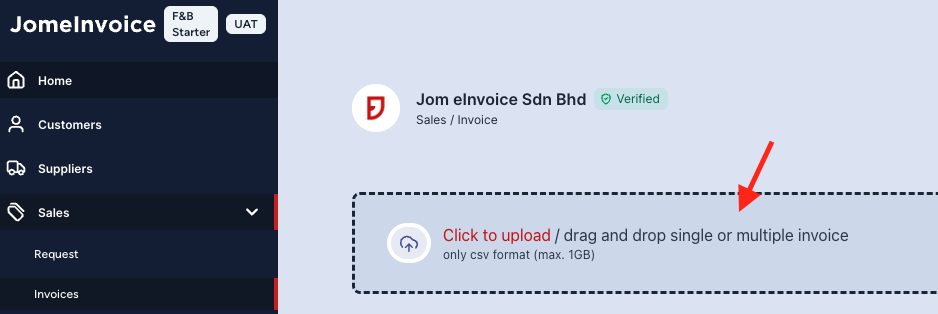
CSV upload is the lowest-barrier strategy for retailers that want e-Invoice readiness without changing their POS system.
This works well for:
- Mom-and-pop shops
- Independent cafés
- Single-outlet boutiques
- Budget-conscious SME owners
- Retailers using older POS systems
- Retailers using POS systems without native e-Invoice integration
If your POS system exports sales data, the finance team can prepare an end-of-day CSV file and upload it into JomeInvoice.
Users can upload Sales or Self-billed e-Invoices through the portal. The upload process includes downloading a CSV template, uploading the completed CSV file, completing field mapping, and choosing Non-Consolidated or Consolidated processing. For more details, you may refer to JomeInvoice Product Guide here.
This makes CSV upload a practical route for retailers that do not want a hardware upgrade.
How CSV Upload Supports POS System e-Invoice Malaysia Workflows
| Step | What happens |
| 1 | Retailer exports end-of-day sales data from the POS system |
| 2 | User prepares the file using the JomeInvoice CSV template |
| 3 | User uploads the completed CSV file into JomeInvoice |
| 4 | User completes field mapping |
| 5 | User selects Non-Consolidated or Consolidated processing |
| 6 | JomeInvoice processes the records for MyInvois submission |
This workflow is especially useful for unsupported POS systems such as:
- StoreHub
- AutoCount POS
- SQL POS
- Xilnex
- IRS POS
- Other POS systems that export sales data
Why CSV Upload Is a Budget-Friendly e-Invoice POS Strategy
CSV upload is included in every JomeInvoice plan, including Starter.
This means a retailer does not need to pay a separate surcharge for a manual upload workflow.
For a business with fewer than 100 e-Invoices a month, the Starter plan at RM 30/month may be enough. The retailer keeps the existing POS, exports sales data, and uses the JomeInvoice portal for upload and processing.
This is a practical affordable e-Invoice POS Malaysia route for shops that want to control cost while preparing for LHDN requirements.
Strategy 2: Use Native Integration for POS System e-Invoice Malaysia Automation
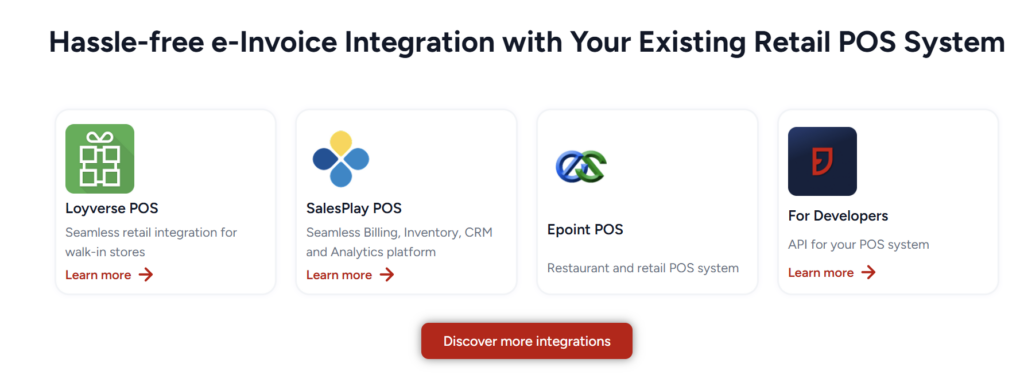
Native POS e-Invoice integration is the better strategy for Malaysia retailers that want less manual work.
Instead of exporting and uploading CSV files, supported POS systems sync transaction data into JomeInvoice.
JomeInvoice supports native integrations with:
- Loyverse
- SalesPlay
- Smart Cashier POS
- Shopify
- WooCommerce
- Cloudbeds
- Techsoft
- JurifytePro
- Baiwang Cloud
This route fits businesses that want a smoother daily process and fewer manual steps.
How Native POS Integration Supports Retail e-Invoice Submission
| Step | What happens |
| 1 | POS or platform records the transaction |
| 2 | Transaction data syncs into JomeInvoice |
| 3 | Records are prepared for the right e-Invoice workflow |
| 4 | Finance team reviews records where needed |
| 5 | JomeInvoice supports submission and status tracking |
Native integration helps retailers reduce repetitive file preparation.
It is useful when the business has multiple outlets, higher transaction volume, or staff who prefer an automated workflow.
When Native Integration Is Worth It for Retail POS Systems
Native e-Invoicing for retail integration is usually a better fit when:
- Transaction volume is increasing
- Staff spend too much time preparing CSV files
- The retailer uses one of the supported POS systems
- The business has more than one outlet
- The finance team wants fresher transaction visibility
- The business wants fewer manual steps before submission
For growing retailers, automation reduces the time spent moving data between systems.
Keep Your POS, Start e-Invoice Submission With Less Upfront Work
Using an older POS system does not mean you need to replace it.
With JomeInvoice, SME retailers can start with CSV upload, move to native POS integration when ready, or discuss API/SFTP for larger setups.

CSV Upload vs Native POS Integration for Retail e-Invoice Submission
Both strategies support e-Invoice submission for retail POS systems.
The right choice depends on how much automation the retailer needs.
| Factor | CSV Upload | Native POS Integration |
| Best for | Older POS systems, unsupported POS systems, lower-volume SMEs | Supported POS systems, growing retailers, multi-outlet businesses |
| Setup effort | Lower technical effort, uses Excel and portal upload | Requires supported integration setup |
| POS replacement needed | No | No |
| Manual work | Higher, because files are exported and uploaded | Lower, because transaction data syncs automatically |
| Included in plans | Yes, included in all plans | Yes, based on integration limits by plan |
| Good starting point for | Shops under 100 e-Invoices per month | Retailers that want automated data transfer |
CSV upload is the most cost-effective starting point for simple setups.
Native integration is better when time savings and automation become more important.
Affordable e-Invoice POS Malaysia Cost Breakdown: JomeInvoice SME Plans
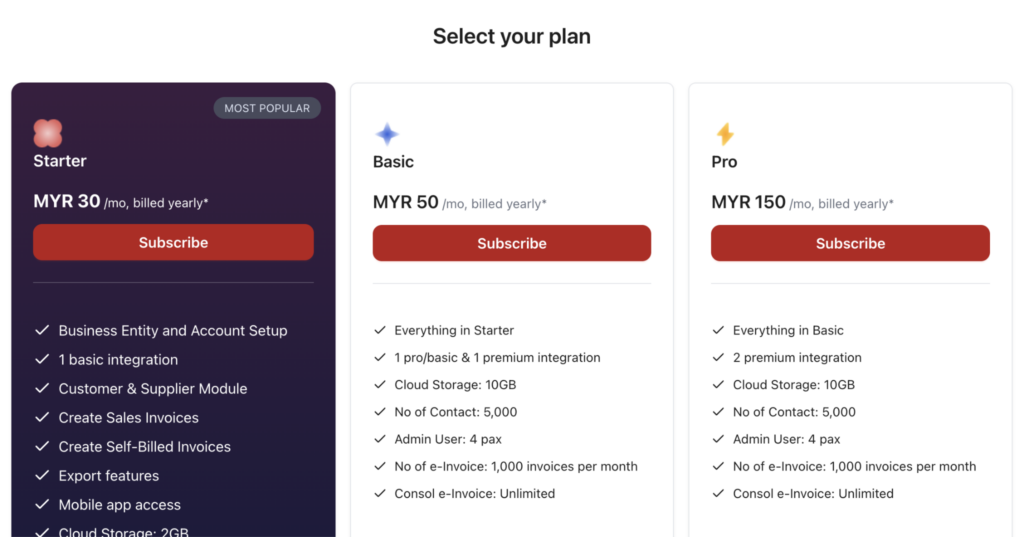
JomeInvoice offers self-serve SME plans and an optional guided setup service.
| Plan | Monthly | Annual | Integrations | e-Invoices per month | Best fit |
| Starter | RM 30/month | RM 360/year | 1 | 100 | Small retailers, cafés, boutiques, or shops testing a low-barrier workflow |
| Basic | RM 50/month | RM 600/year | 2 | 1,000 | Growing SMEs that need more monthly e-Invoice capacity and more integration room |
| Pro | RM 150/month | RM 1,800/year | 4 | 5,000 | Multi-outlet retailers or businesses with higher transaction volume |
| Expert Guided Setup | RM 1,000 one-time | Not applicable | Not applicable | Not applicable | Businesses that want hands-on onboarding by the JomeInvoice team |
Note: The 30-day e-Invoicing software trial at RM 2 is available for Starter or Basic plans. It lets retailers test the workflow before committing.
Standard plans have no setup fee, no hidden charges, and no lock-in.
There are also no per-transaction or per-integration fees beyond the selected plan’s e-Invoice limit.
How Consolidated e-Invoices Reduce e-Invoice Submission for Retail POS
Cost-effective retail e-Invoice submission is not only about the monthly plan.
It is also about reducing the amount of work the team needs to complete.
Retailers often process many B2C transactions where individual customers do not request full e-Invoices. These can be handled through consolidated e-Invoice workflows where applicable.
Consolidated invoices must follow rules, including:
- Same branch only
- Same currency only
- Maximum 5 MB per consolidation
- Maximum 100 e-Invoices per consolidation
- Maximum 300 KB per e-Invoice
Additionally, users can filter invoices as Consolidated and Unprocessed, use Bulk Action, consolidate invoices, review details, export CSV, and submit to LHDN.
This matters for retail because it helps businesses avoid processing every B2C walk-in receipt one by one.
For budget-conscious retailers, consolidated processing reduces manual workload while keeping the e-Invoice process organised.
Which Cost-Effective e-Invoice POS Malaysia Strategy Fits Your Shop?
Use this decision matrix to choose the right e-Invoice submission strategy.
| Question | If yes | Recommended strategy |
| Do you use an older or unsupported POS system? | Yes | Start with CSV upload |
| Do you process fewer than 100 e-Invoices per month? | Yes | Starter plan, CSV upload or 1 integration |
| Do you use Loyverse, SalesPlay, Smart Cashier, Shopify, WooCommerce, Cloudbeds, Techsoft, JurifytePro, or Baiwang Cloud? | Yes | Use native integration |
| Do you want to avoid daily file upload work? | Yes | Choose native POS integration |
| Do you manage multiple outlets or higher transaction volume? | Yes | Consider Basic or Pro |
| Do you need hands-on onboarding? | Yes | Add Expert Guided Setup |
| Do you need a custom connection not covered by standard integrations? | Yes | Book a demo for API/SFTP quotation |
A small retailer does not need to start with the most advanced setup.
A practical route is to start with the lowest suitable workflow, then upgrade when transaction volume or automation needs increase.
Real Retail Use Cases with JomeInvoice in Malaysia
MiX Metro
MiX Metro operates in a retail chain environment where ease of use and daily workflow matter.
JomeInvoice supports retail teams through a centralised dashboard, status visibility, secure data handling, and a user experience that staff can learn without heavy training.
This fits SME retailers that want e-Invoice compliance to become part of normal operations.
SOGO (K.L) Department Store
SOGO (K.L) Department Store operates in a high-volume retail environment.
JomeInvoice helps automate e-Invoice generation and submission in line with current regulations, reducing confusion, manual errors, and operational pressure.
This shows why larger retail operators may prefer automation and stronger system visibility.
Choose a Cost-Effective e-Invoice Submission Route for Your Retail POS
Need to submit e-Invoices without replacing your POS system?
Speak with a JomeInvoice product expert. Review your POS setup, monthly e-Invoice volume, CSV upload option, native integration route, and the most suitable plan for your retail business.
FAQ About e-Invoice Submission for Retail POS Systems
What is the most cost-effective way to start e-Invoice submission for retail POS?
For small retailers using unsupported or older POS systems, CSV upload is often the lowest-barrier starting point. It is included in every JomeInvoice plan, including Starter at RM 30/month.
Does JomeInvoice require POS replacement?
No. Retailers can keep their existing POS system. Supported POS systems use native integration. Unsupported POS systems use CSV upload.
Which POS systems does JomeInvoice support natively?
JomeInvoice supports Loyverse, SalesPlay, Smart Cashier POS, Shopify, WooCommerce, Cloudbeds, Techsoft, JurifytePro, and Baiwang Cloud.
What if my POS system is StoreHub, AutoCount POS, SQL POS, Xilnex, or IRS POS?
These systems can use the JomeInvoice CSV upload workflow. Retailers export end-of-day sales data from the POS and upload the CSV file into JomeInvoice.
Is CSV upload included in the Starter plan?
Yes. CSV upload is included in every plan, including Starter.
How much does JomeInvoice start from?
JomeInvoice starts from RM 30/month for the Starter plan. The Basic plan is RM 50/month, and the Pro plan is RM 150/month.
Is there a trial?
Yes. JomeInvoice offers a 30-day trial at RM 2 for Starter or Basic plans. The trial can be cancelled anytime.
Are there setup fees on standard plans?
No. Standard plans have no setup fee, no hidden charges, and no lock-in.
Does JomeInvoice charge per transaction or per integration?
There are no per-transaction or per-integration fees beyond the selected plan’s e-Invoice limit.
When should a retailer choose native POS integration instead of CSV upload?
Native POS integration is better when the retailer wants less manual work, uses a supported POS system, has higher transaction volume, or manages multiple outlets.
Does JomeInvoice support custom integration?
Yes. For businesses with integration needs not covered by standard plans, custom API/SFTP solutions are supported by quotation. The business should book a demo to discuss the setup.