


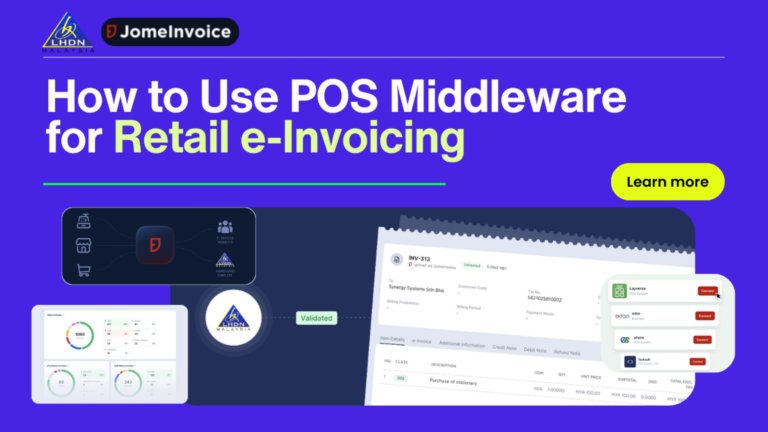
Retail POS Middleware Workflow Summary
A retail POS system records the sale. POS e-Invoice middleware prepares the transaction for e-Invoice processing.
With JomeInvoice, the workflow is simple:
- The POS system records the transaction.
- JomeInvoice receives the data through native integration, API/SFTP, or CSV upload.
- The platform validates the data, checks the buyer TIN where applicable, and prepares the invoice.
- JomeInvoice submits the record to MyInvois and shows status updates on the dashboard.
For supported platforms such as Loyverse, SalesPlay, Smart Cashier POS, Shopify, WooCommerce, Cloudbeds, Techsoft, JurifytePro, and Baiwang Cloud, transactions sync into JomeInvoice automatically.
For unsupported POS systems such as StoreHub, AutoCount POS, SQL POS, Xilnex, IRS POS, and others, retailers can export daily sales data as CSV and upload it into JomeInvoice. No POS replacement is required.
What Is POS Middleware for e-Invoicing for Retail?
POS middleware is the bridge between a retail POS system and MyInvois.
The POS system records the sale. Middleware receives the transaction data and prepares it for e-Invoice processing.
In a retail environment, middleware should help with:
- Sales data transfer from the POS system
- Native sync for supported platforms
- CSV upload for unsupported POS systems
- B2B and B2C invoice handling
- Consolidated e-Invoice grouping
- Buyer TIN validation
- Schema and field checks
- MyInvois submission
- Dashboard status tracking
- Rejection handling and resubmission
This helps retailers avoid three common problems.
First, it avoids full POS replacement.
Second, it reduces manual entry.
Third, it gives finance teams a controlled workflow before and after LHDN submission.
How POS Middleware e-Invoice Malaysia Workflows Connect the Dots
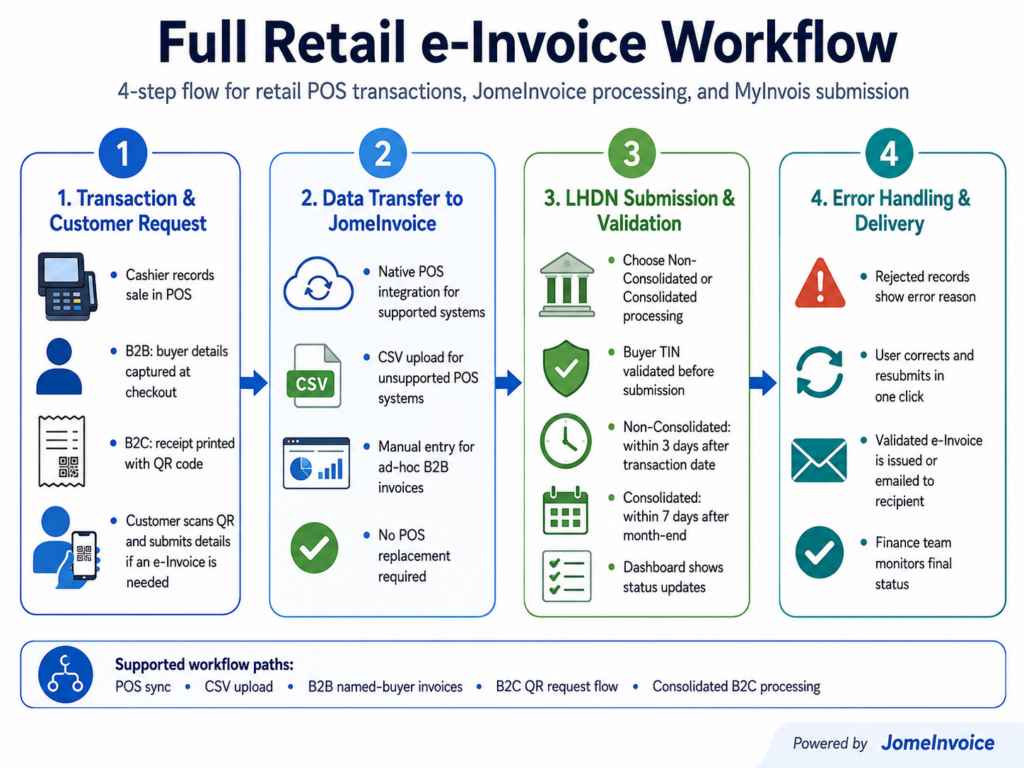
A middleware workflow connects daily store transactions to compliance processing.
The model is straightforward:
POS records the sale. JomeInvoice receives the transaction. JomeInvoice validates and prepares the record. MyInvois receives the submission.
This workflow works for different types of retailers.
A single-outlet shop can use CSV upload if its POS system is not supported. A multi-branch retailer can use native integration if its platform is supported. A larger enterprise can use API or SFTP when it needs custom cadence or system routing.
The key point is that the POS system does not need to do everything by itself.
The POS system handles checkout. JomeInvoice handles the e-Invoice workflow.
How Native POS Integration Works
Native integration is the most hands-free POS e-Invoice integration workflow.
When a supported POS system records a transaction, that transaction syncs into JomeInvoice automatically. The retailer does not need to export the file, retype the invoice, or manually rebuild the transaction in another system.
JomeInvoice supports native integrations with:
- Loyverse
- SalesPlay
- Smart Cashier POS
- Shopify
- WooCommerce
- Cloudbeds
- Techsoft
- JurifytePro
- Baiwang Cloud
For these systems, each transaction lands in JomeInvoice when it is recorded at the POS or platform.
This is useful for stores that want fewer manual steps and clearer daily visibility.
Native POS and Platform Integration Options
For supported systems, transactions can sync into JomeInvoice automatically. The POS or platform records the sale, while JomeInvoice handles the e-Invoice workflow, validation, and MyInvois submission.
| Platform | Best for | How it works with JomeInvoice |
| Loyverse | Retail shops, cafés, and small chains using Loyverse POS | Supports a Loyverse POS e-Invoice integration Malaysia workflow by syncing retail transaction data into JomeInvoice for e-Invoice processing. |
| SalesPlay | Retail and F&B businesses using SalesPlay POS | Supports Salesplay POS e-Invoice integration Malaysia by allowing POS transactions to flow into JomeInvoice for validation and submission. |
| Shopify | Online stores and retail brands selling through Shopify | Supports Shopify e-Invoice Malaysia workflows by moving order data into JomeInvoice for e-Invoice processing. |
| WooCommerce | WordPress-based online stores | Helps WooCommerce merchants connect order data to JomeInvoice for e-Invoice handling. |
| Smart Cashier POS, Cloudbeds, Techsoft, JurifytePro, Baiwang Cloud | Businesses using supported retail, hospitality, or business platforms | Allows transaction data to move into one middleware workflow for MyInvois submission. |
How Unsupported POS Systems Connect Through CSV Upload
Not every POS system is natively supported.
That should not stop a retailer from starting e-Invoice submission.
For unsupported POS systems such as StoreHub, AutoCount POS, SQL POS, Xilnex, IRS POS, and others, JomeInvoice supports CSV upload.
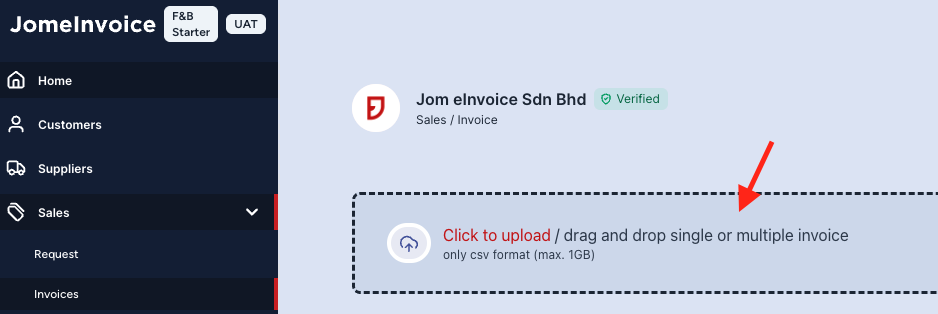
The retailer exports daily sales data from the existing POS system and uploads the CSV file using JomeInvoice’s CSV template.
This is a practical fallback for retailers that do not want to replace their current retail POS system.
CSV Upload Workflow for Retail POS Systems
The Product Guide explains that users can upload Sales or Self-billed e-Invoices through the JomeInvoice workflow.
When CSV Upload Is the Right Fit
CSV upload is useful when:
- The retailer uses an unsupported POS system
- The POS system exports daily sales reports
- The business wants to avoid hardware replacement
- The team prefers end-of-day batch handling
- Invoice volume is still manageable
- The retailer wants to start before custom integration is ready
CSV upload is not a downgrade. It is a fallback route that keeps the business moving.
For many SME retailers, it is the most practical starting point.
How API and SFTP Work for Enterprise Setups
Some businesses need a more customised connection.
For enterprise or complex system environments, JomeInvoice supports API and SFTP integration on request through the sales team.
This is useful when the business has:
- ERP or middle-tier systems
- Multi-entity structures
- High transaction volume
- Custom data routing needs
- Scheduled batch transfer requirements
- Internal IT governance requirements
Unlike native integrations, API and SFTP cadence can be configured based on the customer’s needs.
The transfer can be real-time, daily batch, or another schedule chosen by the customer.
This gives larger businesses more control while still using JomeInvoice as the middleware layer.
Connect Your Retail POS System to e-Invoicing Without Replacing It
Your retail POS system can keep handling checkout.
JomeInvoice adds the middleware layer for e-Invoice preparation, TIN validation, consolidated processing, MyInvois submission, and status tracking.

What POS Data Fields Are Needed for e-Invoice Submission?
A retail POS system needs to provide enough data for e-Invoice processing.
The required fields depend on transaction type, buyer type, and the submission workflow. The core fields used in every e-Invoice submission include:
| Data category | Examples |
| Transaction details | Issue date, receipt number, invoice number |
| Amount details | Total amount, line total, tax code, SST status |
| Item details | Description, quantity, unit price, line total |
| Buyer details where applicable | Name, TIN, Registration ID, email, address, state, country |
For B2B buyers or customers requesting individual e-Invoices, buyer details matter.
For B2C consolidated invoices where the customer does not provide details, JomeInvoice uses LHDN-compliant placeholder data based on the Product Guide.
Examples include:
- Buyer name: General Public
- Buyer TIN for Malaysian individual: EI00000000010
- Buyer TIN for foreign individual: EI00000000020
- Buyer email: [email protected]
- Buyer registration ID: 000000000000
This helps retailers process B2C walk-in transactions without forcing cashiers to collect full details from every customer.
Behind the Scenes: Validation Before MyInvois Submission
Middleware should do more than move data.
It should help prevent avoidable errors before the invoice reaches MyInvois.
Note: JomeInvoice performs live TIN validation against LHDN’s TIN database before submission. Invalid or mismatched TINs are flagged on the dashboard before the invoice reaches MyInvois.
This matters because format-only checks are not enough.
A TIN can look correct but still fail if it does not match LHDN’s database. Live TIN validation helps catch that issue earlier.
JomeInvoice also supports schema validation checks for areas such as:
- Mandatory fields
- Decimal formats
- Currency codes
- Required buyer information
- Required item line information
This makes the middleware a safety net.
It catches problems before they become LHDN rejections.
How Consolidation Works in a POS Middleware Workflow
Retailers often handle many B2C transactions where customers do not request individual e-Invoices.
These transactions can move into consolidated processing where applicable.
Consolidated invoices must follow rules:
- Same branch only
- Same currency only
- Maximum 5 MB per consolidation
- Maximum 100 e-Invoices per consolidation
- Maximum 300 KB per e-Invoice
The guide also shows that users can filter invoices as Consolidated and Unprocessed, use Bulk Action, consolidate invoices, review details, export CSV, and submit to LHDN.
JomeInvoice supports two consolidation formats:
| Format | How it works | Best for |
| Single Receipt | Invoices appear as line items, with a maximum of 300 line items per consolidated invoice | Retailers that need more detail |
| Range of Receipt | Invoices are grouped together into one line item | Retailers that need a simpler summary |
This supports high-volume e-Invoicing for Retail because businesses do not need to submit every walk-in receipt one by one.
How Error Handling Works
Even with validation, some submissions may need correction.
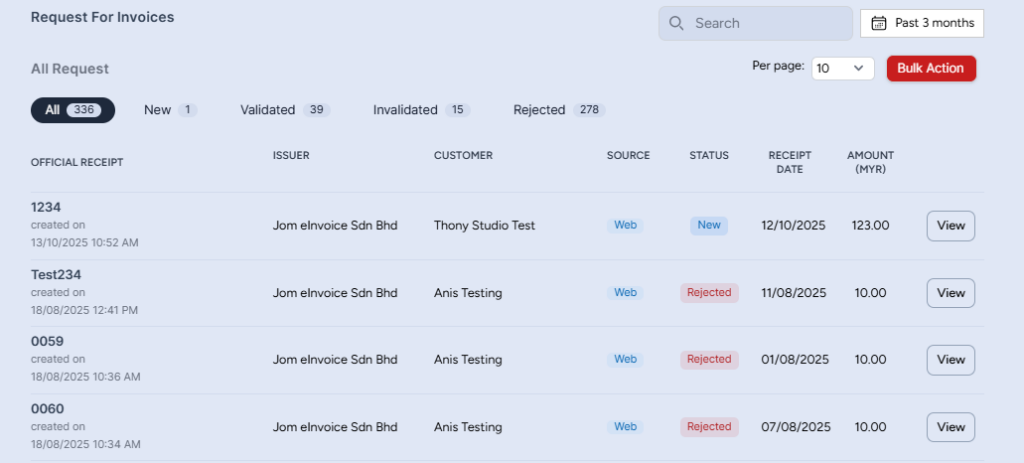
When LHDN rejects a submission, JomeInvoice notifies the admin on the dashboard with the specific rejection reason.
The invoice is flagged with Error status.
The admin can then:
- Review the rejection reason.
- Correct the invoice.
- Resubmit in one click.
There is no need to re-upload the entire batch.
This matters for retail operations because one data issue can affect many records. Clear error handling helps finance teams fix the issue quickly and prevent repeat problems.
System Statuses Finance Teams Can Track
JomeInvoice shows system statuses so users know what is happening.
The statuses include:
- Processing
- Ready
- Completed
- Error
- Cancelled
- Empty
These statuses are useful for finance leads, store operations managers, and multi-branch teams.
They help users track which records are still processing, which are ready for action, which have completed, and which need correction.
Why POS e-Invoice Middleware Works Better Than Replacing a Retail POS System
Retailers should avoid replacing a working POS system unless the business case is clear.
A retail POS system affects daily store operations. Replacing it may create training work, migration issues, reporting changes, cashier confusion, and downtime risk.
POS e-Invoice Middleware gives a more practical route.
It lets the POS system continue handling sales while JomeInvoice handles the e-Invoice layer.
This is useful when:
- The POS system works well for checkout
- Store staff are already trained
- The finance team needs MyInvois submission support
- The retailer wants fewer manual steps
- The business needs B2C consolidation
- The team wants dashboard visibility
- The business wants to avoid custom API work
- The POS system is unsupported but can export CSV
For most Malaysian retailers, the goal is not to own more software.
The goal is to connect the systems they already use to the compliance workflow they now need.
Next Step: “Book a free demo with our product expert”
Need a practical bridge between your retail POS system and MyInvois?
FAQ About POS Middleware and e-Invoicing for Retail
What is POS middleware e-Invoice Malaysia?
POS middleware e-Invoice Malaysia refers to a workflow where middleware connects a POS system to MyInvois. The POS records sales, while the middleware prepares, validates, and submits e-Invoices.
Why does a retail POS system need middleware?
A retail POS system may record sales well, but it may not support MyInvois submission, LHDN TIN validation, consolidated e-Invoices, or rejection handling. Middleware adds that e-Invoice layer without replacing the POS.
Does JomeInvoice support Loyverse POS e-Invoice integration Malaysia?
Yes. JomeInvoice supports Loyverse as a native integration. Transactions can sync into JomeInvoice for e-Invoice processing.
Does JomeInvoice support Salesplay POS e-Invoice integration Malaysia?
Yes. JomeInvoice supports SalesPlay as a native integration. SalesPlay transaction data can flow into JomeInvoice for e-Invoice handling.
Does JomeInvoice support Shopify e-Invoice Malaysia workflows?
Yes. Shopify is one of the supported native integrations. Shopify merchants can use JomeInvoice as middleware for e-Invoice processing.
What if my POS system software is not supported?
Retailers using unsupported POS systems such as StoreHub, AutoCount POS, SQL POS, Xilnex, IRS POS, and others can export daily sales data as CSV and upload it into JomeInvoice.
Does JomeInvoice require POS replacement?
No. Supported systems use native integration. Unsupported systems can use CSV upload. Enterprise systems can discuss API or SFTP with the JomeInvoice sales team.
What buyer details are needed for e-Invoice submission?
Core fields include issue date, receipt or invoice number, total amount, tax code or SST status, item lines, and buyer details where applicable. Buyer details can include name, TIN, Registration ID, email, address, state, and country.
What happens if the buyer does not provide details for B2C consolidation?
For B2C consolidated invoices, JomeInvoice uses Product Guide placeholder details such as General Public, EI00000000010 for Malaysian individuals, EI00000000020 for foreign individuals, [email protected], and 000000000000 as Registration ID.
Does JomeInvoice validate TINs before submission?
Yes. JomeInvoice performs live TIN validation against LHDN’s TIN database before submission. Invalid or mismatched entries are flagged on the dashboard before reaching MyInvois.
What happens when LHDN rejects an invoice?
The invoice is flagged with Error status on the JomeInvoice dashboard. The rejection reason is shown, and the admin can correct and resubmit the invoice in one click.
Is API or SFTP available?
Yes. API and SFTP integration are available on request for enterprise or custom setups. Cadence can be configured based on the customer’s needs.