

Four-Step Retail POS e-Invoice Workflow Summary
The full retail e-Invoice workflow Malaysia businesses can use follows the four-step structure from JomeInvoice’s input:
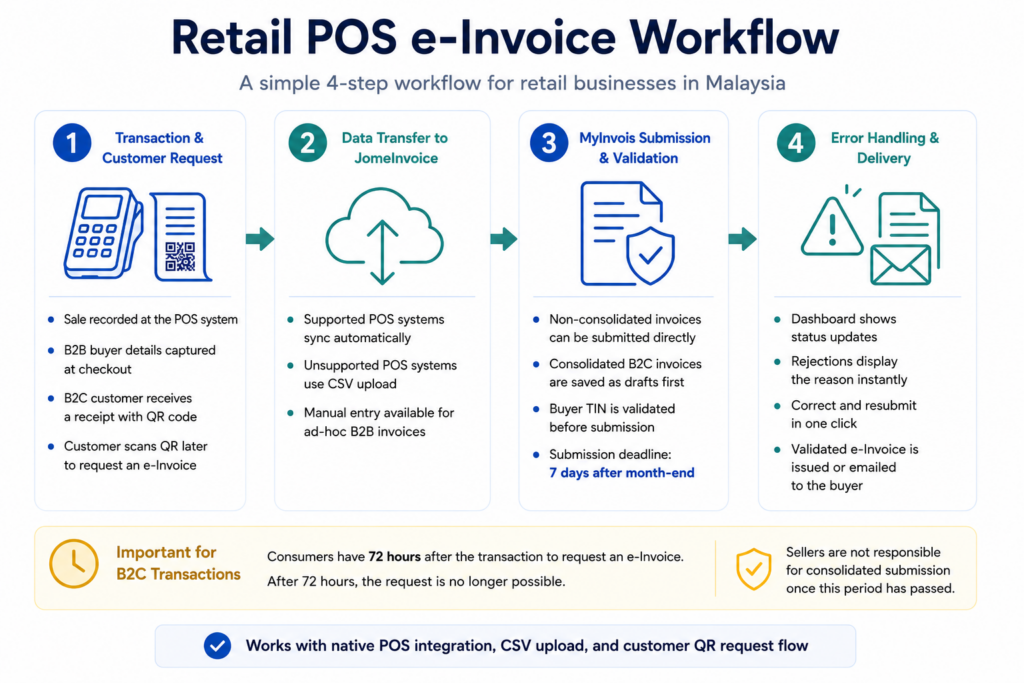
| Step | What happens | Who handles it |
| 1. Transaction and customer request | The cashier records the sale. B2B buyer details are captured at checkout. B2C customers receive a receipt with a QR code if they need to request an e-Invoice after payment. | Cashier / customer |
| 2. Data transfer to JomeInvoice | Transaction data syncs automatically through native POS integration, moves in through CSV upload, or is entered manually for ad-hoc B2B invoices. | System / finance team |
| 3. LHDN submission and validation | Non-consolidated records are submitted directly. Consolidated B2C records are saved as drafts first, then grouped for bulk submission. TIN validation and status tracking help finance teams monitor the process. | JomeInvoice / finance team |
| 4. Error handling and delivery | Rejected records show the reason on the dashboard. Users correct the record and resubmit in one click. Validated e-Invoices are issued or emailed to the recipient. | JomeInvoice / finance team |
This workflow keeps checkout speed separate from e-Invoice data completion.
Retail e-Invoice Workflow in Malaysia
Retail e-Invoice implementation should fit the way stores already operate.
A cashier cannot stop the line to collect full e-Invoice details from every walk-in customer. A store manager cannot ask staff to manually re-enter hundreds of receipts at the end of every day. A finance team cannot wait until month-end to discover missing data, invalid TINs, or rejected submissions.
A good retail e-Invoice workflow Malaysia businesses can use should answer five questions:
- How does the customer request an e-Invoice?
- How does POS data enter the e-Invoice system?
- When should the invoice be submitted to MyInvois?
- How does the team know if LHDN accepts or rejects it?
- What happens when the record needs correction?
For retailers, the goal is simple. Keep the checkout line fast, keep POS data organised, and keep e-Invoice submission under control.
What an Ideal Retail POS e-Invoice Workflow Looks Like
An ideal LHDN e-Invoice POS system should separate cashier work, customer action, and finance control.
At the cashier counter, the transaction should remain simple. The cashier records the sale, prints the receipt, and continues serving the next customer.
For the customer, the e-Invoice request should be easy to complete after checkout, especially for B2C walk-in buyers.
For finance teams, the system should show which records are drafts, which are ready, which have been submitted, and which need correction.
A practical workflow should support:
- B2B named-buyer e-Invoices
- B2C walk-in customer requests
- QR code request flow from the receipt
- POS auto-sync for supported systems
- CSV upload for unsupported POS systems
- Manual entry for ad-hoc B2B invoices
- Non-consolidated direct submission
- Consolidated B2C draft and bulk submission
- LHDN TIN validation
- Rejection alerts and one-click resubmission
- Email delivery after validation
- Dashboard status tracking
This is what e-invoicing for retail business Malaysia needs in daily operations.
Step 1: Transaction and Customer Request
The workflow starts at the POS system.
The cashier records the sale. The next step depends on whether the buyer is B2B or B2C.
B2B Named Buyer Flow
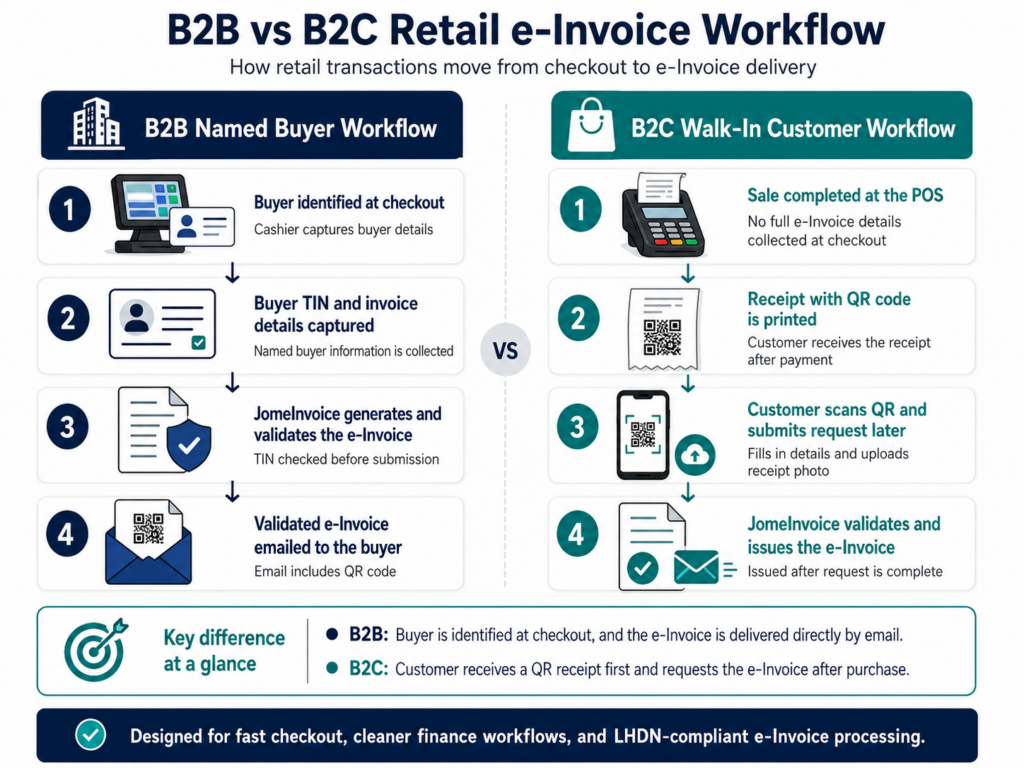
For B2B transactions, the buyer is identified at the point of sale.
The required buyer details, including the buyer name and TIN, are captured for e-Invoice processing.
JomeInvoice then generates the e-Invoice, validates it, and emails the validated e-Invoice to the recipient. The email includes a QR code.
The buyer does not need to scan a receipt or submit another form after checkout.
This works for:
- Corporate buyers
- Business account customers
- Trade buyers
- Buyers who request an individual e-Invoice under a company name
- Ad-hoc B2B purchases at a retail counter
B2C Walk-In Customer Flow
For B2C walk-in transactions, the cashier prints a paper receipt with a QR code.
The customer scans the QR code after the transaction. The QR code leads to a JomeInvoice-hosted form.
The customer then:
- Fills in the required buyer details
- Provides e-Invoice information
- Uploads a photo of the receipt
- Submits the request
This is customer-driven B2C capture.
It keeps the checkout line moving because cashiers do not need to collect TINs and address details from every walk-in customer. Only customers who want an e-Invoice complete the request after payment.
For store operations managers, this is easier to train. For customers, it gives a clear action. For finance teams, it creates a cleaner source of request data.
Step 2: POS Data Enters JomeInvoice
After the sale, transaction data needs to reach JomeInvoice.
JomeInvoice supports three practical entry paths.
Native POS e-Invoice Integration
For supported systems, transactions sync automatically into JomeInvoice as drafts.
JomeInvoice supports native integrations with:
- Loyverse
- SalesPlay
- Smart Cashier POS
- Shopify
- WooCommerce
- Cloudbeds
- Techsoft
- JurifytePro
- Baiwang Cloud
This is the best fit for retailers that want less manual work.
The POS records the transaction. JomeInvoice receives the data and prepares it for the right LHDN e-Invoice workflow.
CSV Upload for Unsupported POS Systems
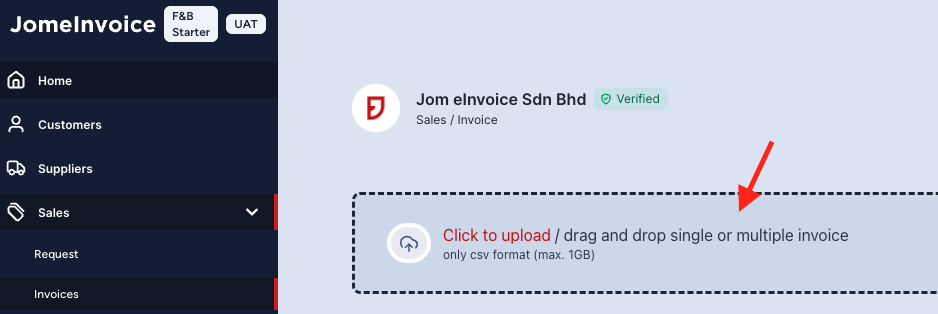
Retailers using unsupported POS systems do not need to replace their current POS.
For systems such as StoreHub, AutoCount POS, SQL POS, Xilnex, IRS POS, and others, the retailer exports an end-of-day CSV file and uploads it through JomeInvoice.
Our JomeInvoice Product Guide shows a CSV upload workflow for Sales or Self-billed e-Invoices. This makes the workflow low-barrier for retailers that want e-Invoice readiness without changing their front-end checkout system.
Manual Entry for Ad-Hoc B2B Invoices
Manual entry is available in the Sales module for ad-hoc B2B invoices.
This is useful when a retailer needs to issue a named-buyer invoice that does not come from the normal POS flow.
For example, a retailer may need to issue a special invoice for a corporate order, event order, or one-off billing request.
Manual entry should not be the main workflow for high-volume retail receipts. It works best as a controlled fallback.
Start Retail e-Invoicing Without Slowing the Checkout Line.
Retail teams need a workflow that works at the cashier counter and in the finance office.
With JomeInvoice, SME retailers can capture B2C e-Invoice requests through QR receipts, sync or upload POS transactions, validate buyer TINs, and track submissions from one dashboard.

Step 3: LHDN Submission and Validation
Once data enters JomeInvoice, the invoice needs to follow the right processing route.
| Processing type | Used for | What happens in JomeInvoice | Deadline |
| Non-Consolidated | B2B buyers or buyers who require an e-Invoice | Submit and convert the e-Invoice, then statuses update after LHDN review | Within 3 days after transaction date |
| Consolidated | B2C individual buyers | Save invoices as drafts, then consolidate and submit to LHDN | Within 7 days after month-end |
This is one of the most important parts of a retail POS e-Invoice workflow.
Retail businesses often process both types on the same day. A company buyer may need a full individual e-Invoice. A walk-in buyer may only need a normal receipt. Another B2C customer may scan the receipt QR code later and request an e-Invoice.
The system needs to support all three situations without forcing store staff to run a complicated process at checkout.
Non-Consolidated e-Invoices for Named Buyers
Non-consolidated e-Invoices apply when the buyer is a business or when the buyer requests an individual e-Invoice.
Based on the Product Guide workflow, uploaded non-consolidated records can be submitted and converted through JomeInvoice. After LHDN reviews the invoices, their statuses update automatically.
This works for:
- B2B retail purchases
- Business account buyers
- Corporate purchases at store counters
- Buyers who request an individual e-Invoice
- Ad-hoc named-buyer invoices
The deadline for non-consolidated e-Invoices is within 3 days after the transaction date.
Consolidated B2C e-Invoices for Walk-In Retail
Consolidated e-Invoices apply when buyers are individuals and do not request individual e-Invoices.
In terms of workflow, consolidated records are first saved as drafts. Users then locate them under the Consolidated and Unprocessed filters before consolidation.
The consolidated workflow also follows rules:
- Same branch only
- Same currency only
- Maximum 5 MB per consolidation
- Maximum 100 e-Invoices per consolidation
- Maximum 300 KB per e-Invoice
The user can then use Bulk Action and Consolidate Invoices to group records.
JomeInvoice supports two consolidation formats:
- Single Receipt, where invoices appear as line items
- Range of Receipt, where invoices are grouped together into one line item
The deadline for consolidated e-Invoices is within 7 days after month-end.
This is useful for high-volume B2C retail because retailers do not need to submit every walk-in receipt one by one.
B2C Placeholder Buyer Information for Walk-Ins
Some walk-in customers do not request an individual e-Invoice.
For consolidated B2C invoices, JomeInvoice gives default buyer information that can be used when the buyer is not required for e-invoicing.
This helps retailers handle B2C walk-in transactions in a practical way.
It also reduces the need for cashiers to collect full details from customers who do not want an individual e-Invoice.
LHDN TIN Validation Before Submission
For named buyers, TIN accuracy matters.
JomeInvoice supports live LHDN TIN validation. Every buyer TIN is cross-checked against LHDN’s database before submission. Invalid TINs are flagged on the dashboard before they reach MyInvois.
This helps finance teams correct errors earlier.
A POS transaction alone may not confirm whether the buyer’s TIN is valid. The validation layer helps prevent avoidable rejection.
Status Tracking After LHDN Review
The consolidation Product Guide shows these status flags:
- Processing, when invoice consolidation is in progress
- Ready, when consolidation is finished and prepared for submission and approval
- Completed, when the consolidation process has completed successfully
- Error, when a problem occurred during consolidation
- Cancelled, when the consolidation process was stopped
- Empty, when no invoices are available for consolidation
These statuses give finance teams better visibility.
Instead of checking disconnected spreadsheets or waiting for manual updates, users can see which records need attention.
Step 4: Error Handling, Correction, and Delivery
Retailers need a workflow for rejected records and customer delivery.
If LHDN rejects a submission, JomeInvoice notifies the user instantly on the dashboard with the rejection reason.
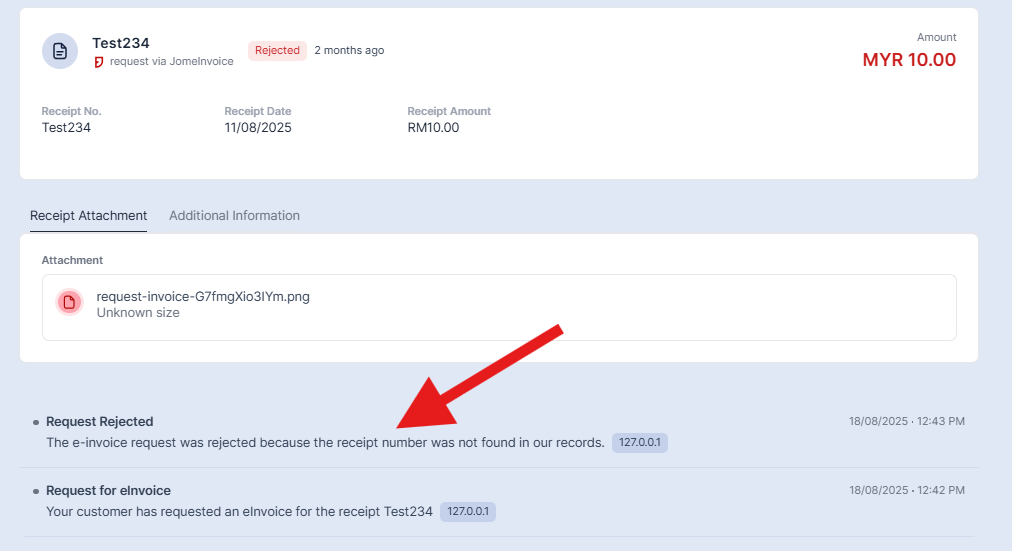
The user can review the error, correct the invoice, and resubmit the corrected invoice in one click.
This matters for retail operations because one error pattern can affect many records.
Fast error visibility helps finance teams fix issues before they repeat across more transactions.
For B2B buyers, JomeInvoice emails the validated e-Invoice directly to the recipient after validation. The email includes a QR code.
For B2C customers who request an e-Invoice through the QR receipt flow, JomeInvoice validates and issues the e-Invoice once the request is complete.
This keeps responsibilities clear:
- The cashier handles the sale
- The customer completes the B2C request if needed
- JomeInvoice validates, processes, and issues the e-Invoice
- The finance team monitors statuses and handles corrections
Real Retail Use Cases with JomeInvoice in Malaysia
MiX Metro
MiX Metro operates in a retail chain environment where ease of use matters.
JomeInvoice supports retail teams through a centralised dashboard, status visibility, secure data handling, and a workflow that staff can learn without heavy training.
This fits SME retail teams that need e-Invoice processing to become part of daily operations, not a separate manual burden.
iSEC Healthcare
iSEC operates across multiple branches.
After adopting JomeInvoice, the team reported better operational efficiency, fewer human errors, and smoother data integration.
This shows why multi-branch businesses need a clear workflow from transaction capture to validation and status tracking.
SOGO (K.L) Department Store
SOGO (K.L) Department Store operates in a retail environment where high transaction volume and clear compliance matter.
JomeInvoice helps automate e-Invoice generation and submission in line with current regulations, reducing manual errors and operational pressure.
Start Your Retail e-Invoice Workflow With JomeInvoice
Need a retail e-Invoice workflow that works for cashiers, customers, and finance teams?
Start with JomeInvoice. Capture B2C requests through QR receipts, sync or upload POS data, validate buyer TINs, and manage MyInvois submission from one dashboard.
FAQ About Retail POS e-Invoice Workflows in Malaysia
How does JomeInvoice handle B2C customer e-Invoice requests?
For B2C walk-in transactions, the cashier prints a receipt with a QR code. The customer scans the QR code, fills in a JomeInvoice-hosted form, uploads a receipt photo, and submits the request.
How does JomeInvoice handle B2B retail e-Invoices?
For B2B buyers, the buyer is identified at the point of sale. JomeInvoice generates and emails the validated e-Invoice with a QR code to the recipient after validation.
Does JomeInvoice support POS integration?
Yes. JomeInvoice supports native integrations with Loyverse, SalesPlay, Smart Cashier POS, Shopify, WooCommerce, Cloudbeds, Techsoft, JurifytePro, and Baiwang Cloud.
What if my POS system is not supported?
Retailers using unsupported POS systems such as StoreHub, AutoCount POS, SQL POS, Xilnex, IRS POS, and others can export an end-of-day CSV file and upload it through JomeInvoice.
Does JomeInvoice support manual entry?
Yes. Manual entry is available in the Sales module for ad-hoc B2B invoices.
What happens if LHDN rejects an e-Invoice?
JomeInvoice notifies the user instantly on the dashboard with the rejection reason. The user can correct the invoice and resubmit it in one click.
What statuses can users see in JomeInvoice?
Users can see statuses such as Processing, Ready, Completed, Error, Cancelled, and Empty.
Does JomeInvoice validate buyer TINs?
Yes. JomeInvoice supports live LHDN TIN validation. Buyer TINs are cross-checked against LHDN’s database before submission, and invalid TINs are flagged on the dashboard.
What is the deadline for retail e-Invoice submission?
The deadline is within 3 days after the transaction date for non-consolidated e-Invoices and within 7 days after month-end for consolidated e-Invoices.
Relevant Guide Links:
- Consolidate Invoices: https://jomeinvoice.apidocumentation.com/product-guide/sales-module/create-invoice/consolidate-invoices
- B2C Buyer Information placeholders: https://jomeinvoice.apidocumentation.com/product-guide/references/buyer-information-for-b2c
- Deadlines: https://jomeinvoice.apidocumentation.com/product-guide/references/submitting-to-lhdn/important-deadlines