


Key Takeaway: TP1 Form, TP2 Form, and TP3 Form Guide for Malaysia Employers
- For Malaysian employers, getting TP1, TP2, and TP3 right is a basic part of new hire compliance. It also has a direct impact on monthly PCB and take-home pay.
- The TP1 form or TP2 Form helps employees apply eligible tax reliefs for monthly PCB purposes.
- TP2 helps employers capture taxable benefits in kind, such as a vehicle, accommodation, or driver.
- The TP3 form helps a new employer continue PCB calculations accurately when an employee changes jobs within the same year.
k
Hiring a new employee in Malaysia involves more than issuing an offer letter and setting up payroll. Employers also need to collect the right tax forms early, because the wrong form or a missing form can affect the Monthly Tax Deduction, also known as PCB, and create payroll errors later.
This is where the TP1 form, TP2 Form, and TP3 form come in.
Many HR teams and employers know these forms exist, but they often confuse the purpose of each one. Some assume every new hire needs the same form. Some collect TP3 only at year’s end. Some miss TP2 completely, even when the employee receives benefits in kind. These gaps can lead to inaccurate PCB calculations and employee complaints about take-home pay.
This article explains the difference between TP1, TP2, and TP3 in a practical way. It also gives employers a clear onboarding view, so new hires are set up correctly from the start. If you are looking for a TP3 form guide or want clarity on the TP1 form and TP2 Form, this guide covers what matters most.
What is the TP1 form or TP2 Form?
The TP1 form, often called the TP2 Form, is a form submitted by the employee to the employer to apply tax reliefs for monthly PCB deduction purposes.
In practice, the TP1 form allows the employee to inform the employer about personal tax relief items that can reduce monthly PCB. Examples include children, insurance, medical expenses, and other qualifying tax reliefs.
This matters because when reliefs are reflected earlier in payroll, the employee’s monthly PCB can be reduced. As a result, monthly take-home pay can be higher, and the employee may not need to wait until tax filing season to benefit from those reliefs.
What employers should know about the TP1 form
Employees only need to submit the TP1 form to HR. They do not need to attach the supporting receipts to the employer when submitting the form. However, they still need to keep those receipts and documents for future tax audit or review purposes.
This is important for employers because HR should not assume every claim requires a document pack at onboarding. At the same time, employers should remind employees to keep proper records in case LHDN asks for proof later.
What is TP2, and when should employers collect it?
TP2 form applies to new employees who receive benefits in kind from the company. TP2 is the form used to record company-provided non-cash benefits, also known as Benefit In Kind..
These benefits are not the same as a normal monthly cash salary. Even so, they can still be taxable. That is why TP2 matters.
TP2 and taxable benefits in kind
A company car, a driver, or employer-provided accommodation can increase the employee’s taxable value for payroll purposes. When these benefits are taxable, they can increase PCB.
This means the employee’s monthly deduction can rise even if the cash salary does not change.
For employers, TP2 is important because benefits in kind are often overlooked during onboarding. If payroll misses them, the employee’s monthly tax deduction may be understated. If payroll includes them late, the employee may see a sudden increase in PCB later in the year.
Common employer mistake with TP2
A common error is treating TP2 as optional paperwork with no payroll impact. In reality, it helps payroll identify taxable non-cash benefits early.
If your company provides benefits in kind to new hires, HR and payroll should check TP2 during onboarding instead of waiting for year-end tax review.
What is the TP3 form?
The TP3 form is used for employees who change jobs within the same year. TP3 is for a new employee who had a previous employer earlier in the same calendar year.
The purpose of the TP3 form is to tell the new employer about income and tax-related amounts from the previous employer, so the new employer can continue monthly PCB calculations more accurately.
This is why the TP3 form is one of the most important forms when hiring mid-year joiners.
TP3 form guide for employers
A simple TP3 form guide starts with one rule. Collect the TP3 form from any employee who joined your company after working elsewhere in the same year.
The employee uses the TP3 form to inform the new employer about the previous company’s income and tax deduction information. Without this data, the new employer does not have a full year-to-date picture.
That gap can lead to inaccurate monthly PCB calculations.
Why the TP3 form matters for payroll accuracy
PCB works on accumulated income and deduction logic. If a new employer only sees the current month’s salary and ignores the earlier months from the previous employer, the payroll system may under-deduct or miscalculate tax.
If the TP3 form is not submitted on time, the new employer cannot properly track the employee’s previous income and tax deductions. That leads to an inaccurate monthly PCB.
For employers, this means the TP3 form is not just an admin form. It is a payroll control form.
TP3 form guide for new hires who switched jobs
When a new hire has moved from another company in the same year, HR should ask this question during onboarding: Did you work for another employer earlier this year?
If the answer is yes, the employee should be guided to complete the TP3 form. This should happen as early as possible, ideally before the first payroll cut-off.
A practical TP3 form guide for employers should include:
- checking whether the employee had prior employment in the same year,
- requesting the TP3 form before first payroll processing,
- coordinating with payroll to include prior year-to-date figures where relevant,
- following up quickly if the form is incomplete or delayed.
TP1 form vs TP2 vs TP3 form, what is the difference?
The easiest way to understand the difference is to look at the purpose of each form.
The TP1 form or TP2 Form is about tax relief claims for monthly PCB.
TP2 is about taxable benefits in kind provided by the employer.
The TP3 form is about previous employment data within the same year, so the new employer can continue PCB calculations correctly.
Another way to see it is by asking three onboarding questions.
- Does the employee want tax reliefs reflected in the monthly PCB? Use the TP1 form.
- Does the employee receive taxable company benefits like a car or accommodation? Use TP2.
- Did the employee work for another employer earlier this year? Use the TP3 form.
Once employers separate the forms by purpose, the onboarding process becomes much easier.
What Malaysian employers should collect from new employees
When hiring a new employee, employers should not collect forms blindly. They should collect forms based on the employee’s actual situation.
For example, not every new hire will need a TP3 form. A fresh graduate starting a first job in the year would not usually need one. On the other hand, an experienced hire joining in July after leaving another employer in March likely will.
Not every new hire will need TP2 either. If the company does not provide taxable benefits in kind, there may be nothing to declare under that form.
But many employees may benefit from submitting a TP1 form or TP2 Form if they want eligible reliefs reflected in the monthly PCB.
This is why employers need a clear onboarding checklist, not a one-size-fits-all process.
A practical onboarding workflow for TP1 form, TP2, and TP3 form
Here is a simple approach employers can use.
At offer acceptance, ask whether the employee has worked for another employer in the same year. If yes, flag the TP3 form requirement.
Before the first payroll, ask whether the employee wants to submit a TP1 form for monthly PCB relief claims. Explain that the TP2 Form can reduce monthly deductions if the employee has eligible reliefs.
At the same time, check whether the role includes taxable benefits in kind, such as a company car, accommodation, or driver. If yes, collect TP2 details early.
During payroll setup, make sure the team reviews all forms before processing the first month’s salary.
After onboarding, keep a clean record of submitted forms and remind employees to retain their own supporting documents where required, especially for claims related to the TP2 Form.
This workflow helps reduce payroll corrections later.
Common mistakes employers make with the TP2 Form and the TP3 Form
One common mistake is failing to explain the TP1 form clearly. When employees do not understand the TP2 Form, they may skip it and end up with a higher monthly PCB than necessary.
Another common mistake is collecting the TP3 form too late. When HR waits until after the first or second payroll run, the monthly tax deduction may already be inaccurate.
A third mistake is forgetting TP2 when the employee receives benefits in kind. Payroll then misses taxable items that should have been included from the start.
A fourth mistake is assuming that supporting documents for the TP2 Form must be submitted to HR together with the form. The employee submits the TP1 form to HR, but keeps the receipts and proof for future audit purposes.
Why TP1 form, TP2, and TP3 form matter during employee onboarding
When a new employee joins, payroll must calculate tax deductions based on the right information. A missing or incorrect form can affect the monthly PCB, the employee’s net salary, and the accuracy of year-to-date tax reporting.
From an employer’s point of view, these forms help answer three different questions.
k
First, does the employee want to claim tax reliefs for monthly PCB purposes? That is where the TP1 form or TP2 Form comes in.
k
Second, is the employee receiving taxable benefits in kind from the employer, such as a car, accommodation, or driver? That is where TP2 is relevant.
k
Third, has the employee changed jobs within the same calendar year, so the new employer needs information from the previous employer to continue PCB calculations correctly? That is the role of the TP3 form.
k
Each form serves a different purpose. Employers should not treat them as interchangeable.
FAQs on TP1 form, TP2 Form, and TP3 form
Is TP2 Form mandatory for every new employee?
No. TP2 Form is relevant when an employee wants eligible tax reliefs reflected in monthly PCB calculations.
When should an employer request a TP3 form?
An employer should request a TP3 form when a new hire has worked for another employer earlier in the same calendar year.
Does the employee need to submit receipts together with the TP1 form?
The employee submits the TP1 form to HR but keeps the receipts and supporting documents for future audit or review purposes.
What happens if the TP3 form is submitted late?
Late submission can cause inaccurate monthly PCB calculations because the new employer may not have the employee’s previous income and tax deduction information.
What is TP2 used for?
TP2 is used to record taxable benefits in kind provided by the employer, such as a car, accommodation, or driver, which may increase PCB.
For Smoother e-Invoice Compliance, Choose JomeInvoice – the Best e-Invoice Software for SMEs Malaysia and Large Enterprises
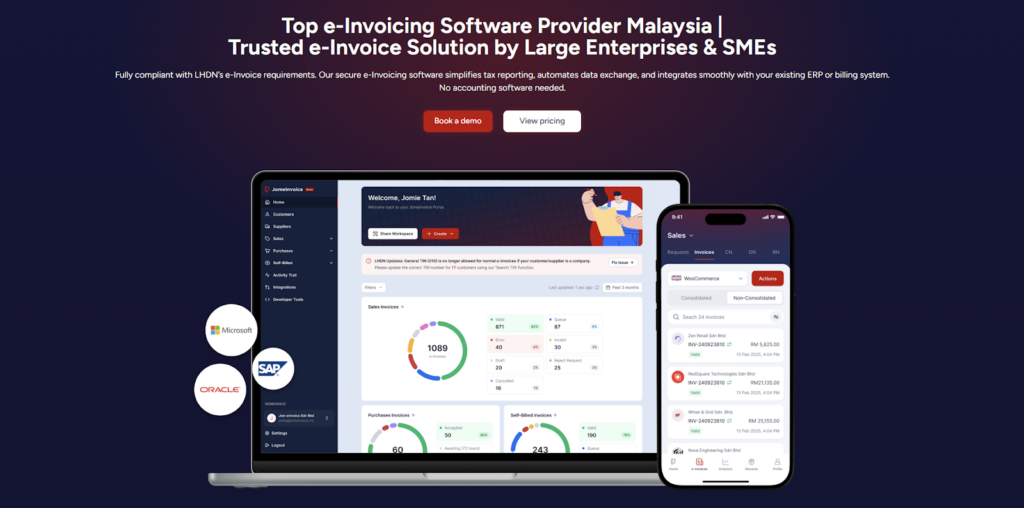
JomeInvoice is widely adopted as one of the best einvoicing software solutions in Malaysia. It is designed to support SMEs and large enterprises across all industries while meeting LHDN e-Invoice requirements with minimal operational disruption.
As a flexible e-Invoice platform for large enterprises and a practical solution for growing businesses, JomeInvoice supports high transaction volumes, complex workflows, and multi-system environments.
One e-Invoice Platform Built for All Business Sizes
JomeInvoice works as the best e-Invoice software for SMEs by offering fast onboarding, simple user interfaces, and automated compliance features. At the same time, it scales into a full e-Invoice platform for large enterprise use, supporting thousands of invoices daily through ERP and system integrations.
Key advantages
• Suitable for SMEs, mid-sized companies, and large enterprises
• Handles low and high invoice volumes efficiently
• Supports consolidated and self-billed e-Invoice workflows
Tailored for Every Industry
JomeInvoice works for a broad range of sectors, including retail, eCommerce, manufacturing, services, and more. It adapts to specific workflows, whether your business runs point-of-sale systems, online stores, or ERP platforms.
Retail e-Invoicing Solution for High-Volume Transactions
For retail businesses, JomeInvoice functions as a complete retail e-Invoicing solution. It supports POS integration, daily sales consolidation, and compliance with the RM10,000 consolidated e-Invoice threshold requirement
Retailers benefit from
• Automated consolidated e-Invoice generation
• POS system integration
• Reduced manual reporting during peak sales periods
e-Invoice for eCommerce and Online Businesses
JomeInvoice also serves as a reliable e-Invoice for eCommerce solution. It integrates with online stores and payment platforms, enabling seamless invoice issuance for high-frequency digital transactions.
eCommerce e-Invoicing features include
• Automated e-Invoice issuance for online sales
• Support for refunds, credit notes, and self-billed e-Invoice
• Compatibility with marketplaces and payment gateways
Enterprise-Grade Integration and Compliance
As a full einvoicing software for large enterprises, JomeInvoice integrates with major ERP systems such as SAP, Oracle NetSuite, Microsoft Dynamics, and other accounting platforms. It connects to the MyInvois system via API integration, minimizing the need for major changes to existing infrastructure.
Enterprise-ready capabilities
• ERP, accounting, and middleware integration
• Pre-validation checks to reduce rejection risks
• Audit trails and reporting for compliance and review
Book a free demo with JomeInvoice now!
See how your business can align with the Malaysia e-invoice guideline, stay prepared for any e-invoice compliance review framework selection, and move ahead of your e-invoice implementation timeline before enforcement tightens.Contact JomeInvoice to help your business stay compliant, reduce manual work, and prepare for full e-Invoice enforcement with confidence.