

🔑Key Takeaways: CP500 Amendment, CP500 Appeal, and CP500 Penalty
- CP500 is an estimated tax installment for individuals with business income issued by LHDN You can amend CP500 using CP502. This process is also known as a CP500 appeal
- You are allowed to amend CP500 twice per year only
- CP500 amendment deadlines are before 30 June and 31 October for the same year of assessment
- Underestimating during a CP500 appeal can trigger a CP500 penalty
- If your revised estimate is lower than your final tax payable by more than 30 percent, a 10 percent CP500 penalty applies
- Always calculate projected self-employment tax carefully before you amend CP500
- Submit CP502 by email, post, walk in, or MyTax Customer Feedback Form
- After a successful CP500 appeal, LHDN issues CP503X with revised installment amounts
- A conservative CP500 amendment reduces risk of CP500 penalty
Received a CP500 notice from LHDN? Do not rush to pay —-and do not rush to amend it either.
There is a lesser known rule that can trigger a CP500 penalty if you revise incorrectly.
This guide explains how CP500 works, how to submit a CP500 appeal using CP502, and how to amend CP500 safely for self employment tax without triggering the 10 percent penalty.
Download CP502 Form (Latest Version) https://www.hasil.gov.my/media/lvaduqs5/borang-cp502.pdf
What Is CP500 for Self Employment Tax
CP500 is an estimated tax installment issued by LHDN. It applies to individuals with business income or self employment tax obligations. Read our full CP500 guide for more details.
This includes:
- Sole proprietors
- Freelancers
- Commission earners
- Partners in partnership
- Individuals with business income
LHDN estimates your annual tax. Then split the amount into installments. You must pay based on the CP500 schedule unless you amend CP500 using CP502.
Can You Amend CP500 and What’s the Deadline
Yes. You can amend CP500 twice per year using CP502. This is also known as a CP500 appeal.
Note: Two revision windows:
- Second amendment window. Before 31 October 2026
- First amendment window. Before 30 June 2026
Late submissions are typically not accepted by LHDN.
Hidden Rule That Triggers CP500 Penalty
Many taxpayers amend CP500 to a lower amount. This can trigger a CP500 penalty.
Warning:
If your revised estimate is lower than actual tax by more than 30 percent, LHDN imposes a 10 percent penalty.
Example:
Actual tax payable: RM12,000
Revised CP500 estimate: RM5,000
Difference: RM7,000
30 percent of actual tax: RM3,600
The difference exceeds 30 percent.
Penalty applies.
Penalty calculation:
10 percent x RM3,400 = RM340 CP500 penalty
This applies to self employment tax estimates submitted through CP500 appeal.
Step by Step Guide to Amend CP500 Using CP502
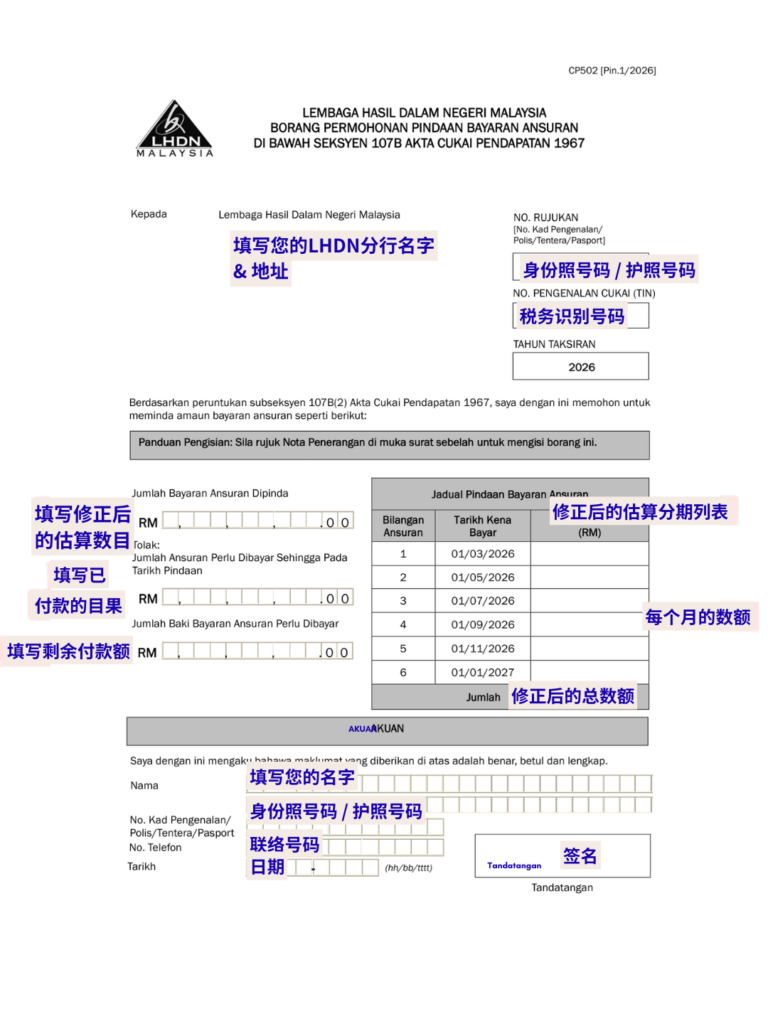
Step 1: Fill in taxpayer details
Enter:
- Name
- Identification number or passport
- Tax reference number
- Year of assessment
- LHDN branch name and address
These fields identify your CP500 amendment request.
Step 2: Enter revised CP500 estimated tax amount
Fill in:
- Revised estimated tax amount
- Total installments already paid
- Remaining balance payable
This section determines your new CP500 installment schedule.
Step 3: Fill revised CP500 installment schedule
Enter:
- Remaining installment months
- Monthly installment amount
- Total revised CP500 amount
Important: Ensure your revised estimate stays within the 30% tolerance to avoid penalty.
Step 4: Sign CP500 appeal form
Complete:
- Name
- Identification number
- Contact number
- Date
- Signature
Unsigned CP502 forms may be rejected.
How to Submit CP500 Appeal to LHDN
You can submit CP502 using four methods:
- Email
[email protected] - Mail
Send to your LHDN branch - Walk-in submission
Submit directly at LHDN office - MyTax portal
Submit through Customer Feedback Form
Important: After submission, LHDN will issue CP503X. You must follow the CP503X installment schedule.
How to Amend CP500 Safely Without CP500 Penalty
Use these guidelines:
- Estimate conservatively
Do not reduce too aggressively - Use latest business income
Base estimate on actual performance - Account for seasonal revenue
Avoid underestimating annual income - Check 30 percent tolerance rule
Ensure difference stays within range
This reduces the risk of a CP500 penalty for self employment tax.
When Should You Amend CP500
Consider CP500 appeal if:
- Business income dropped
- Business closed temporarily
- Profit margin decreased
- One-time income that is not recurring
- Economic slowdown affected revenue
Do not amend CP500 if income remains stable. Risk of CP500 penalty increases.
CP500 Amendment Checklist
Before submitting CP500 appeal:
- Calculate actual projected income
- Estimate tax payable
- Check 30 percent rule
- Confirm installment affordability
- Complete CP502 form
- Submit before deadline
Final Notes on CP500 Amendment
CP500 is an estimated self employment tax installment.
You can amend CP500 using CP502.
But an incorrect CP500 appeal can trigger a penalty.
Always calculate carefully before you amend CP500.
Looking for the Best e-Invoicing Software Malaysia for Your Growing Business?
If you already run a registered business or issue invoices regularly, invoicing becomes part of daily operations. JomeInvoice helps organize billing records, reduce manual work, and support structured e-Invoice workflows. It supports integrations with accounting, ERP, POS, and eCommerce systems while aligning with LHDN e-Invoice requirements.

Frequently Asked Questions About CP500
Can I amend CP500 more than twice
No. Only two CP500 appeal windows allowed.
What happens after I amend CP500
LHDN issues CP503X with a new installment schedule.
Who receives CP500
Individuals with business income and self employment tax.
What triggers CP500 penalty
Underestimating tax by more than 30 percent.
Is CP500 mandatory
Yes, unless it has been revised using CP502.
Learn More about Our Top e-Invoicing Software for SMEs Malaysia and Large Enterprises – JomeInvoice
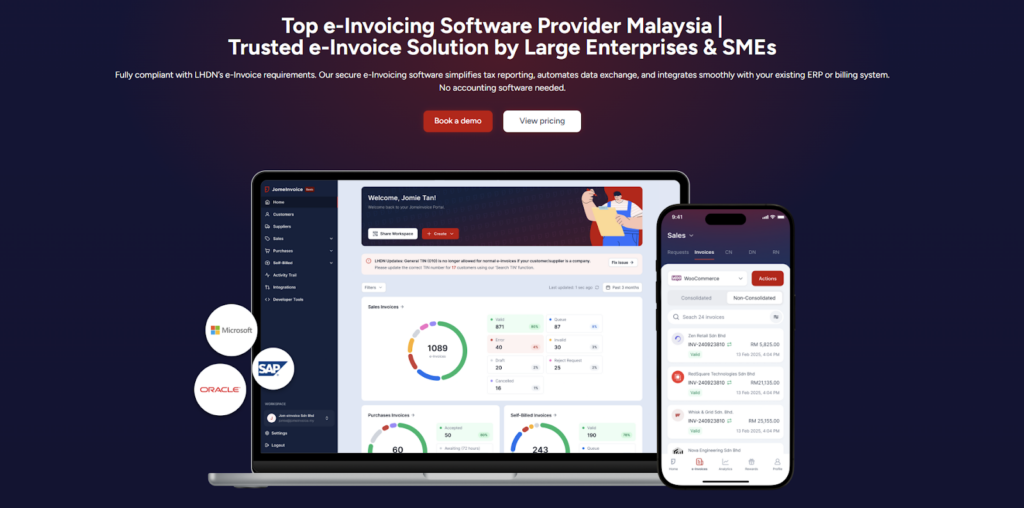
JomeInvoice is widely adopted as one of the best einvoicing software solutions in Malaysia. It is designed to support SMEs and large enterprises across all industries while meeting LHDN e-Invoice requirements with minimal operational disruption.
As a flexible e-Invoice platform for large enterprises and a practical solution for growing businesses, JomeInvoice supports high transaction volumes, complex workflows, and multi-system environments.
One e-Invoice Platform Built for All Business Sizes
JomeInvoice works as the best e-Invoice software for SMEs by offering fast onboarding, simple user interfaces, and automated compliance features. At the same time, it scales into a full e-Invoice platform for large enterprise use, supporting thousands of invoices daily through ERP and system integrations.
Key advantages
• Suitable for SMEs, mid-sized companies, and large enterprises
• Handles low and high invoice volumes efficiently
• Supports consolidated and self-billed e-Invoice workflows
Tailored for Every Industry
JomeInvoice works for a broad range of sectors, including retail, e-commerce, manufacturing, services, and more. It adapts to specific workflows, whether your business runs point-of-sale systems, online stores, or ERP platforms.
Retail e-Invoicing Solution for High-Volume Transactions
For retail businesses, JomeInvoice functions as a complete retail e-Invoicing solution. It supports POS integration, daily sales consolidation, and compliance with the RM10,000 consolidated e-Invoice threshold requirement
Retailers benefit from
• Automated consolidated e-Invoice generation
• POS system integration
• Reduced manual reporting during peak sales periods
e-Invoice for eCommerce and Online Businesses
JomeInvoice also serves as a reliable e-Invoice for eCommerce solution. It integrates with online stores and payment platforms, enabling seamless invoice issuance for high-frequency digital transactions.
eCommerce e-Invoicing features include
• Automated e-Invoice issuance for online sales
• Support for refunds, credit notes, and self-billed e-Invoice
• Compatibility with marketplaces and payment gateways
Enterprise-Grade Integration and Compliance
As a full einvoicing software for large enterprises, JomeInvoice integrates with major ERP systems such as SAP, Oracle NetSuite, Microsoft Dynamics, and other accounting platforms. It connects to the MyInvois system via API integration, minimising the need for major changes to existing infrastructure.
Enterprise-ready capabilities
• ERP, accounting, and middleware integration
• Pre-validation checks to reduce rejection risks
• Audit trails and reporting for compliance and review
Book a free demo with JomeInvoice now!
See how your business can align with the Malaysia e-invoice guideline, stay prepared for any e-invoice compliance review framework selection, and move ahead of your e-invoice implementation timeline before enforcement tightens.
Contact JomeInvoice to help your business stay compliant, reduce manual work, and prepare for full e-Invoice enforcement with confidence.