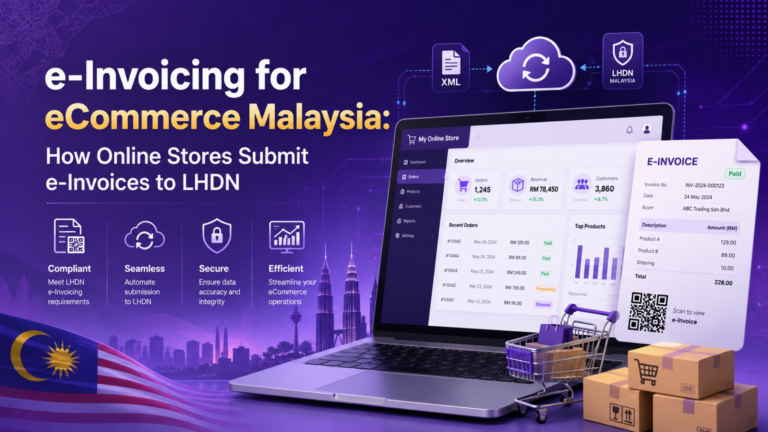
For online sellers, e-Invoicing is no longer just an accounting task. Orders from Shopify, WooCommerce, custom websites, refunds, vouchers, delivery charges, buyer requests, and monthly consolidated receipts can all affect how your business submits e-Invoices to LHDN.
This is why e-Invoicing for eCommerce Malaysia needs a clear workflow. Instead of checking order details, buyer information, TIN, invoice amount, refund status, and LHDN validation manually, online stores can use einvoicing software for ecommerce to connect order data to MyInvois more efficiently.
This guide explains how eCommerce businesses submit e-Invoices in Malaysia, how online orders become LHDN-compliant e-Invoices, and how JomeInvoice supports Shopify, WooCommerce, B2C buyer requests, consolidated e-Invoices, refunds, and adjustment notes.
🔑Key Takeaway
- For eCommerce businesses, e-Invoicing is not only about issuing one invoice after checkout. Online orders may need to become individual e-Invoices, monthly consolidated e-Invoices, refund notes, credit notes, or debit notes depending on the buyer details and order status.
- If the buyer provides TIN, BRN, or other required details, the transaction should be handled as an individual non-consolidated e-Invoice. If the buyer does not request an individual e-Invoice, the order can remain under general public transactions and be submitted later through monthly consolidated e-Invoice submission.
- For Shopify and WooCommerce stores, JomeInvoice can help sync online orders into the e-Invoice workflow. WooCommerce orders, for example, can sync to JomeInvoice when the order status changes to Completed. Buyers can then request an e-Invoice through a QR code or request link, while non-requested orders remain under consolidation.
- For platforms without direct integration, eCommerce sellers can still use API, SFTP, CSV bulk upload, or manual creation. This makes JomeInvoice useful as einvoicing software for ecommerce because it helps online sellers connect order data to LHDN MyInvois without replacing their existing store setup.
Do eCommerce Businesses Need to Submit e-Invoices in Malaysia?
Yes, but the workflow depends on where the sale happens.
For marketplace sales on platforms such as Shopee, Lazada, and TikTok Shop, the marketplace operator may handle e-Invoice issuance for platform transactions. However, if you sell through your own website, such as Shopify, WooCommerce, or a custom online store, your business still needs to manage the e-Invoice workflow for those direct sales.
This is where e-Invoicing for eCommerce Malaysia can become confusing for sellers using multiple channels. Marketplace sales, own website orders, WhatsApp orders, and manual orders may each need different handling, so online stores need either a manual MyInvois workflow or einvoicing software for ecommerce that can connect order data to LHDN.
What Online Store Transactions Must Be Handled for e-Invoicing?
eCommerce businesses should not only think about normal sales invoices. Online store transactions may involve different e-Invoice treatments depending on the buyer details and order status.
Common eCommerce transactions include:
• B2B online orders
• B2C buyer-requested individual e-Invoices
• General public B2C receipts
• Monthly consolidated e-Invoices
• Refund notes
• Credit notes
• Debit notes
• Returned items
• Cancelled or refunded orders
• Shipping charges
• Vouchers and discounts
• Partial refunds
From an e-Invoice point of view, the important question is not only whether the order is B2B or B2C. The key question is whether the buyer is identified with proper details, such as TIN, BRN, NRIC, company name, or other required buyer information.
If the buyer is specified with TIN or BRN, the transaction should be handled as a non-consolidated e-Invoice. If the buyer is treated as general public, the transaction can be included in consolidated e invoice Malaysia submission, subject to the applicable rules and deadlines.
Shipping charges, vouchers, and discounts should be treated as invoice line items. Refunds, returns, cancellations, and partial refunds may require the correct adjustment document, such as a refund note, credit note, or debit note.
How an Online Order Becomes an LHDN e-Invoice
A proper eCommerce e-Invoice workflow connects online order data to LHDN without repeated manual entry.
In general, the order moves through this flow:
Online store order > JomeInvoice draft invoice > buyer detail check > individual or consolidated e-Invoice > LHDN submission > status update
This means Shopify, WooCommerce, API, SFTP, or CSV order data can enter JomeInvoice first. From there, the invoice is either submitted as an individual e-Invoice or kept for monthly consolidated e-Invoice submission, depending on the buyer details.
This gives readers the basic process before we explain the Shopify, WooCommerce, buyer request, refund, and consolidation workflows in detail.
Shopify e-Invoice Malaysia: How Shopify Orders Enter JomeInvoice
For Shopify sellers, e-Invoicing for eCommerce Malaysia is mainly about connecting Shopify order data to LHDN MyInvois.
JomeInvoice supports Shopify integration, which means completed Shopify orders can be converted into LHDN-compliant e-Invoices without manual processing.
This is useful because Shopify order data may include:
• Customer name
• Billing address
• Shipping address
• Order amount
• Shipping fee
• Discount or voucher
• Product line items
• Refund or return status
• Company details if provided
• TIN or BRN if collected
A Shopify e invoice Malaysia workflow should reduce manual copy-paste work between Shopify, spreadsheets, accounting software, and MyInvois Portal.
With JomeInvoice, Shopify sellers can connect order data into a more structured e-Invoice process. The system can help prepare draft invoices, support submission, and track LHDN validation status.
This is especially useful for brands selling through their own Shopify website, because marketplace rules do not cover direct website sales.
WooCommerce e-Invoice Malaysia: How WooCommerce Orders Enter JomeInvoice
WooCommerce sellers face similar challenges.
A WooCommerce store may receive orders from individual customers, businesses, repeat buyers, or buyers who later request an e-Invoice for claim or tax purposes.
In the WooCommerce workflow, the sync trigger is the order status changing to Completed. When the merchant marks an order as Completed in the WooCommerce Admin Panel, the order automatically syncs to JomeInvoice.
Learn how to connect your WooCommerce store with JomeInvoice.
The WooCommerce order number becomes the Invoice Number in JomeInvoice. For example, if the WooCommerce order is Order 212, the invoice number in JomeInvoice follows that order reference.
At the same time, WooCommerce sends the customer an Order Completed email. This email includes the customer’s receipt and a Request e-Invoice link. The link directs the buyer to the JomeInvoice e-Invoice Request Form, where they can submit their details if they need a formal e-Invoice.
After syncing, the invoice appears in the JomeInvoice workspace under:
Sales > Invoices > WooCommerce > Consolidated > Unprocessed
All WooCommerce orders start here by default, regardless of whether the buyer later requests an individual e-Invoice or remains under monthly consolidation.
What If Your eCommerce Platform Is Not Shopify or WooCommerce?
Not every online store uses Shopify or WooCommerce.
Some sellers use other platforms, custom websites, marketplace exports, order management systems, ERP, or manual spreadsheets.
For these cases, JomeInvoice can still support online sellers through:
• API
• SFTP
• CSV bulk upload
• Manual creation
CSV bulk upload is useful when the online store can export order data but does not have direct integration.
This is important for sellers using platforms that do not yet have a direct connector. Instead of replacing the whole online store system, the seller can still prepare e-Invoice data through CSV upload or other data entry methods.
A good einvoicing software for ecommerce should not force every seller into one platform. It should support different levels of digital readiness.
Some businesses are ready for direct integration. Some are ready for API. Some still need CSV upload. Some need manual creation for special cases.
The best workflow is the one that fits the seller’s actual operation.
Connect Your Online Store to JomeInvoice
Whether your store runs on Shopify, WooCommerce, API, SFTP, or CSV exports, JomeInvoice helps connect your eCommerce order data to LHDN MyInvois without forcing you to replace your current system. This gives online sellers a simpler way to manage order sync, buyer e-Invoice requests, consolidated e-Invoices, refund notes, and submission status tracking.

B2B, B2C, Individual Buyer and General Public: What Is the Difference?
Many businesses describe eCommerce orders as B2B or B2C.
That is useful from a business perspective, but e-Invoicing needs more precise handling.
From an e-Invoice perspective, the important difference is whether the buyer is specifically identified or treated as general public.
Individual Buyer e-Invoice
An individual buyer e-Invoice applies when the buyer provides the required details, such as TIN, BRN, NRIC, company name, or other required information.
This buyer may be:
• A company buying from your online store
• A sole proprietor buying for business use
• An individual requesting an e-Invoice for claim or tax purposes
• A customer who provides details through checkout, QR code, or request link
If the buyer details are available and valid, the transaction should be treated as a non-consolidated e-Invoice.
General Public Transaction
A general public transaction applies when the buyer does not request or provide details for an individual e-Invoice.
These transactions can be grouped into monthly consolidated e-Invoice submission, subject to the applicable rules.
For eCommerce sellers, this is important because many B2C customers may not request an individual e-Invoice at checkout. The seller still needs a way to track those receipts and submit them correctly through consolidated e invoice Malaysia workflows.
How B2C Buyer Requests Work Through QR Code or Link
One major challenge for online stores is handling buyer requests after purchase.
A customer may buy from your website first, then later request an e-Invoice for company claim, accounting, or tax purposes.
JomeInvoice supports a buyer request flow using QR code or link.
Every traditional receipt your customer receives, whether paper or digital, can carry a QR code or link pointing to the JomeInvoice e-Invoice Request Form.
The process can work like this:
- Seller issues a normal paper or digital invoice or receipt.
- The invoice or receipt includes a QR code or request link.
- The buyer scans the QR code or opens the link.
- Receipt number, date, and amount are pre-filled based on the order data.
- Buyer fills in the required e-Invoice request details.
- The buyer submits the form before the last day of the transaction month.
- JomeInvoice checks whether the invoice number, date, and amount match the seller’s record.
- If details match, JomeInvoice approves the request and submits the individual e-Invoice to LHDN.
- If details do not match, the request is rejected and the buyer can be notified to resubmit with corrected information.
For example, if a buyer purchases on 15 May, the buyer can use the QR code or link to request an e-Invoice before the end of May. If the buyer does not request within the allowed period, the seller can proceed with consolidated submission.
The buyer may need to provide details such as:
• Name
• Email address
• Contact number
• Residential address
• Individual TIN
• Company name, if requesting under a company
• BRN, if applicable
Once a valid request is processed, the invoice status in JomeInvoice updates from Consolidated to Non-Consolidated. The seller does not need to manually review or approve each request one by one.
Merchants can track request statuses under:
Sales > Requests
This workflow helps reduce disputes, duplicate handling, and manual approval work.
How Monthly Consolidated e-Invoice Malaysia Works for Online Stores
For many online stores, not every B2C customer requests an individual e-Invoice.
Those non-requested B2C receipts can go through monthly consolidated e-Invoice submission.
The basic flow is:
- The online store receives B2C orders during the month.
- Orders are sent to JomeInvoice as draft records.
- Buyers who request individual e-Invoices through QR code or link are separated from consolidation.
- Approved individual requests are submitted as individual e-Invoices.
- Remaining general public transactions stay under consolidation.
- Seller reviews the monthly consolidated draft.
- Seller converts and submits the consolidated e-Invoice by the 7th of the following month.
Inside JomeInvoice, the merchant can go to:
Sales > Invoices > WooCommerce > Consolidated > Unprocessed
From there, the merchant can select Bulk Action, then Consolidate Invoices. The merchant can apply filters such as date, currency, or branch, click Proceed, and review the consolidated invoice before approving it.
That single submission covers qualifying transactions from the previous month where no individual buyer was identified.
This helps avoid double counting.
If a buyer has already requested and received an individual e-Invoice, that transaction is moved to Non-Consolidated status and should not appear in the consolidation pool.
For online sellers with many small orders, this is one of the most important parts of e-Invoicing for eCommerce Malaysia.
Refunds, Returns, Vouchers and Shipping Charges in eCommerce e-Invoicing
eCommerce is not always a straight sale.
Customers may return goods. Orders may be cancelled. Items may be partially refunded. A customer may apply a voucher. Shipping may be charged separately.
All these details affect the e-Invoice record.
Shipping Charges
Shipping charges are usually treated as line items in the invoice.
If the shipping fee is part of the order total, it should be reflected correctly in the invoice line items.
Vouchers and Discounts
Vouchers and discounts should also be reflected as part of the invoice calculation.
For example, if a customer uses a RM20 voucher, the order total and line items should match the final payable amount.
Returns and Refunds
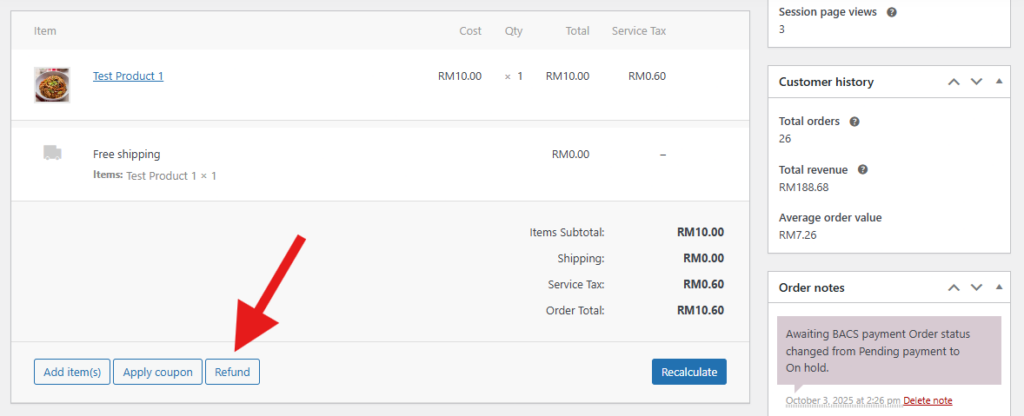
When a customer requests a refund in WooCommerce, the merchant can open the order, scroll to the Items section, click Refund
Enter the refund amount and reason, choose Refund Manually, and update the order status to Refunded.
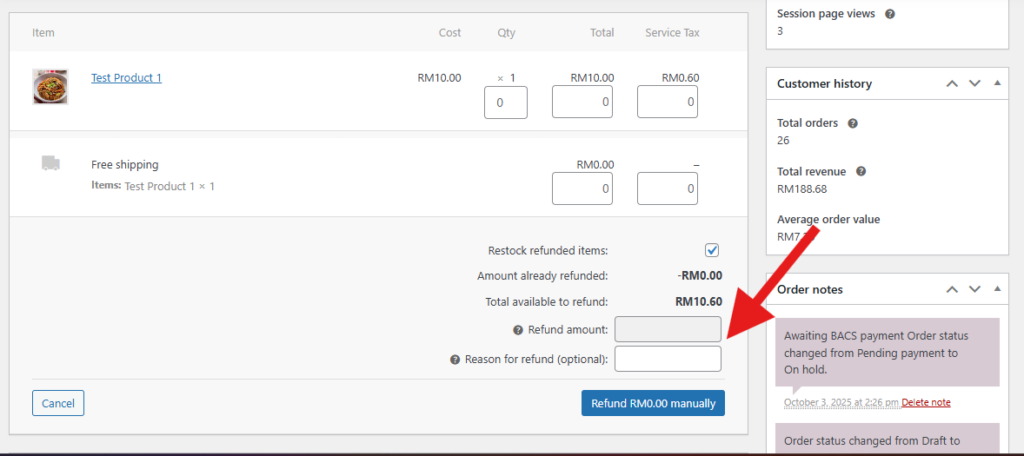
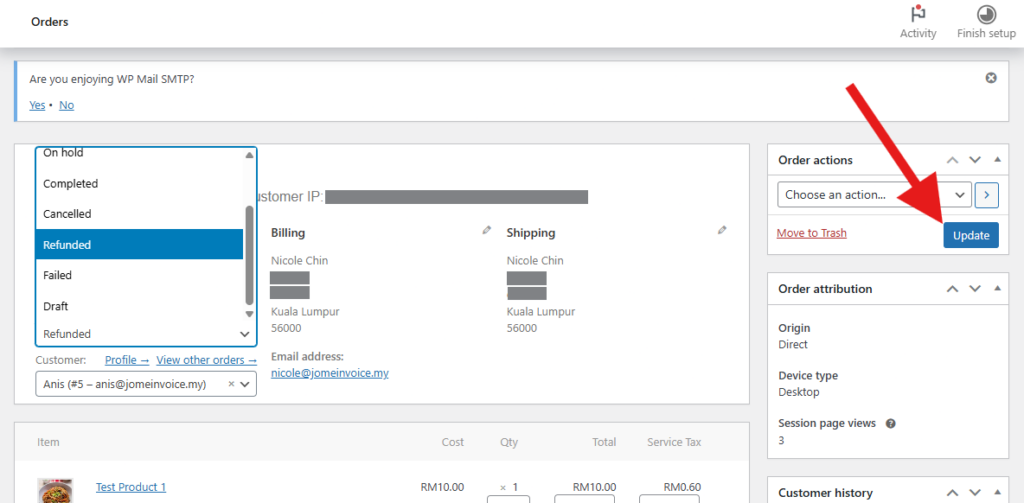
WooCommerce and JomeInvoice stay in sync automatically.
Once the refund is created, the refund details sync to JomeInvoice, and a new Refund Note appears under:
Sales > Refund Notes > WooCommerce > Consolidated
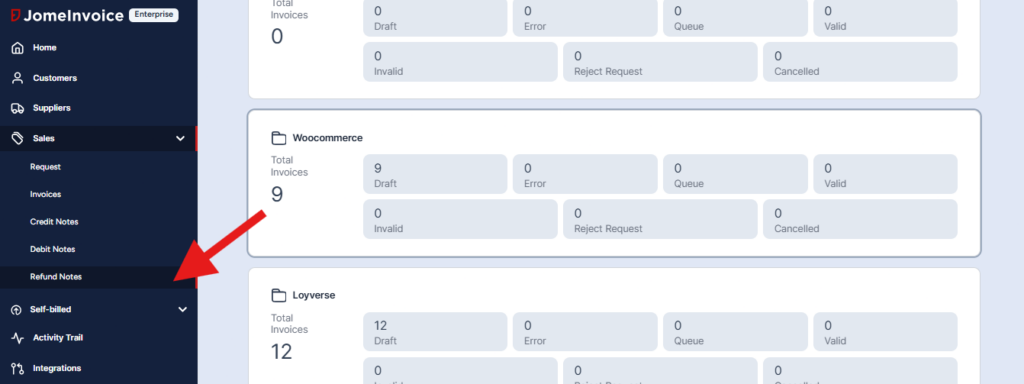
The Refund Note carries its own reference number and links back to the original invoice through an offset invoice reference.
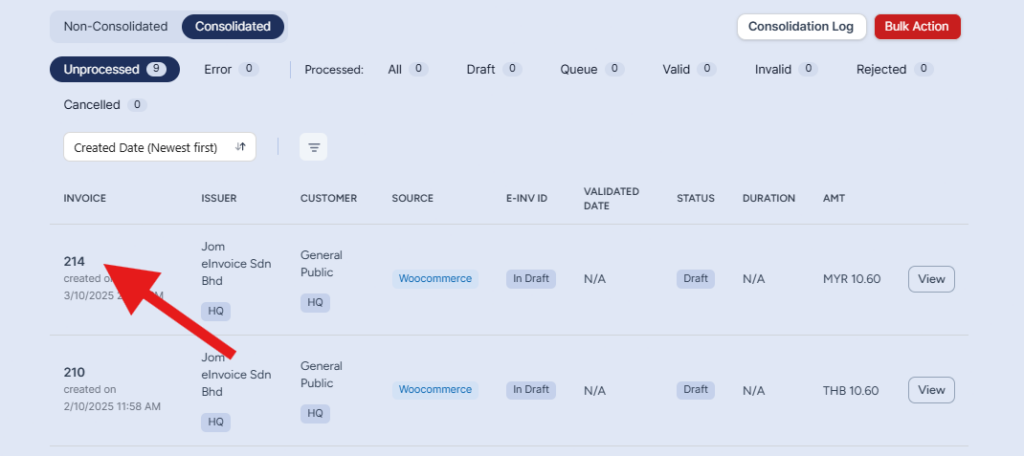
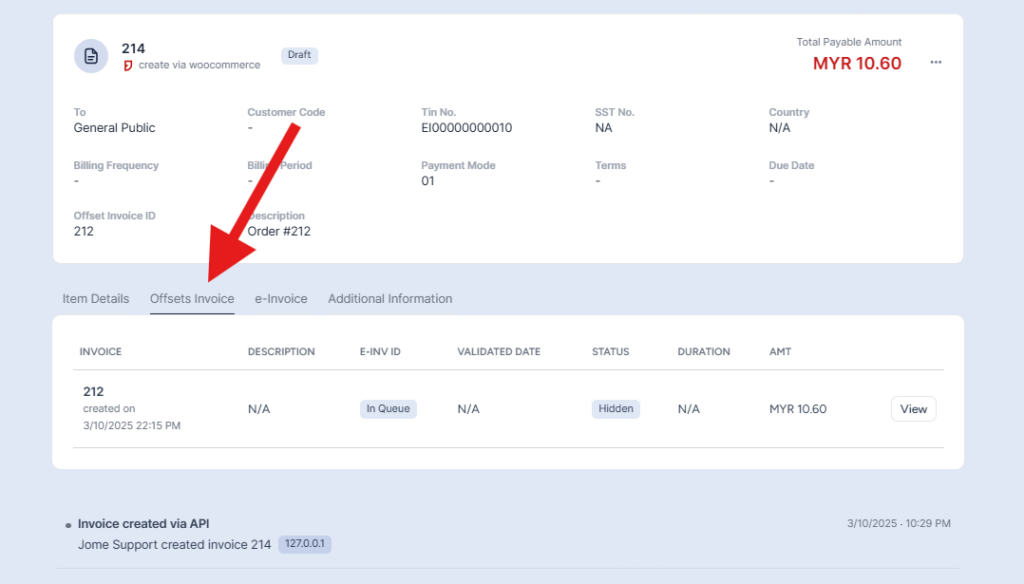
For example, if the original invoice was Invoice #212, the Refund Note can be linked back to that original invoice through the offset number.
Inside the Refund Note record, the merchant can review the refunded item details, refund amount, refund reason, quantity, unit price, subtotal, and tax breakdown.
For this WooCommerce refund and return workflow, invoice cancellation is not supported. Refund Notes are used instead.
For the detailed workflow with step-by-step screenshots, refer to the JomeInvoice WooCommerce refund process guide.
Credit Notes and Debit Notes
Credit notes and debit notes are used when the original invoice needs adjustment.
For eCommerce sellers, this may happen when:
• Quantity changes
• Price changes
• Discounts are corrected
• Delivery fees are added
• Partial returns happen
• Billing errors are found
A good einvoicing software for ecommerce should help sellers manage these adjustment scenarios properly, instead of treating every order as a simple fixed sale.
Is eCommerce e-Invoice Submission Fully Automatic?
Partly. Shopify and WooCommerce orders can sync into JomeInvoice automatically, and buyer e-Invoice requests can be matched against the invoice number, date, and amount without manual checking.
However, monthly consolidated e-Invoices still require the seller to review, convert, and submit the consolidated record by the required deadline. This gives merchants automation for daily order handling while keeping control over month-end consolidated submission.
What About Shopee, Lazada and TikTok Shop Sellers?
For sellers on Shopee, Lazada, and TikTok Shop, the marketplace operator generally handles e-Invoice issuance for sales made on the marketplace platform.
This means the seller does not issue e-Invoices directly for those marketplace transactions. The marketplace submits the relevant e-Invoice to LHDN MyInvois on behalf of the platform sales flow.
However, marketplace sellers should still keep proper e-Invoice records.
There are two important documents to understand:
- Self-billed e-Invoices for sales revenue
The marketplace collects money from buyers and pays out the seller. For that payout flow, the platform may issue self-billed e-Invoices to the seller.
- Normal e-Invoices for platform fees
The marketplace may also issue normal sales e-Invoices to the seller for commissions, advertising fees, service charges, or other platform fees.
Sellers should download these records from their Seller Centre dashboard for accounting and tax record purposes.
If your business sells on both Shopee and your own WooCommerce store, the marketplace handles its side, while JomeInvoice can handle your direct website sales. Your total revenue across all channels still matters when determining your e-Invoice implementation phase.
For sellers on other eCommerce platforms without a direct JomeInvoice connector, order data can still be brought into JomeInvoice through CSV upload, SFTP, or API. Once the order data is inside the system, the validation and submission workflow can continue through JomeInvoice.
How JomeInvoice Works as e-Invoicing software for ecommerce
JomeInvoice is designed to help online sellers connect their order workflow to LHDN e-Inovoice implementation.
It acts as the middle layer between online stores and LHDN.
For eCommerce businesses, JomeInvoice can support:
• Direct connector with Shopify
• Direct connector with WooCommerce
• API for custom online stores
• SFTP for structured data transfer
• CSV bulk upload for unsupported platforms
• Manual creation for special cases
• Auto-sync from eCommerce to JomeInvoice
• Buyer request matching
• Pulling requested transactions from consolidated to non-consolidated
• LHDN submission
• Status updates
• 1-click monthly consolidated submission
This is useful for large enterprises and SMEs running online stores because each business may have a different setup.
Some brands run one Shopify store. Some operate multiple WooCommerce websites. Some sell through both marketplace and own website. Some use ERP systems. Some still export CSV files.
JomeInvoice gives these businesses a practical way to connect different workflows to LHDN MyInvois.
Why Online Stores Should Not Rely Only on Manual MyInvois Submission
Manual submission may work for a very small online store with only a few orders.
But it becomes difficult when order volume grows.
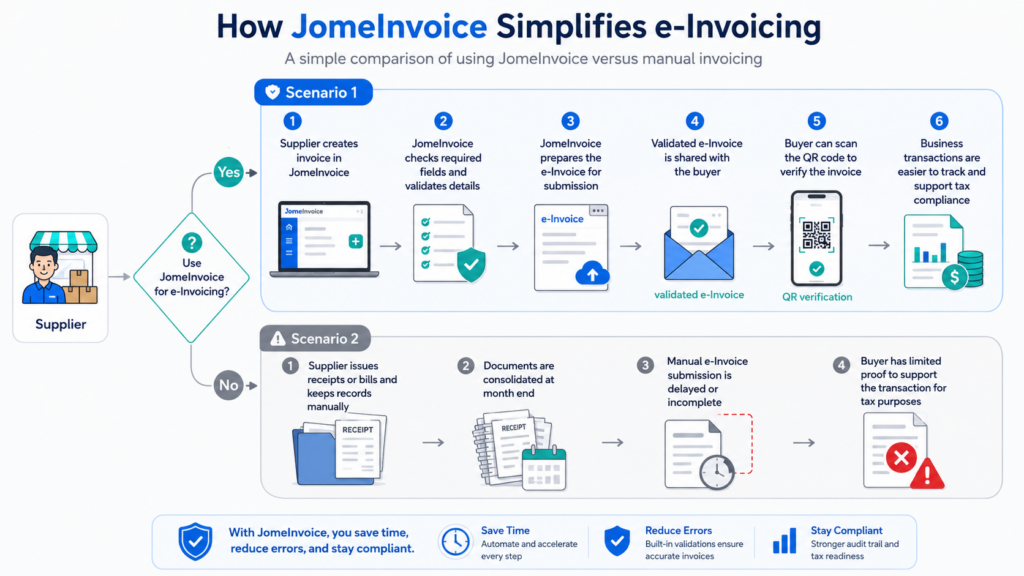
How JomeInvoice helps online sellers reduce manual e-Invoice work, validate details, share QR verification with buyers, and keep transactions easier to track.
Manual work can create problems such as:
• Re-entering customer details
• Missing buyer TIN or BRN
• Incorrect invoice amount
• Shipping fee mismatch
• Voucher not reflected correctly
• Refund not adjusted properly
• Duplicate consolidated submission
• Late monthly submission
• No clear tracking of Pending, Valid, or Invalid status
• Time wasted checking buyer requests manually
For online sellers, the goal is not only to submit e invoice Malaysia records. The goal is to build a repeatable workflow that can handle orders, requests, refunds, and consolidation without overwhelming the team.
Start Managing eCommerce e-Invoices with JomeInvoice
If your online store needs a simpler way to manage e-Invoicing, JomeInvoice helps connect Shopify, WooCommerce, API, SFTP, and CSV workflows to LHDN MyInvois. It supports order sync, buyer e-Invoice requests, monthly consolidated e-Invoices, refund notes, and status tracking in one platform.
FAQ About e-Invoicing for eCommerce Malaysia
How long does a buyer have to request an individual e-Invoice?
The buyer has until the last day of the transaction month. For example, a purchase made on 15 May must be requested by 31 May. After that, the seller is no longer obligated to issue an individual e-Invoice, and the transaction goes into consolidated submission.
Do eCommerce businesses need to submit e-Invoices in Malaysia?
Yes. eCommerce businesses need to comply with Malaysia e-Invoice requirements based on their business type, sales channel, revenue phase, and transaction workflow. For own website sales, such as Shopify or WooCommerce, sellers need to manage their own e-Invoice submission workflow.
How do online stores submit e invoice Malaysia transactions?
Online stores can submit e-Invoices manually through MyInvois Portal or use einvoicing software for ecommerce such as JomeInvoice. JomeInvoice supports direct integration, API, SFTP, CSV upload, and manual creation depending on the store setup.
Do Shopify sellers need e-Invoice software in Malaysia?
Shopify sellers with their own online store need a way to submit direct website sales to LHDN. JomeInvoice supports Shopify e invoice Malaysia workflows by connecting Shopify orders to JomeInvoice for e-Invoice preparation and submission.
Does WooCommerce support e-Invoice Malaysia?
WooCommerce stores can use JomeInvoice’s WooCommerce integration to connect online sale data to LHDN-compliant e-Invoice workflows. This helps reduce manual processing for WooCommerce e invoice Malaysia submission.
What if my eCommerce platform is not Shopify or WooCommerce?
If your platform is not Shopify or WooCommerce, JomeInvoice can still support API, SFTP, CSV bulk upload, or manual creation, depending on your data structure and workflow.
What is consolidated e-Invoice Malaysia for eCommerce?
Consolidated e invoice Malaysia refers to grouping general public B2C transactions into a monthly consolidated e-Invoice. For online stores, B2C receipts not requested as individual e-Invoices can go into monthly consolidation.
When must consolidated e-Invoices be submitted?
For monthly consolidated e-Invoices, businesses should follow the applicable LHDN deadline. In the JomeInvoice workflow described by the client, the seller reviews, converts, and submits monthly consolidated e-Invoices by the 7th of the following month.
How do B2C customers request an e-Invoice from an online store?
B2C customers can request an individual e-Invoice using a QR code or link provided on the invoice or receipt. They fill in the required buyer information before the end of the transaction month.
What happens if the buyer request details do not match the seller’s record?
If the invoice number, date, or amount does not match the seller’s record in JomeInvoice, the request can be rejected. If the details match, the request can be submitted to LHDN and returned as a valid e-Invoice.
Is eCommerce e-Invoice submission fully automatic?
Order sync from eCommerce platforms to JomeInvoice can be automated. Individual buyer request matching can also be automated. For monthly consolidated e-Invoices, the seller still needs to review, convert, and submit the consolidated record.
Do Shopee, Lazada and TikTok Shop sellers need to issue e-Invoices themselves?
For marketplace platform sales, the marketplace operator generally handles e-Invoice issuance. Sellers still need to download and keep records such as self-billed e-Invoices for payouts and normal e-Invoices for commissions, advertising fees, and service charges.
Is JomeInvoice suitable for SMEs and large enterprises running online stores?
Yes. JomeInvoice can support both SMEs and large enterprises running online stores. SMEs can use simpler workflows such as CSV upload, Shopify, or WooCommerce integration. Larger businesses can use API, SFTP, ERP, or multi-store workflows.