

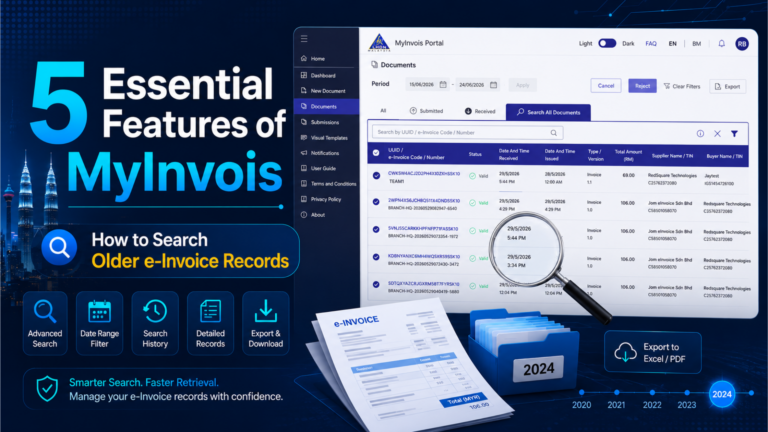
MyInvois Portal is one of the main tools businesses use to issue, view, and manage LHDN e-Invoices in Malaysia.
For many SMEs, it works as a starting point.
But once your business starts issuing more e-Invoices, small portal features become important. You need to know how to search old records, export documents, check customer TIN numbers, use QR codes, customize invoice templates, and batch import invoices.
One feature matters most for daily operations: how to find older e-Invoice records in MyInvois. Many users open the Documents section and only see recent records. This can make them think old e-Invoices are gone. In most cases, they are searching in the wrong place.
This guide explains how to use MyInvois Search All Documents,how to search historical e-Invoice records more efficiently , and why businesses should download e-Invoice records from MyInvois for their own storage.
🔑Key Takeaway
- MyInvois Portal does not show all old e-Invoices in the default recent view.
- To find older MyInvois e-Invoice records, use Search All Documents.
- Each MyInvois search works better with a limited date range, so businesses should search month by month.
- You can export e-Invoice records from MyInvois after filtering the correct period.
- SMEs should not rely only on portal search. Keep your own LHDN e-Invoice records for future audit and compliance checks.
- MyInvois also has useful features such as TIN search, taxpayer QR code, visual templates, and batch upload.
- Growing SMEs may need e-invoicing software to manage records, track statuses, reduce manual work, and organise e-Invoices better.
Why Searching Older e-Invoices Matters
Many SMEs only learn about MyInvois e-Invoice history when they need to find an old invoice.
This usually happens when:
• A customer asks for a copy of an e-Invoice.
• The accounts team needs to check whether an invoice was submitted.
• The business wants to export monthly LHDN e-Invoice records.
• The company needs to prepare documents for accounting, SST, income tax, or audit.
• The owner wants to check cancelled, rejected, or validated e-Invoices.
The problem is simple. The default document view does not always show everything.
If you only check Recent Documents, you may not see older records. This is why SMEs need to know how to use Search All Documents inside MyInvois Portal.
Feature 1: How to Search Older e-Invoices in MyInvois Portal This is one of the most important MyInvois features for SMEs.
Note: If you want to search e-Invoices beyond 10 days, do not rely only on the Recent Documents section. Use the Search All Documents function instead.
Step-by-Step: How to Search Older e-Invoices in MyInvois Portal
Step 1: Log in to MyInvois Portal.
Step 2: Go to the left menu and click Documents.
Step 3: If the default view only shows recent transactions, look for Search All Documents.
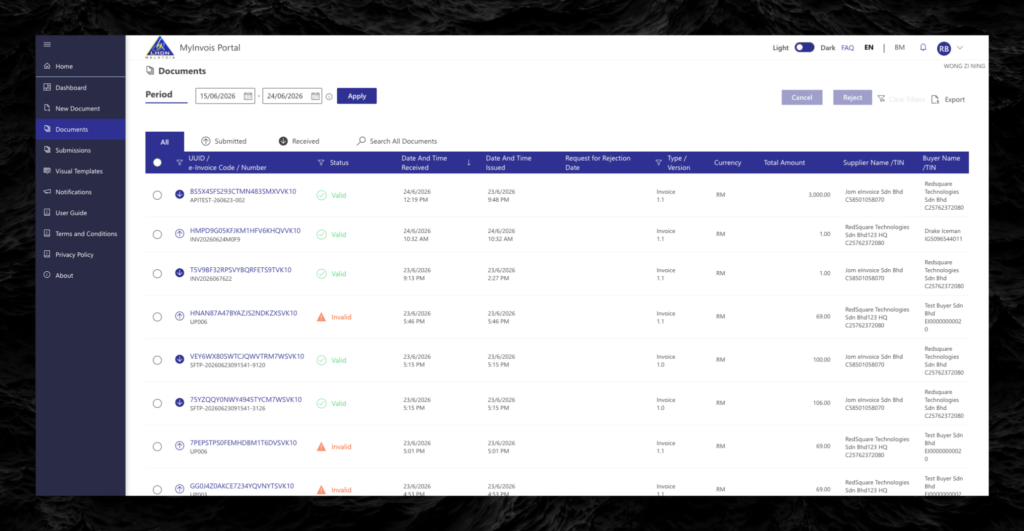
Default View
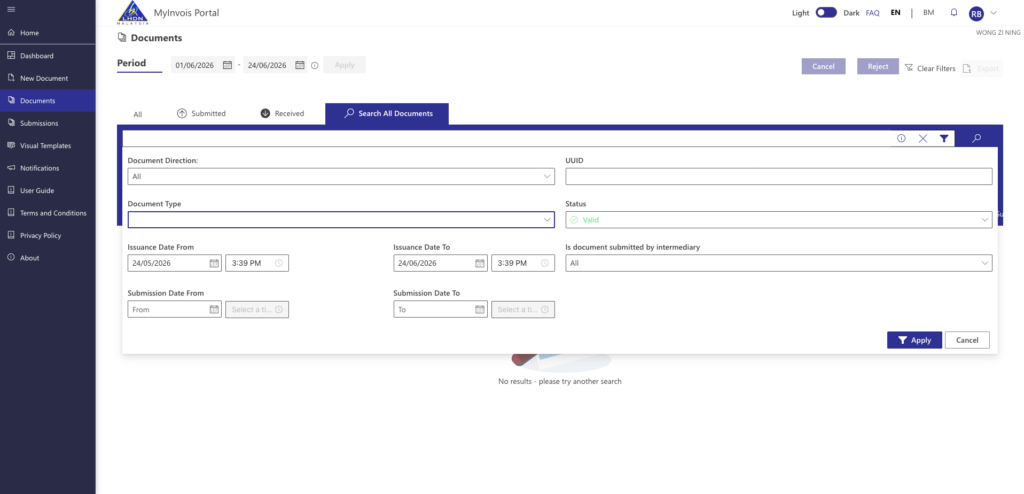
Search All Documents
Step 4: Click the filter button.
Step 5: Select the date range you want to search.
Step 6: Apply the filter.
Step 7: Review the e-Invoices that appear in the search result.
Step 8: Change items per page to 100 if you want to view more records in one page.
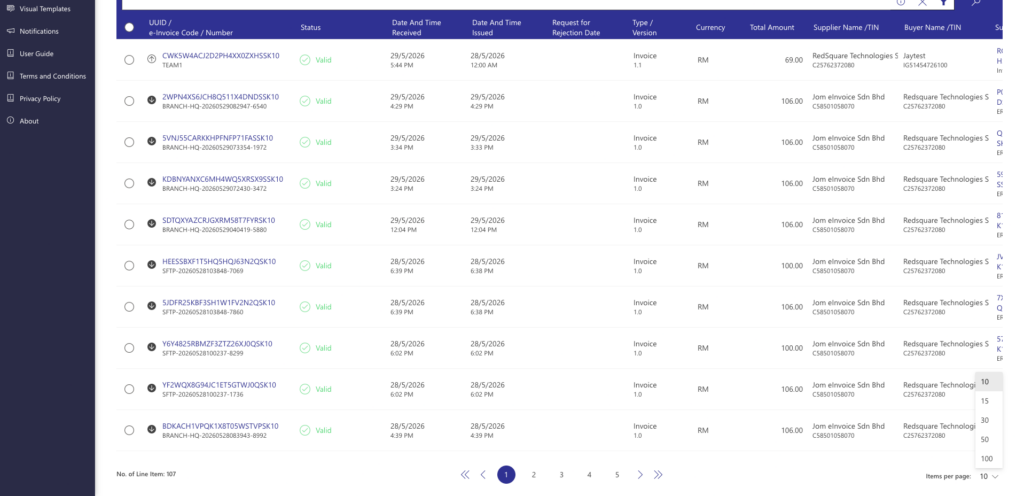
Step 9: Click Export to download the filtered records.
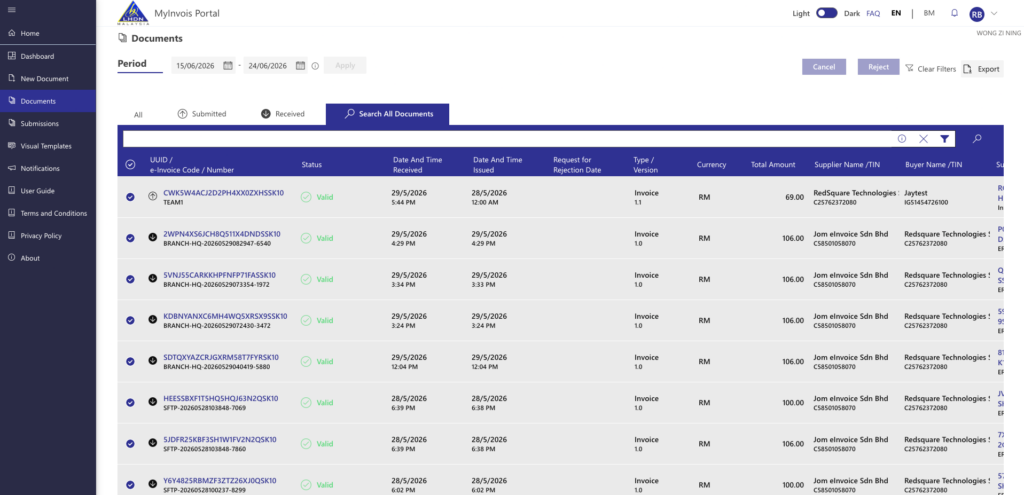
This is the practical way to find MyInvois old e-Invoice records when they no longer appear in the recent view.
Important: Best Practice for Searching Historical e-Invoices
Alert: When using Search All Documents, do not select a long period at once.
MyInvois search works better with a limited date window. In practice, users should search in smaller date ranges, usually month by month.
For example:
• 1 May 2026 to 31 May 2026
• 1 June 2026 to 30 June 2026
• 1 July 2026 to 31 July 2026
This makes the search easier to manage. It also helps your team export records by month for accounting and internal filing.
How to Export e-Invoices from MyInvois
After applying the filter, you can export the result from MyInvois.
This is useful because the portal should not become your only filing system.
Your business should download e-Invoice from MyInvois and keep copies in your own records. This matters because LHDN e-Invoice records may be needed for future reviews, tax checks, internal audits, accounting reconciliation, and customer disputes.
A simple monthly process can help:
• Search one month at a time.
• Export the e-Invoice records.
• Save the file in your company folder.
• Name the folder by month and year.
• Back up the file in cloud storage or your accounting system.
• Keep records linked to supporting documents such as receipts, payment proof, delivery notes, and credit notes.
Why SMEs Should Store Their Own LHDN e-Invoice Records
MyInvois Portal helps businesses issue and retrieve e-Invoices, but SMEs should not treat the portal as their only long-term storage system.
This matters because LHDN audit risk does not end after 30 days. According to IRBM’s Tax Audit Framework, audit cases involving fraud, wilful default, or negligence are not subject to the normal time limit, and employer audit offences under Section 83 of the ITA can go up to 12 years from the year the offence was committed under subsection 121(1).
For SMEs, this creates a simple rule: do not wait until audit time to search for old files. Export, download, and store your e-Invoices every month.
Businesses should keep their own LHDN e-Invoice records because:
• MyInvois recent document access is limited to around 31 days.
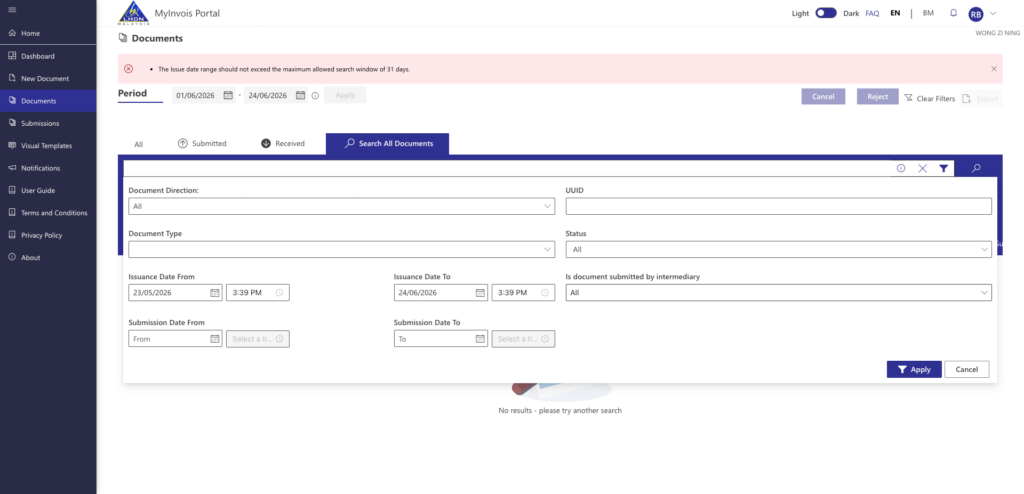
Error view when filter more than last 31 days
• Search and export should be done regularly, ideally month by month.
• Auditors may ask for supporting documents years later.
• Customer requests may come months after the transaction.
• Finance teams need records for tax, accounting, and reconciliation.
• The 12-year prosecution window means serious tax issues can still be reviewed long after the invoice was issued.
For SMEs, the safest habit is simple: search, export, download, and store your e-Invoice records every month.
Need a Better Way to Manage e-Invoice Records?
JomeInvoice helps SMEs manage e-Invoices in one place, track submission status, reduce manual work, and keep records more organised. If your business is growing beyond basic MyInvois Portal use, explore JomeInvoice as your e-invoicing software for daily operations.

Feature 2: Search Customer TIN Without Leaving MyInvois
Another useful MyInvois feature is the built-in TIN search shortcut.
When creating an e-Invoice, you may reach the customer details section and realise you do not know the buyer’s TIN.
Instead of logging in to MyTax separately, MyInvois allows users to search for TIN from within the portal.
How the TIN Search Feature Works
When you are filling in customer details:
• Click the search icon near the TIN field.
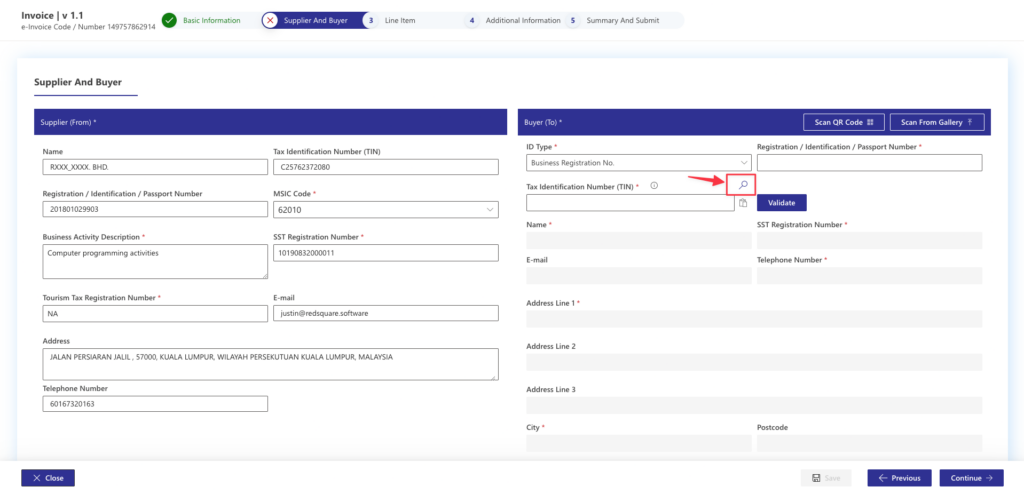
• Choose the taxpayer type.
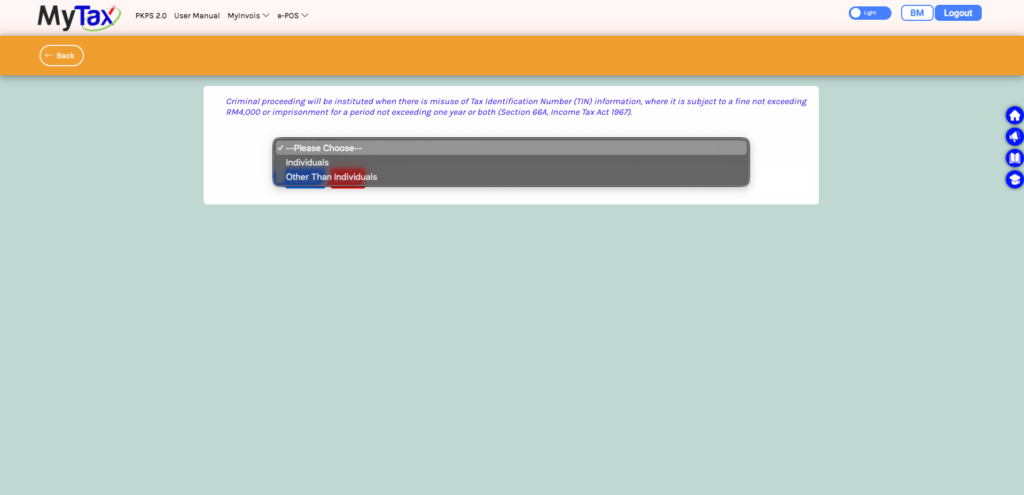
• For a company, select the business or company option.
• Enter the company registration number.
• Click Search.
• MyInvois will show the relevant TIN if the information matches.
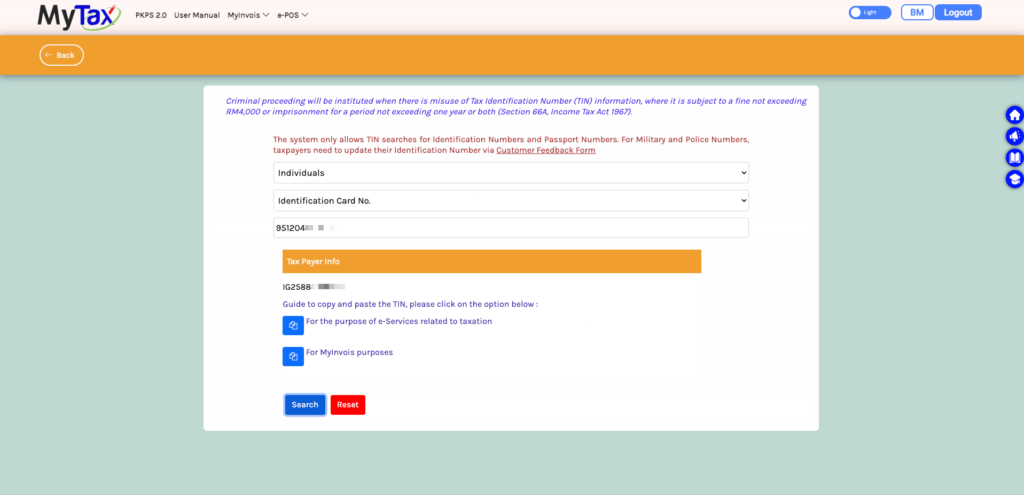
This saves time for admin staff who issue e-Invoices manually.
It also reduces the risk of entering the wrong TIN, which can cause submission errors, buyer rejection, or follow-up work.
Feature 3: Generate and Use a Taxpayer QR Code
MyInvois Portal also allows taxpayers to generate their own QR code.
This QR code helps make data entry faster when issuing or receiving e-Invoices.
How to Generate Your Taxpayer QR Code
To generate your QR code:
• Go to the top right section of MyInvois Portal.
• Click View Taxpayer Profile.
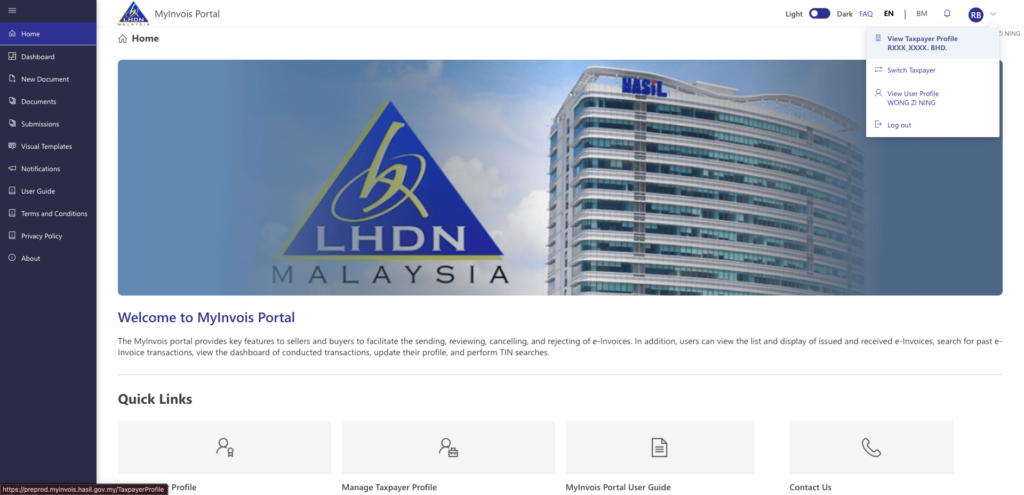
• Look for the QR code section.
• Generate your taxpayer QR code.
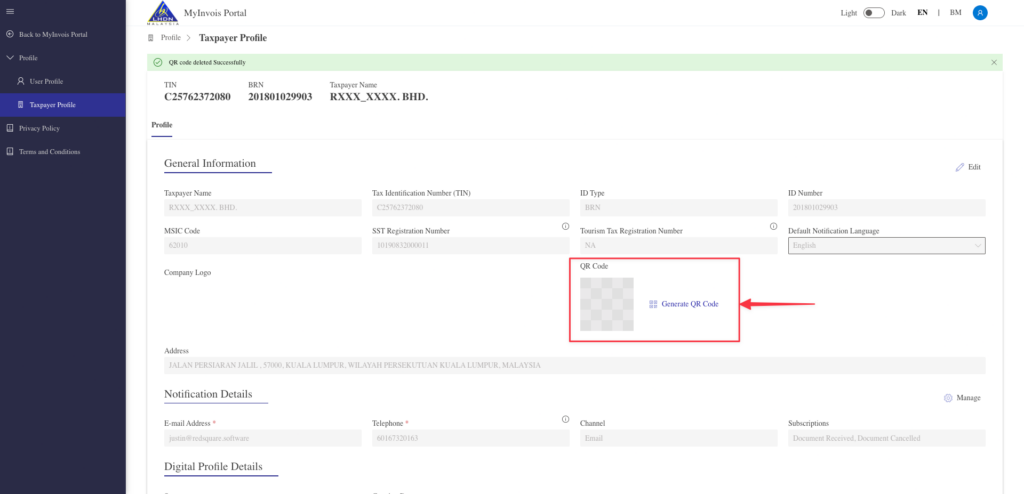
• Download and save the QR code.
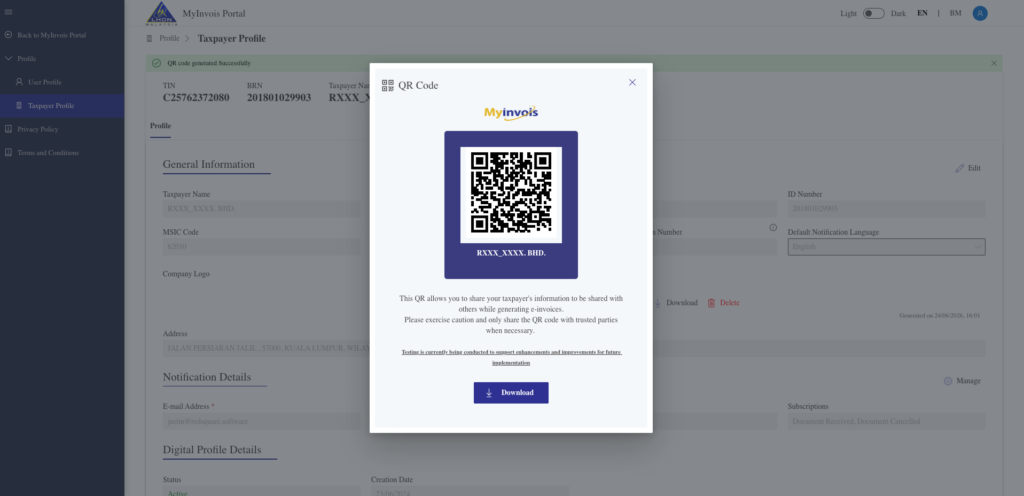
Once downloaded, you can share it with customers or suppliers when needed.
How the QR Code Helps During e-Invoice Creation
When creating an e-Invoice, users can upload or scan a taxpayer QR code.
After the QR code is uploaded, the portal can auto-fill selected taxpayer information. This helps reduce manual typing and lowers the chance of entering wrong company details.
For SMEs, this is useful when dealing with regular suppliers, corporate buyers, or customers who request e-Invoices often.
Feature 4: Create Visual Templates for Better e-Invoice Presentation
A standard MyInvois e-Invoice may look basic.
For SMEs that want a more branded document, MyInvois Portal has a Visual Templates feature.
This allows users to customize how the visual version of the e-Invoice looks.
What You Can Add in Visual Templates
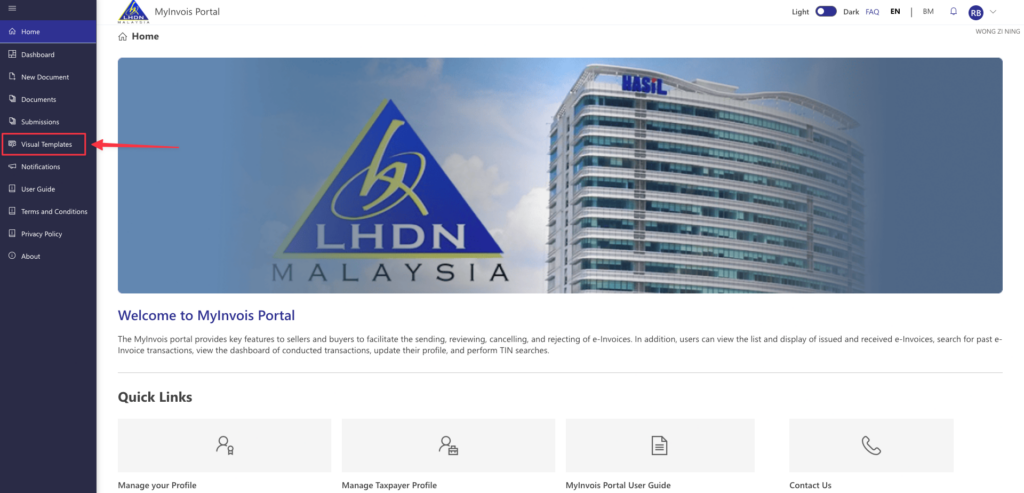
Inside Visual Templates, users can create a new template and customise details such as:
• Company logo
• Company header
• Company name
• Registration number
• Phone number
• Email address
• Footer image or footer text
• Extra invoice details
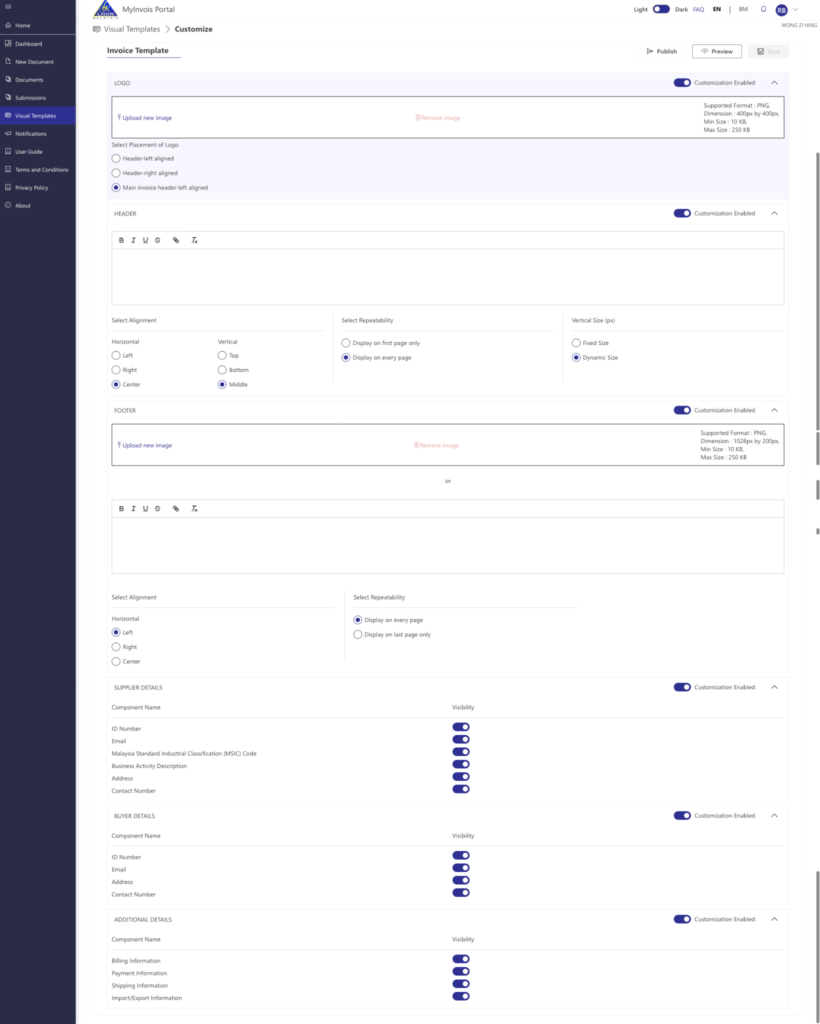
This helps businesses present e-Invoices in a more professional format.
Why Visual Templates Matter for SMEs
Visual templates do not only make the document look better.
They also help customers recognise your company faster. A branded e-Invoice with your logo, business details, and footer can look more complete when shared with buyers.
This is especially useful for service businesses, retailers, consultants, agencies, and suppliers who send invoices directly to customers.
Feature 5: Batch Import e-Invoices with Excel Template
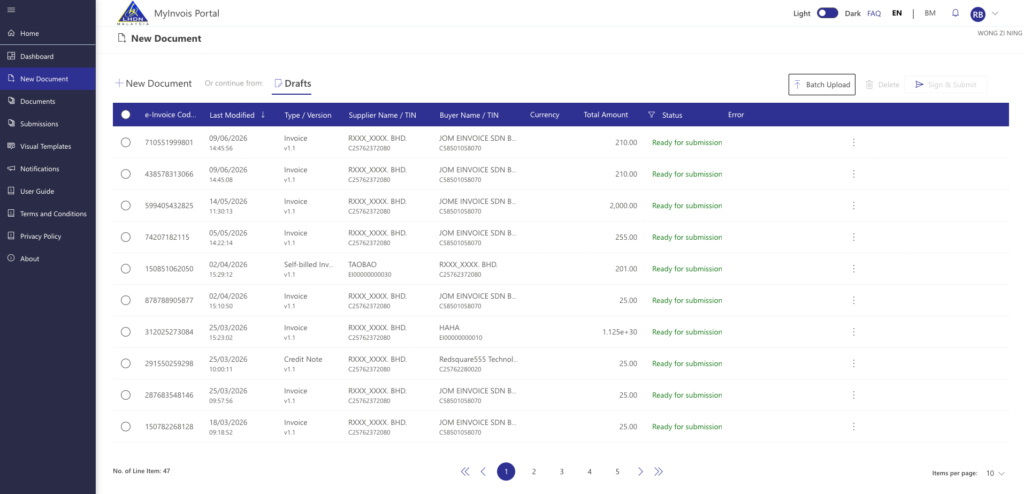
The fifth feature is batch import.
For SMEs that issue more than a few e-Invoices, creating each invoice one by one can become slow.
MyInvois Portal provides a batch upload option that uses an Excel template.
How to Find the Batch Upload Template
To find the batch upload template:
• Go to New Document.
• Click Drafts.
• Select Batch Upload.
• Download the Excel template.
The template includes multiple tabs. Users need to fill in the required information correctly before uploading it back into MyInvois.
When Batch Upload Is Useful
Batch upload can help when your business needs to submit many e-Invoices at once.
For example:
• Monthly B2B invoices
• Repeated service invoices
• Rental invoices
• Supplier invoices
• Bulk customer billing
• Internal finance uploads prepared by the accounts team
But it also requires care. If the Excel file has missing fields, wrong formats, or incorrect tax information, the upload may fail or create errors.
This is where businesses need a clear SOP before using batch import.
MyInvois Portal Is Useful, But SMEs Still Need a Record-Keeping SOP
MyInvois Portal gives SMEs the basic tools to issue, search, export, and manage e-Invoices.
But using the portal well requires discipline.
At minimum, SMEs should create a monthly e-Invoice SOP.
Suggested Monthly SOP for MyInvois e-Invoice History
Use this simple process:
- Search e-Invoices month by month.
- Use Search All Documents instead of relying only on Recent Documents.
- Export e-Invoice records from MyInvois.
- Download supporting PDFs or data files where needed.
- Save the files in a structured folder.
- Check cancelled, rejected, and valid e-Invoices.
- Match e-Invoices with accounting records.
- Back up all files.
- Keep customer and supplier records updated.
- Review missing or failed submissions before month-end closing.
This helps reduce stress when your accountant, auditor, customer, or management team asks for old records.
When Should SMEs Move from MyInvois Portal to e-Invoicing Software?
MyInvois Portal is helpful for basic use.
But some SMEs will outgrow it.
Your business may need e-invoicing software when:
• You issue many e-Invoices every month.
• You need to search old records often.
• You manage multiple users or branches.
• Your team spends too much time exporting files.
• You need better e-Invoice status tracking.
• You want to connect POS, eCommerce, accounting, or ERP systems.
• You need a better storage and workflow process.
• You want fewer manual errors.
• You need better visibility for finance teams.
For a growing SME, the real issue is not only how to issue an e-Invoice. It is how to manage the full e-Invoice workflow after submission.
That includes searching, exporting, storing, tracking, correcting, cancelling, and reporting.
How JomeInvoice Helps SMEs Manage e-Invoices More Efficiently
JomeInvoice is built for businesses that want a more organised Malaysia e invoice workflow.
Instead of relying only on manual portal work, SMEs can use JomeInvoice to manage e-Invoice operations in a more structured way.
JomeInvoice helps businesses with:
• e-Invoice submission
• e-Invoice status tracking
• Customer and supplier records
• Bulk upload
• Integration workflows
• Branch and outlet handling
• B2B and B2C invoice management
• Better operational visibility
• Reduced manual work for finance and admin teams
For small businesses with low volume, MyInvois Portal may be enough at the beginning.
For growing SMEs, an e-invoicing software platform can reduce repeated manual tasks and make record management easier.
Still using MyInvois Portal manually for every search, export, and download?
JomeInvoice helps Malaysian SMEs manage e-Invoices with better workflow, clearer tracking, and less manual effort. Start your e-Invoice process with a system built for daily business use.
FAQ About MyInvois Search e-Invoices Beyond 10 Days
How do i search older e-Invoices in MyInvois?
Go to Documents, select Search All Documents, click the filter button, choose the date range, and apply the search. Do not rely only on the default recent document view.
Why can’t I see old e-Invoices in MyInvois Portal?
If you cannot locate older e-Invoices, use Search All Documents together with the relevant date filters to search historical records.
What is the best way to search historical e-Invoices in MyInvois?
For easier searching, exporting, and record management, many businesses prefer to search historical e-Invoices month by month.
Can I export e-Invoices from MyInvois?
Yes. After filtering the records, users can export e-Invoice records from MyInvois. This helps businesses keep their own monthly records.
Should I download e-Invoice from MyInvois for my own storage?
Yes. Businesses should keep their own copies and supporting documents. MyInvois Portal helps with retrieval, but your company still needs proper internal records.
How often should SMEs export LHDN e-Invoice records?
A monthly export is a practical habit. High-volume businesses may export weekly or daily, depending on transaction volume and internal accounting needs.
Does MyInvois Portal replace accounting software?
No. MyInvois Portal helps with e-Invoice issuance and retrieval. It does not replace your full accounting, reconciliation, storage, reporting, or business workflow.
When should I use e-invoicing software instead of only MyInvois Portal?
Use einvoicing software when your business has higher invoice volume, multiple users, multiple branches, POS or eCommerce data, or frequent record search and export needs.
Can JomeInvoice help with Malaysia e invoice workflow?
Yes. JomeInvoice helps SMEs manage e-Invoice submission, tracking, bulk upload, integrations, and records in a more organised way. Explore our SME e-invoicing software features.