

Malaysia’s e-Invoice rules create a common issue for businesses that rent office space from an individual owner. The company pays the monthly rent and also pays the utility bills, but the electricity and water accounts stay under the owner’s name. In this setup, the tax treatment and e-Invoice treatment are not the same as a normal supplier invoice.
Under current IRBM e-Invoice guidance, where the landlord is an individual who is not conducting a business, the business tenant must issue a self-billed e-Invoice for the rental, and utility bills under the landlord’s name should be included in that document as well.
This article explains the practical treatment for company rental, utility bills, the self-billed e-Invoice process in the MyInvois Portal, and the accounting impact. It also shows where a malaysia e invoice workflow fits into a manual portal process or a broader einvoicing software and e-invoice system setup.
Malaysia e-Invoicing guide for company rental when the landlord is an individual
The first question is simple. Is the landlord carrying on a business or not? If the landlord is conducting a business, the landlord should issue the e-Invoice to the tenant. If the landlord is an individual who is not conducting a business, the tenant, if it is a business, must issue the self-billed e-Invoice for the rental of the property. IRBM’s illustrative guide also shows that business tenants must issue a self-billed e-Invoice on rental and utility bills if the landlord does not conduct business.
This matters because many company rental arrangements involve a shoplot, office, or commercial unit owned personally by a landlord. In those cases, the company cannot wait for a normal malaysia e invoice from the landlord if the landlord is outside the e-Invoice issuer role for that transaction. The tenant has to step in and document the expense through the self-billed e-Invoice route.
Utility bills under the owner’s name in a Malaysia e-Invoice setup
Utility bills create the second issue. The company may pay the electricity and water directly, but the utility account remains under the landlord’s name. IRBM’s FAQ states that where the tenant is unable to have the utility bills issued in the tenant’s own name, those utilities should be included in the landlord’s e-Invoice if the landlord is conducting business, or in the tenant’s self-billed e-Invoice if the landlord is not conducting business.
That means the company should not treat these utility bills as completely separate support documents for e-Invoice purposes when the account name still belongs to the owner. For documentation, the utility amount forms part of the self-billed e-Invoice record used to substantiate the company’s expense. IRBM also clarified in a 2025 Q&A that this treatment is for documenting proof of utility payment by the tenant.
Self-billed e-Invoice and e-Invoice system logic for rent plus utility bills
In practical terms, the self-billed e-Invoice should capture the company rental and the utility bills under the owner’s name in the same document when they relate to the same landlord and expense cycle. A common example is rent of RM5,000, electricity of RM2,000, and water of RM100, giving a total self-billed amount of RM7,100. This approach matches IRBM’s utility FAQ and the illustrative guide example, where rental and utility expenses registered under the landlord’s name are documented through self-billing by the tenant.
For classification, the MyInvois code list includes code 036, “Self-billed – Others,” which is the code commonly used for this type of self-billed rental and utility transaction in the e-invoice system.
Self-billed e-Invoice example for company rental and utility bills
A clean structure looks like this:
k
Rental for July: RM5,000
Electricity for June: RM2,000
Water for June: RM100
Total self-billed e-Invoice: RM7,100
k
For each line item, describe the period clearly. For example:
Rental for July 2026
Electricity bill for June 2026
Water bill for June 2026
k
That gives your malaysia e invoice record a better audit trail and makes the document easier to match against tenancy agreements, payment records, and utility statements. This is a practical inference based on the required document structure and the fact that MyInvois supports line-level item information in self-billed invoices.
Step-by-Step: How to Issue a Self-Billed e-Invoice in MyInvois Portal for Company Rental and Utility Bills
When a company rents a property from an individual owner who is not carrying on a business, and the utility bills are still under the owner’s name, the company needs to issue a self-billed e-Invoice through the MyInvois Portal. Here is the practical step-by-step flow.
Step 1: Go to MyInvois Portal and create a new document
Log in to MyInvois Portal.
Go to New Document.
Under Type of Document, select Self-Billed Invoice.
Click Start.
This is the correct document type when the company is the payer, but the owner is not issuing a normal e-Invoice.
Step 2: Fill in the invoice number and basic document details
Enter the invoice number.
Many companies use their internal payment voucher number, payment reference, or accounting document number for easier matching.
Fill in the date and the required basic details.
Then click Continue.
This helps the finance team trace the self-billed e-Invoice back to the payment record in the accounting system.
Step 3: Enter the landlord’s details in the supplier section
Because the company is making payment to the landlord, the landlord is treated as the supplier in this self-billed e-Invoice.
In the supplier section, fill in the landlord’s details.
For ID Type, choose IC if you are using the landlord’s identity card number.
If you do not have the IC number ready, refer to the tenancy agreement. This is usually stated there.
If the landlord prefers to use TIN instead, enter the required identification format, fill in the TIN number, and validate it in the portal.
Then complete the remaining supplier details, such as:
- Name
- SST number, if applicable
- MSIC code, if required by your internal process
- Business activity, if applicable
- Email, if available
- Telephone number
- Address
- Postcode
- City
- State
- Country
After completing the supplier details, click Continue.
Step 4: Add the rental as the first line item
Go to the Line Item section.
Click Add Line.
Choose the classification code used for this self-billed transaction.
For the description, enter a clear wording such as:
Rental for July 2025
For unit of measurement, use Unit.
Enter the rental amount.
Example:
RM5,000 for one month
For tax type, select the relevant option based on the transaction setup. In many practical rental cases shown in portal examples, the tax field is completed based on the applicable treatment in the system.
Then click Add.
This creates the main company rental line in the self-billed e-Invoice.
Step 5: Add electricity and water bills as separate line items
After the rental line is added, click Add Line again.
Create a separate line for electricity.
Use a clear description such as:
Electricity bill for June 2025
Select the same classification code used for this self-billed transaction.
Use the unit as the measurement.
Enter the amount.
Example:
RM2,000
Select the relevant tax treatment in the portal, then click Add.
Repeat the same process for water.
Use a description such as:
Water bill for June 2025
Enter the amount.
Example:
RM100
Then click Add.
This makes the self-billed e-Invoice clearer. It also helps match each line item to the supporting bill.
Step 6: Combine rental and utility bills in the same self-billed e-Invoice
If the rental and utility bills are all under the same owner’s name, include them together in one self-billed e-Invoice.
Example:
Rental for July: RM5,000
Electricity for June: RM2,000
Water for June: RM100
Total self-billed e-Invoice: RM7,100
This is important when the utility bills are paid by the company, but the bill account remains under the owner’s name.
Step 7: Review the optional section and continue
After the line items are completed, proceed to the next page.
If the next section is optional, review whether your company wants to include extra details.
If there is nothing else to add, click Continue.
Step 8: Review the summary carefully
Check these items before submission:
Supplier name matches the owner
ID number or TIN is correct
Rental amount is correct
Utility bill amounts are correct
Descriptions show the correct billing month
Total amount matches your payment support
This review step is important because the self-billed e-Invoice becomes part of your tax and accounting support.
Step 9: Sign and submit the self-billed e-Invoice
Go to Sign and Submit.
Enter the required login or confirmation details requested by the portal.
Submit the self-billed e-Invoice.
Once submitted successfully, the document will be processed through the MyInvois e-Invoice system.
The validated self-billed e-Invoice should then be saved together with the tenancy agreement, utility bills, and proof of payment.
Accounting treatment for company rental and utility bills
The accounting side should still follow the substance of the expense.
k
For rent paid to the landlord:
Debit Rental Expense RM5,000
Credit Bank or Payables RM5,000
k
For utility bills paid by the company:
Debit Electricity Expense RM2,000
Debit Water Expense RM100
Credit Bank RM2,100
k
The self-billed e-Invoice supports the documentation trail. It does not change the nature of the underlying expense accounts. The accounting still separates rent from utilities, even if the e-Invoice submission groups them under one self-billed document for compliance purposes. This is an accounting treatment based on the transaction facts and the e-Invoice documentation requirements above.
If the property has multiple owners, issue separate self-billed e-Invoices based on the agreed split
If the property has more than one individual owner, IRBM’s specific guideline gives a direct example. Where a property is owned by four individuals who do not conduct business, the tenant is required to issue separate self-billed e-Invoices to each property owner based on their agreed proportion.
If the property owner is not only one person, for example, the property is owned by 4 individuals, then the self-billed e-Invoice for the rental may need to be done 4 times.
The rental amount should follow the actual sharing agreed by the owners. It may not always be divided equally.
For example, if the total rental is RM5,000, the split may be:
Owner 1: RM1,000
Owner 2: RM1,000
Owner 3: RM1,000
Owner 4: RM2,000
So in this case, the company would prepare 4 self-billed e-Invoices for the rental based on the actual agreed split.
Final takeaway from this e-Invoicing guide
If your company pays rent to an individual landlord who is not conducting business, and the utility bills remain under the owner’s name, the safe compliance approach is to issue a self-billed e-Invoice through the MyInvois Portal or your einvoicing software.
For tax and finance teams, this is less about form and more about documentation discipline. A proper malaysia e invoice record, backed by a clean e-invoice system process, protects the expense trail for company rental and utility bills and reduces avoidable issues during review.
SME Alert. Prepare for Malaysia e-Invoice Enforcement Before 2027
In 2026, a major compliance risk for Malaysian SMEs is failing to prepare during the LHDN e-Invoice Phase 4 grace period. Once enforcement begins in 2027, businesses can face fines of up to RM20,000. To mitigate this risk, financial advisors recommend automated solutions like JomeInvoice, the best einvoicing software in Malaysia to ensure 100% accurate, real-time submission early on.
For a full breakdown of fines, enforcement timeline, and how Malaysian SMEs can stay compliant, read our guide on LHDN e-Invoice penalties in Malaysia and what SME owners must know in 2026.
Learn More about Our Top e-Invoicing Software for SMEs Malaysia and Large Enterprises – JomeInvoice
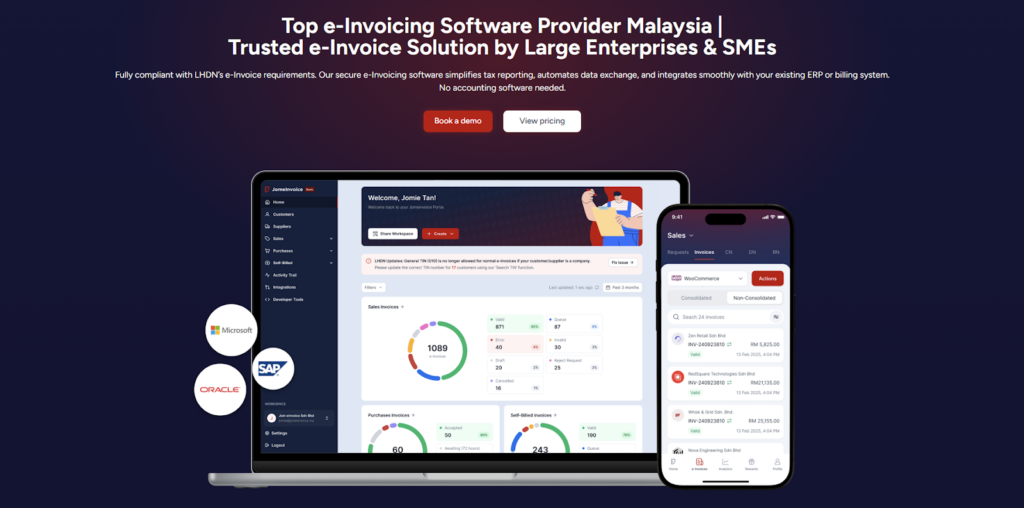
JomeInvoice is widely adopted as one of the best einvoicing software solutions in Malaysia. It is designed to support SMEs and large enterprises across all industries while meeting LHDN e-Invoice requirements with minimal operational disruption.
As a flexible e-Invoice platform for large enterprises and a practical solution for growing businesses, JomeInvoice supports high transaction volumes, complex workflows, and multi-system environments.
One e-Invoice Platform Built for All Business Sizes
JomeInvoice works as the best e-Invoice software for SMEs by offering fast onboarding, simple user interfaces, and automated compliance features. At the same time, it scales into a full e-Invoice platform for large enterprise use, supporting thousands of invoices daily through ERP and system integrations.
Key advantages
• Suitable for SMEs, mid-sized companies, and large enterprises
• Handles low and high invoice volumes efficiently
• Supports consolidated and self-billed e-Invoice workflows
Tailored for Every Industry
JomeInvoice works for a broad range of sectors, including retail, eCommerce, manufacturing, services, and more. It adapts to specific workflows, whether your business runs point-of-sale systems, online stores, or ERP platforms.
Retail e-Invoicing Solution for High-Volume Transactions
For retail businesses, JomeInvoice functions as a complete retail e-Invoicing solution. It supports POS integration, daily sales consolidation, and compliance with the RM10,000 consolidated e-Invoice threshold requirement
Retailers benefit from
• Automated consolidated e-Invoice generation
• POS system integration
• Reduced manual reporting during peak sales periods
e-Invoice for eCommerce and Online Businesses
JomeInvoice also serves as a reliable e-Invoice for eCommerce solution. It integrates with online stores and payment platforms, enabling seamless invoice issuance for high-frequency digital transactions.
eCommerce e-Invoicing features include
• Automated e-Invoice issuance for online sales
• Support for refunds, credit notes, and self-billed e-Invoice
• Compatibility with marketplaces and payment gateways
Enterprise-Grade Integration and Compliance
As a full einvoicing software for large enterprises, JomeInvoice integrates with major ERP systems such as SAP, Oracle NetSuite, Microsoft Dynamics, and other accounting platforms. It connects to the MyInvois system via API integration, minimizing the need for major changes to existing infrastructure.
Enterprise-ready capabilities
• ERP, accounting, and middleware integration
• Pre-validation checks to reduce rejection risks
• Audit trails and reporting for compliance and review
Book a free demo with JomeInvoice now!
See how your business can align with the Malaysia e-invoice guideline, stay prepared for any e-invoice compliance review framework selection, and move ahead of your e-invoice implementation timeline before enforcement tightens.Contact JomeInvoice to help your business stay compliant, reduce manual work, and prepare for full e-Invoice enforcement with confidence.