

Many businesses struggle when they need to issue e-invoice for Disbursement and Reimbursement correctly via MyInvois portal.
One invoice can contain:
• Normal service fees
• Reimbursement charges
• Disbursement fee
Each uses a different classification code. Each has different tax treatment. If you apply the wrong code, your LHDN e-invoice submission may be incorrect.
This MyInvois Portal guide walks you through the full process step by step.
Understanding Disbursement and Reimbursement in Malaysia e Invoice
Before using the MyInvois portal, understand the difference clearly.
What is Disbursement
Disbursement means you pay a fee on behalf of your client, then claim the exact amount back.
Example:
• You pay SSM registration fees for your client.
• You claim back the same RM200.
Key point:
• A disbursement fee has no service tax.
• You must use the correct classification code.
• Tax type is Not Applicable.
What is Reimbursement
Reimbursement happens when:
• A cost is charged to you.
• You pass the cost back to your client.
Examples:
• Travel expenses
• Printing costs
Key point:
• Reimbursement is subject to service tax.
• You must apply an 8% service tax.
Getting this wrong affects your LHDN e-invoice compliance.
Step 1: Create a New Invoice in MyInvois Portal
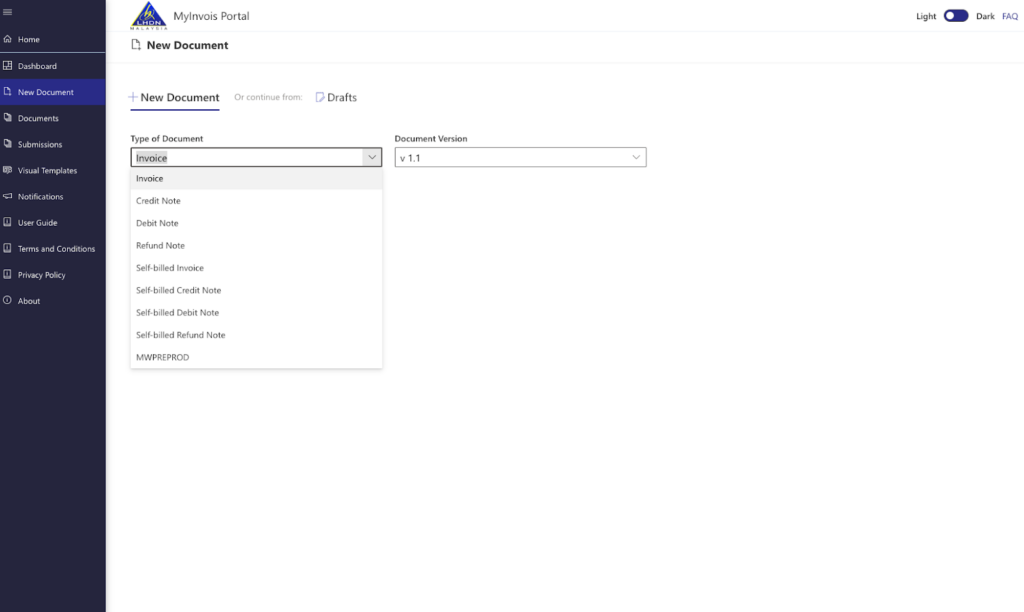
Log in to the MyInvois portal.
Click:
• New Document
• Select Invoice under Type of Document
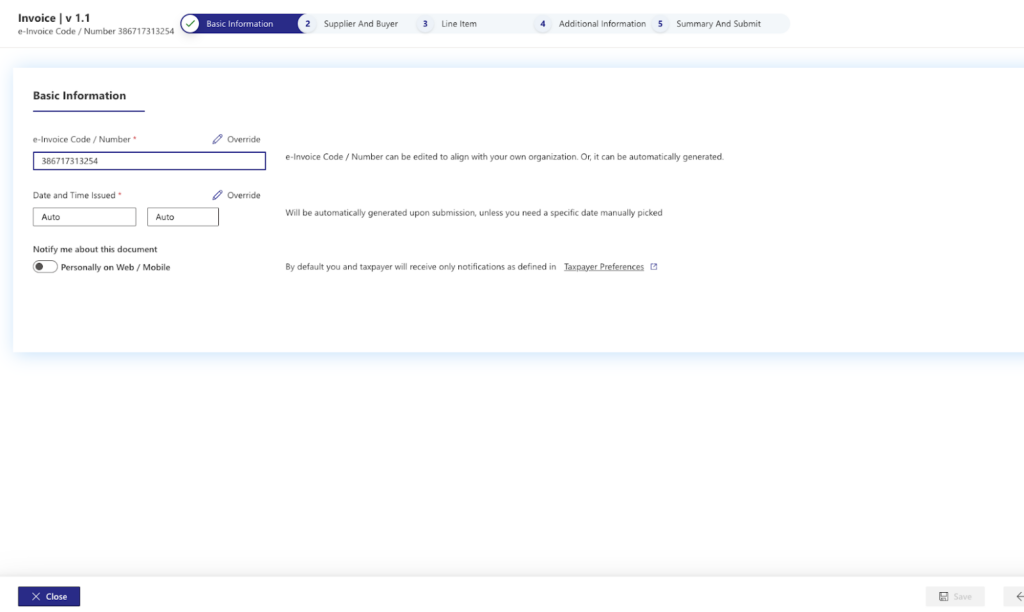
Fill in:
• Invoice number
• Date
• Time
Click Continue.
Next, enter your customer details:
• Name
• Tax number if available
• Telephone number
• Address
• City
• Postcode
• State
• Country
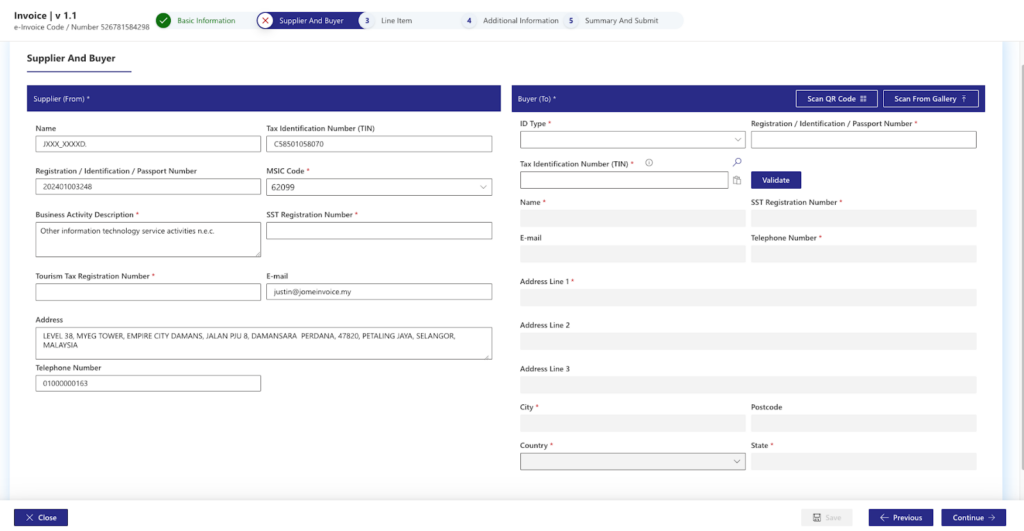
Click Validate. Then click Continue.
This ensures your e-Invoice meets submission requirements.
Step 2: Add Line Items Correctly in the e-Invoice System
This is the most important part when you issue an e-invoice for Disbursement and Reimbursement.
Each charge must be entered separately.
Service Fees Line Item
Click Add Line.
Under Classification Code:
Select 022 Others.
Example:
Description: Secretarial fees
Quantity: 12
Unit price: RM100
Total: RM1200
If there is no discount, leave it blank.
Under Add Tax Type:
Select Service Tax 8 percent.
Click Add.
This completes your normal service fee entry in the e-invoice system.
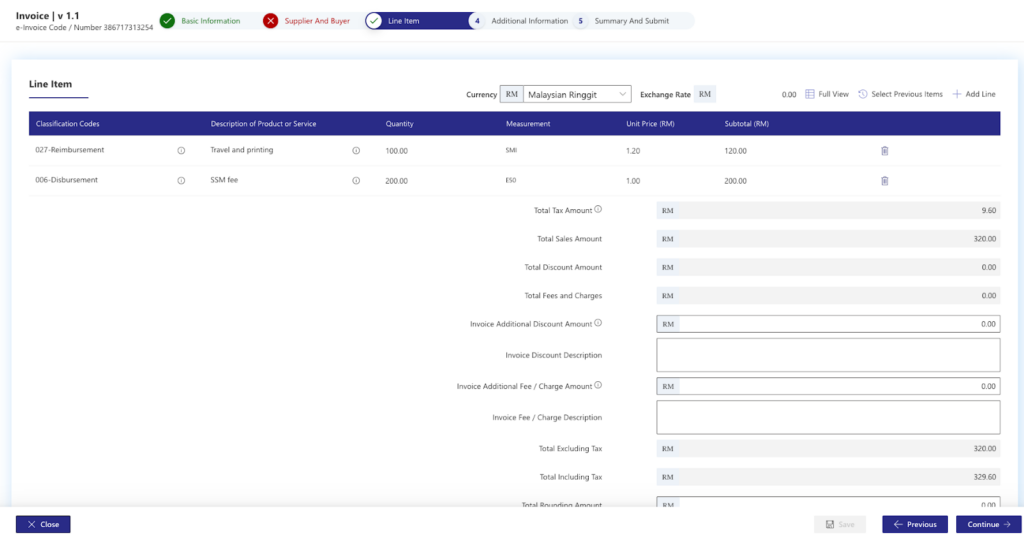
Reimbursement Line Item
Click Add Line again.
Under Classification Code:
Select 027 Reimbursement.
Example:
Description: Travel and printing
Amount: RM100
Important:
• Reimbursement is taxable.
• Add Service Tax 8 percent.
Click Add.
Many businesses make mistakes here. Reimbursement is not treated like a disbursement fee.
Disbursement Fee Line Item
Click Add Line.
Under Classification Code:
Select 006 Disbursement.
Example:
Description: SSM fee
Amount: RM200
For tax:
Select Not Applicable.
Reason:
• Disbursement fee is not subject to service tax.
• You are claiming exact third-party cost.
Click Add.
Now your invoice contains:
• Service fee
• Reimbursement
• Disbursement
All in one Malaysia e invoice with different classification codes.
Step 3: Review and Submit Your e-Invoice
Click Continue to the Optional Fields page.
You can skip this if not required.
Click Continue again to review the final summary.
Check:
• Classification codes
• Tax treatment
• Total amounts
If correct:
• Click Sign
• Click Submit
• Enter IC
• Enter password
• Submit
Once approved, your e-invoice is completed.
Common Mistakes When Issuing e-Invoice for Disbursement and Reimbursement
• Using wrong classification code
• Applying tax on disbursement fee
• Forgetting service tax on reimbursement
• Combining all charges into one line item
• Skipping validation
Accuracy matters in Malaysia e invoice compliance.
Why Businesses Move Beyond Manual MyInvois Portal Guide
Using the MyInvois portal works. But manual entry becomes time consuming when:
• You manage multiple companies
• You issue high invoice volumes
• You handle frequent reimbursement and disbursement fee transactions
• You need integration with accounting or ERP
This is where einvoicing software simplifies the process.
Instead of manual submission:
• Sync invoices automatically
• Apply correct classification codes
• Reduce human errors
• Centralize multi-company management
An automated e-invoice system saves time and reduces compliance risk.
See how JomeInvoice can Issue e-Invoices for Disbursement and Reimbursement with Simplified Steps
MyInvois Portal vs JomeInvoice for Disbursement and Reimbursement e-Invoice
| Process | MyInvois Portal | JomeInvoice |
| Manual data entry | ❌ Required for every invoice | ✅ Auto-sync from accounting system |
CRM | No real CRM or customer database.Manual input supplier and customer data for every invoice created | Can save supplier and customer data in jomeinvoice, one click to select when creating invoices, no need to fill in everytime |
| Service fee code 022 | ❌ Manually select each time | ✅ Auto-mapped |
| Reimbursement code 027 | ❌ Manually classify and apply 8 percent tax | ✅ Auto-classified with tax applied |
| Disbursement code 006 | ❌ Manually select Not Applicable tax | ✅ Auto-set as non-taxable |
| Tax calculation | ❌ Manual selection of service tax | ✅ Tax mapped automatically from accounting system |
| Review before submit | ❌ Manual checking | ✅ System validation |
| Submit to LHDN | ❌ Manual sign and submit | ✅ One-click submission |
| Multi-company handling | ❌ Log in separately | ✅ All companies in one workspace |
| Error risk | ❌ Higher due to manual steps | ✅ Reduced with automation |
Managing multiple entities inside the MyInvois portal takes time and increases error risk. JomeInvoice connects your accounting or ERP directly to the Malaysia e invoice framework. Issue e-invoice for Disbursement and Reimbursement instantly. Apply correct classification codes automatically. Ensure every LHDN e-invoice stays compliant. Book a demo today and see how one centralized einvoicing software handles all your companies in a single dashboard.
Book a demo with JomeInvoice today!
Get Started with the Best e-Invoice Software for SMEs Malaysia and Large Enterprises – JomeInvoice
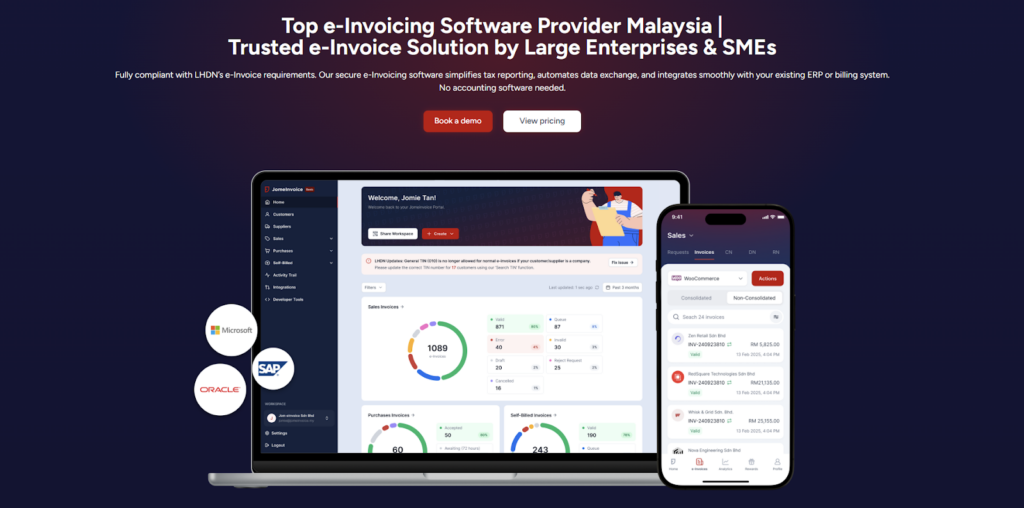
JomeInvoice is widely adopted as one of the best einvoicing software solutions in Malaysia. It is designed to support SMEs and large enterprises across all industries while meeting LHDN e-Invoice requirements with minimal operational disruption.
As a flexible e-Invoice platform for large enterprises and a practical solution for growing businesses, JomeInvoice supports high transaction volumes, complex workflows, and multi-system environments.
One e-Invoice Platform Built for All Business Sizes
JomeInvoice works as the best e-Invoice software for SMEs by offering fast onboarding, simple user interfaces, and automated compliance features. At the same time, it scales into a full e-Invoice platform for large enterprise use, supporting thousands of invoices daily through ERP and system integrations.
Key advantages
• Suitable for SMEs, mid-sized companies, and large enterprises
• Handles low and high invoice volumes efficiently
• Supports consolidated and self-billed e-Invoice workflows
Tailored for Every Industry
JomeInvoice works for a broad range of sectors, including retail, eCommerce, manufacturing, services, and more. It adapts to specific workflows, whether your business runs point-of-sale systems, online stores, or ERP platforms.
Retail e-Invoicing Solution for High-Volume Transactions
For retail businesses, JomeInvoice functions as a complete retail e-Invoicing solution. It supports POS integration, daily sales consolidation, and compliance with the RM10,000 consolidated e-Invoice threshold requirement
Retailers benefit from
• Automated consolidated e-Invoice generation
• POS system integration
• Reduced manual reporting during peak sales periods
e-Invoice for eCommerce and Online Businesses
JomeInvoice also serves as a reliable e-Invoice for eCommerce solution. It integrates with online stores and payment platforms, enabling seamless invoice issuance for high-frequency digital transactions.
eCommerce e-Invoicing features include
• Automated e-Invoice issuance for online sales
• Support for refunds, credit notes, and self-billed e-Invoice
• Compatibility with marketplaces and payment gateways
Enterprise-Grade Integration and Compliance
As a full einvoicing software for large enterprises, JomeInvoice integrates with major ERP systems such as SAP, Oracle NetSuite, Microsoft Dynamics, and other accounting platforms. It connects to the MyInvois system via API integration, minimizing the need for major changes to existing infrastructure.
Enterprise-ready capabilities
• ERP, accounting, and middleware integration
• Pre-validation checks to reduce rejection risks
• Audit trails and reporting for compliance and review
Book a free demo with JomeInvoice now!
See how your business can align with the Malaysia e-invoice guideline, stay prepared for any e-invoice compliance review framework selection, and move ahead of your e-invoice implementation timeline before enforcement tightens.Contact JomeInvoice to help your business stay compliant, reduce manual work, and prepare for full e-Invoice enforcement with confidence.