With the e-invoicing Malaysia regulations now in full effect, it’s mandatory for all imported goods to be self-billed. This includes items purchased through online platforms like Taobao. If you’re wondering how to issue a self-billed e-invoice for Taobao purchases, particularly when shipping from Taobao to Malaysia, this step-by-step guide will walk you through the process. Additionally, we’ll cover the use of the K1 form and the common scenarios you’ll encounter with Taobao shipping to Malaysia.
1. What is a Self-Billed e-Invoice for Taobao?
A self-billed e-invoice is an invoice issued by the buyer instead of the supplier, for imported goods. With e-invoicing Malaysia in effect, it’s essential to correctly issue these invoices when importing products from overseas, including purchases from platforms like Taobao.
In cases where items are consolidated (shipped together from multiple sellers), you might not receive a K1 form. In this scenario, the process of issuing a self-billed e-invoice becomes slightly different. Let’s look at how to navigate this situation.
2. How to Issue a Self-Billed e-Invoice for Taobao
To issue a self-billed e-invoice for Taobao, follow these steps using the MyInvois Portal:
Step 1: Start a New Document
- Go to the MyInvois Portal and select “New Document”.
- In the type of document dropdown, select “Self Billed E-invoice”.
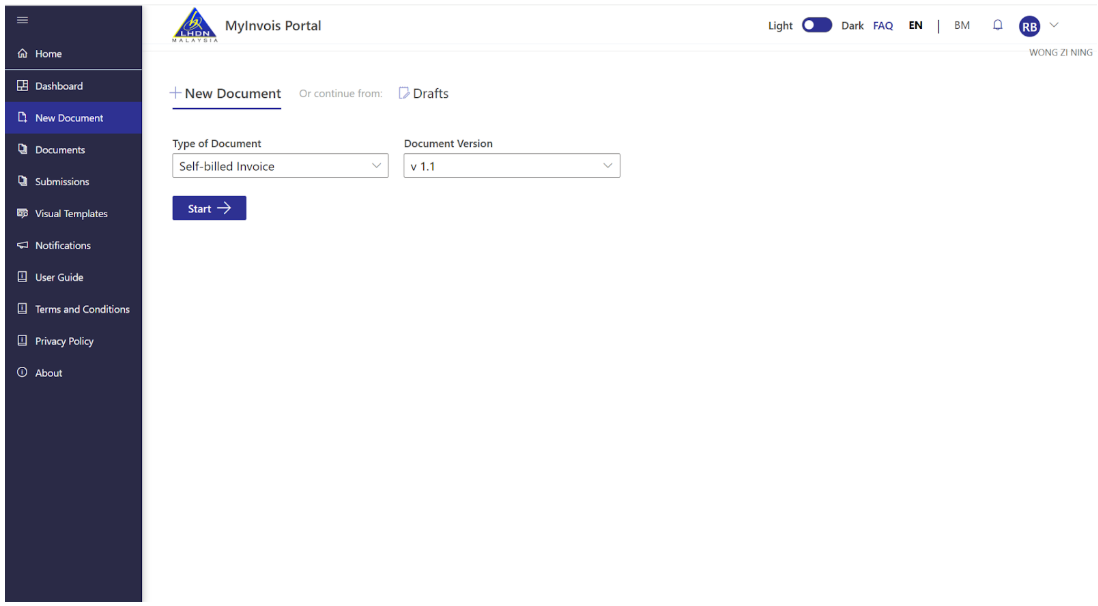
- Click Start to begin the process.
- Enter the invoice number, date, and time, and click Continue.
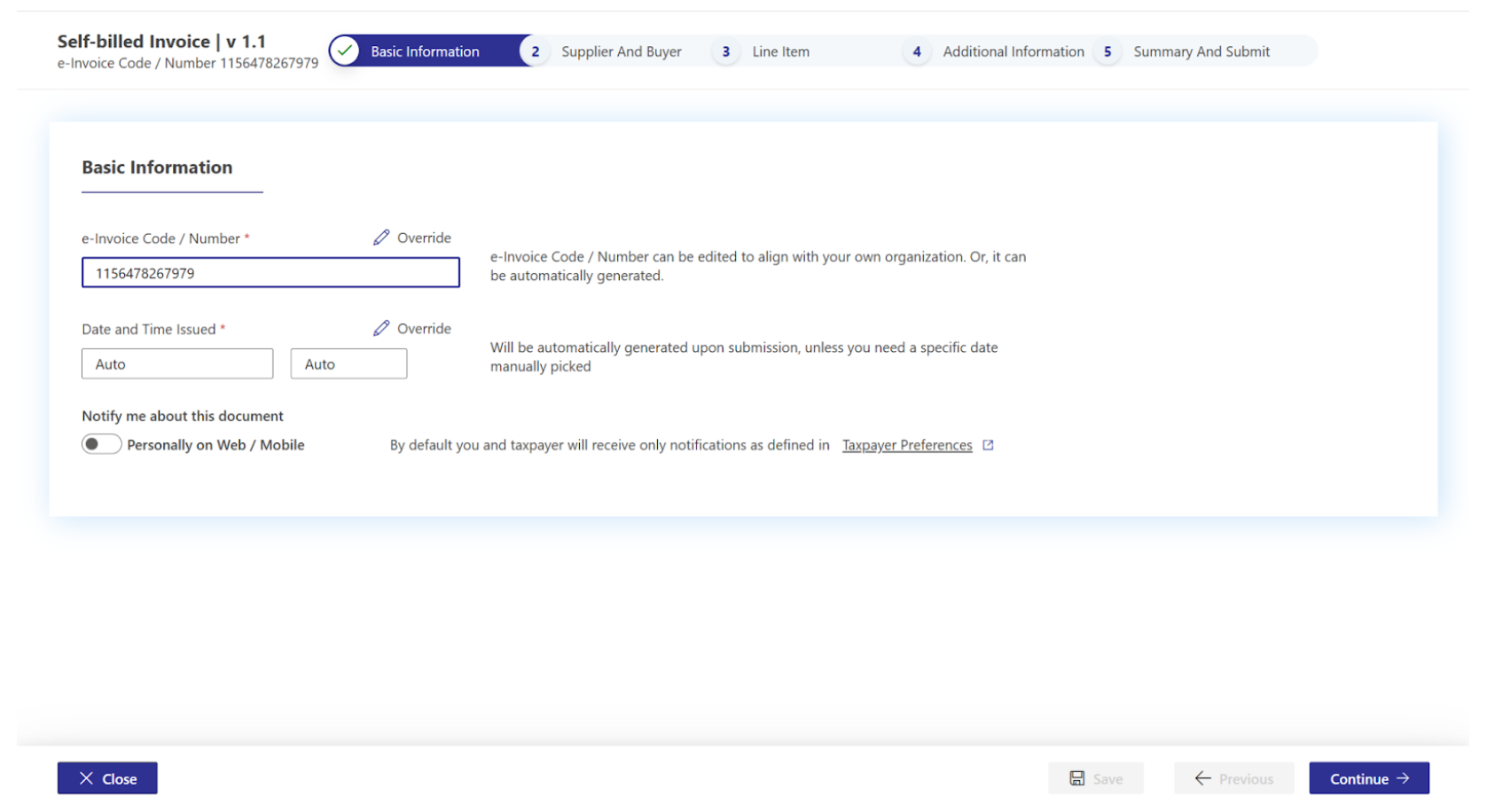
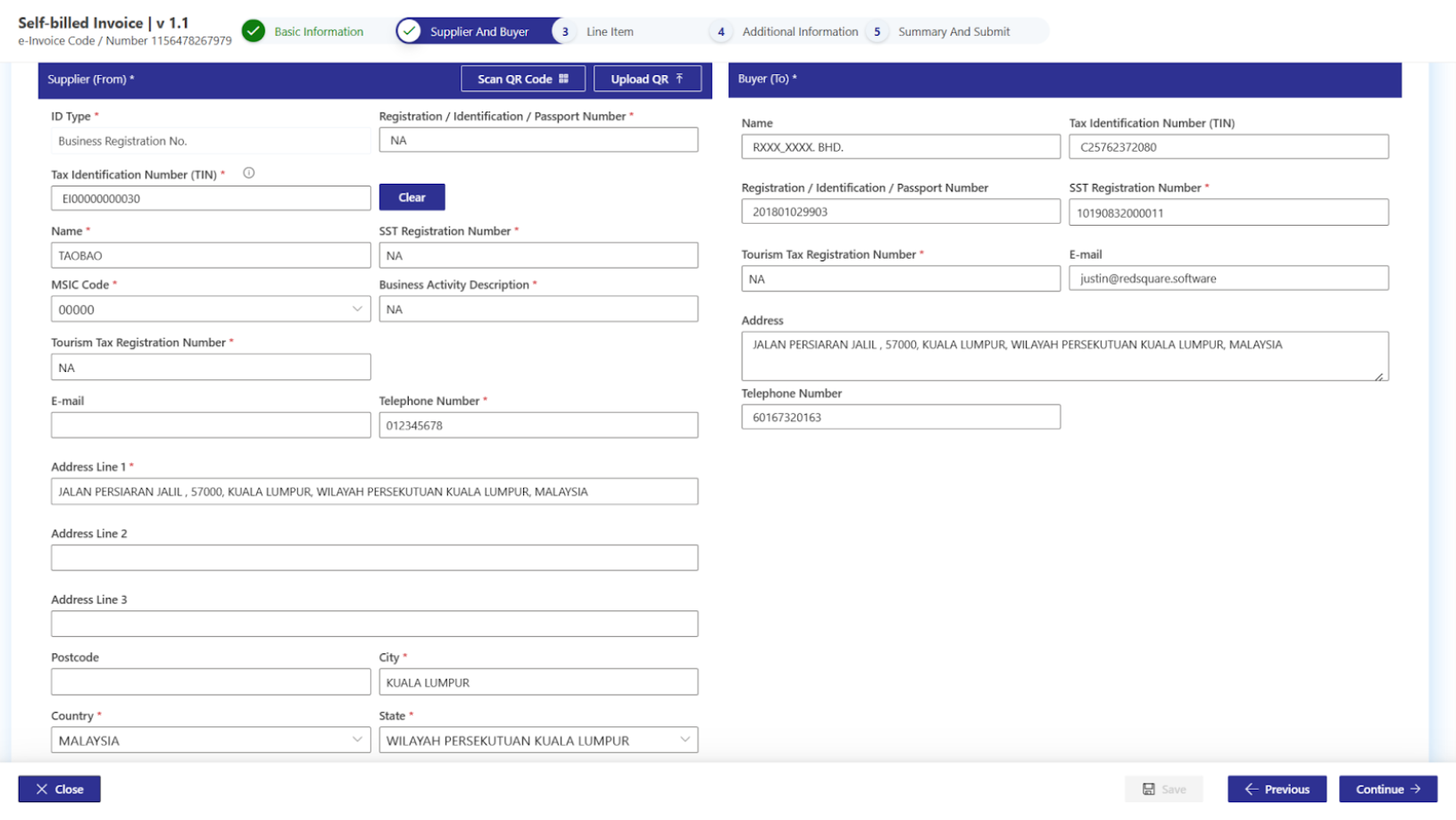
Step 2: Supplier Information
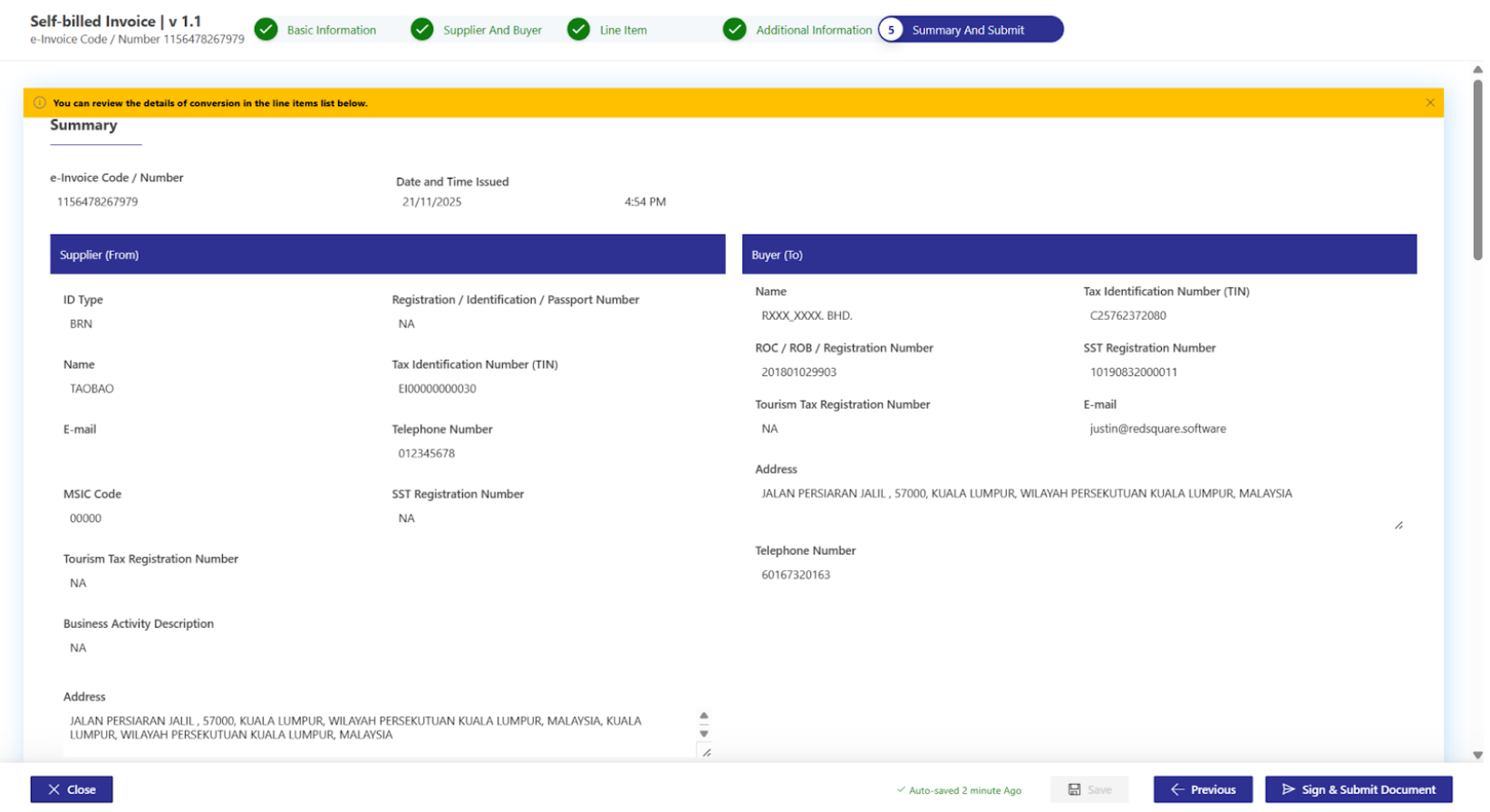
Since this is a self-billed e-invoice, you must enter the supplier details. However, because this is an international import (from Taobao), you’ll need to use a standard tax identification number (TIN).
- BRN: Enter NA as this is an overseas purchase.
- Tax Number: Enter EI00000000030 (standard TIN for imports).
- Name: Enter TAOBAO.
- SST Registration Number: Enter NA.
- MSIC Code: Enter 00000.
- Business Activity: Enter NA.
- Tourism Tax Registration Number: Enter NA.
- Phone Number: Enter a valid number.
- Address: Fill in the address where the goods are shipped from.
Click Continue after filling in the details.
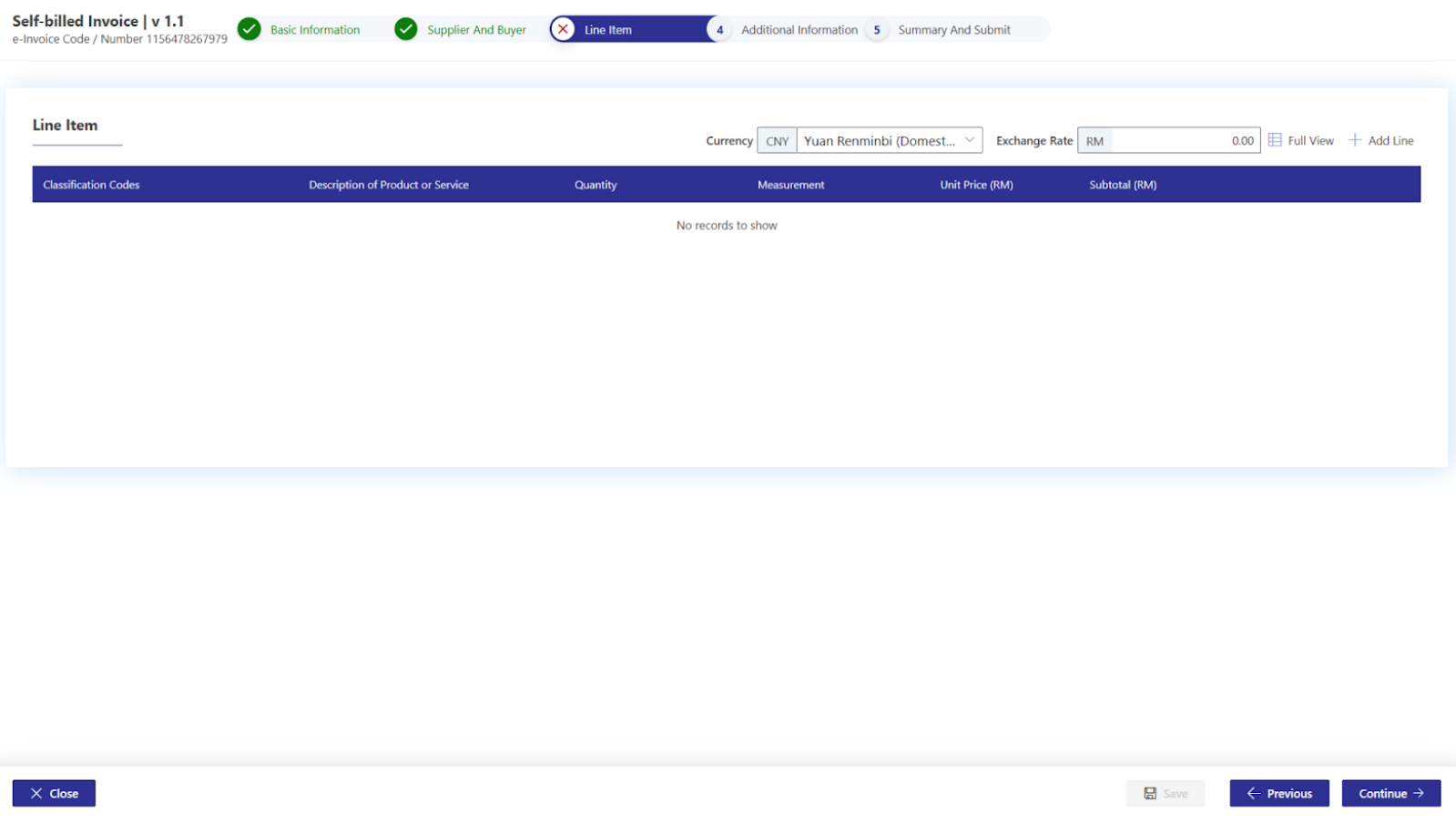
Step 3: Currency and Exchange Rate
Since you’re importing goods, the invoice will likely involve a foreign currency. Choose the appropriate currency used for your purchase, then enter the exchange rate.
- You can use the daily delivery rate, mid rate, or customs rate, depending on your internal policy. The government does not regulate this rate, so use what works best for your business.
Click Add Line once the currency and exchange rate have been filled in.
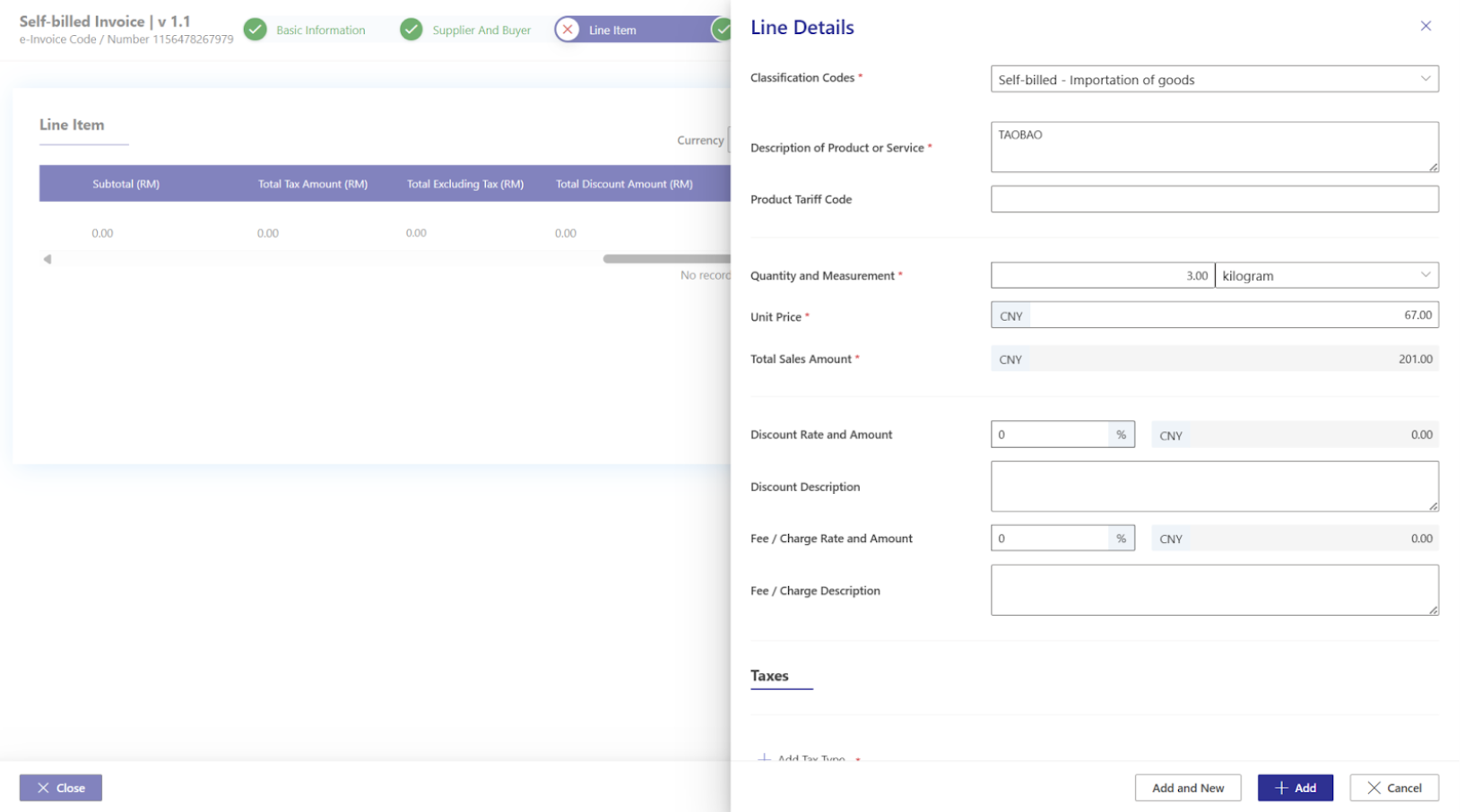
Step 4: Product Details and Classification Code
Since these are imported goods, you must use the appropriate classification code:
- Classification Code: Enter 034, which stands for Self Billed: Importation of Goods.
Fill in the product details, including:
- Product Name
- Unit of Measurement
- Price
- If there are discounts or fees, include those details as well.
For sales tax (SST), leave the field as NA since the sales tax will be calculated at the time of customs clearance via the K1 form.
Click Add and then Continue.
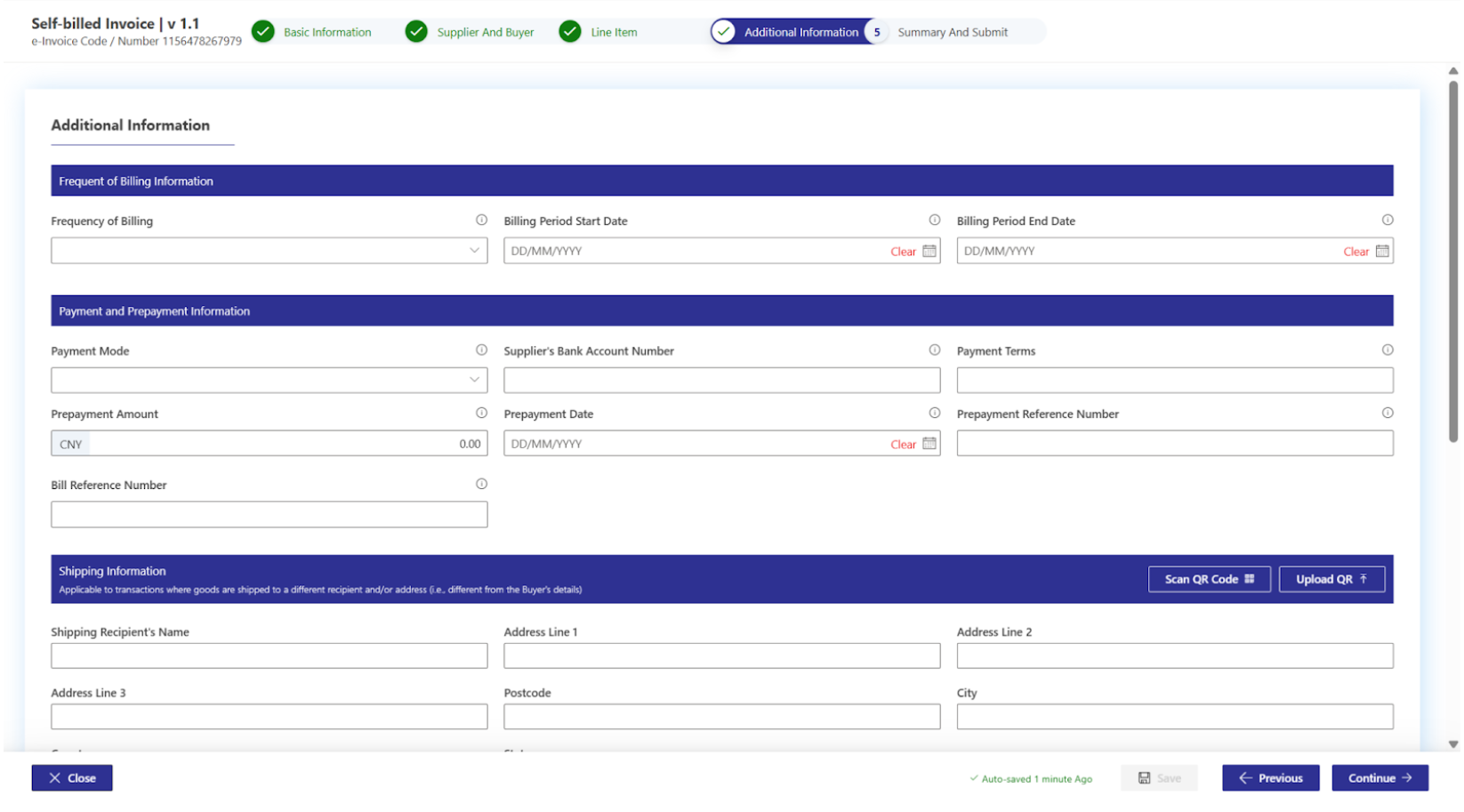
Step 5: Additional Information and K1 Form Number
This section is typically optional, but for imported goods, it is mandatory to provide additional information, such as the K1 form number:
- If you are using a consolidated shipment from Taobao (i.e., items from multiple sellers in one shipment), you may not have received a K1 form. In this case, you can enter NA or leave the field blank for the Reference Number of Customs Form.
- However, if you are handling a direct shipment (i.e., handling customs clearance yourself), ensure you enter the K1 form number here.
Click Continue after filling in the details.
Step 6: Final Review and Submission
Once all the required details have been filled out, review the information for accuracy. Ensure that you’ve provided the correct K1 form number (if applicable) and that all fields are completed.
- Sign and Submit the document to complete the process.
3. Common Pitfalls When Issuing a Self-Billed e-Invoice for Taobao Shipment to Malaysia
- Not Having the K1 Form: As mentioned, when goods are consolidated (such as in Taobao shipping to Malaysia), you won’t receive a K1 form. In such cases, leave the K1 number field blank or enter NA. However, if it’s a direct shipment, make sure to include the K1 form number.
- Incorrect Classification Code: Be sure to use Classification Code 034 for imported goods, otherwise, you could run into compliance issues.
- Exchange Rate Confusion: Choose an exchange rate that aligns with your internal policy (e.g., daily delivery rate or mid rate).
- Missing Additional Information: Always fill in the K1 form number if applicable. Failing to do so can delay the customs clearance process.
4. Why the K1 Form Matters for Self-Billed e-Invoices in Malaysia
The K1 form is vital for tracking and verifying the sales tax due on imported goods. Without the K1 form, you risk complications with customs clearance and may face fines or delays.
For Taobao shipping to Malaysia, it’s important to understand that consolidated shipments won’t have a K1 form, and therefore, the Reference Number of Customs Form should be left as NA. However, direct imports must have a K1 form number.
5. Conclusion: Mastering the Self-Billed e-Invoice for Taobao Shipping to Malaysia
Issuing a self-billed e-invoice for Taobao shipments to Malaysia can be tricky, especially when you don’t receive a K1 form. However, following the correct process and using the MyInvois portal will ensure that your goods are cleared efficiently. Whether you’re dealing with direct imports or consolidated shipments, this guide will help you stay compliant with e-invoicing Malaysia regulations.
Need Help to Implement e-invoice Seamlessly? Explore the Best e-invoicing Software Malaysia – JomeInvoice
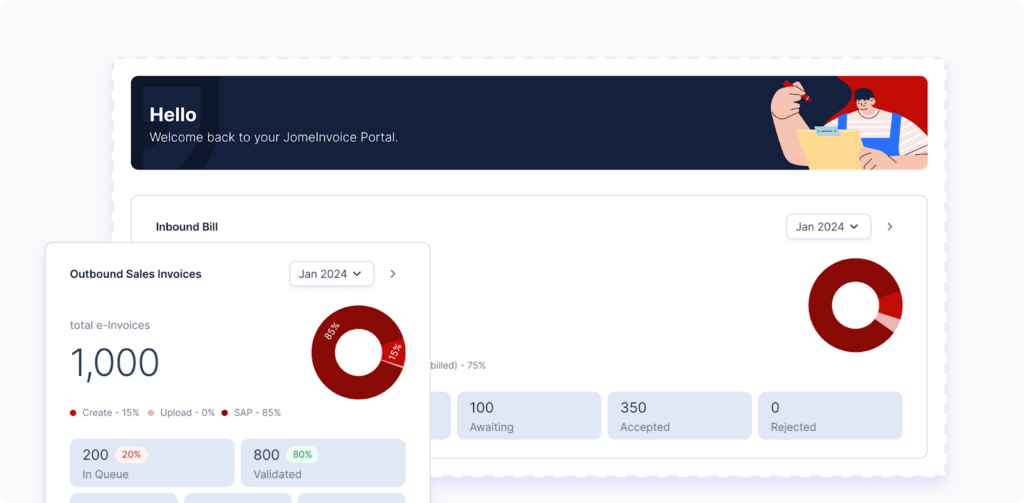
JomeInvoice: Best e-invoicing Software Malaysia
When it comes to integrating best e-invoicing software solutions for both small and large enterprise Malaysia, JomeInvoice has quickly become a standout choice, positioning itself among the top middleware as e-invoicing platforms in the country. With its user-friendly features and robust e-invoice system compatibility, it’s no surprise why many businesses are turning to JomeInvoice for a seamless transition to the LHDN e-invoice compliance.
Why JomeInvoice is the Best e-invoicing Software Provider for SMEs and Large Enterprise Malaysia:
JomeInvoice stands out as the most user-friendly and comprehensive e-invoicing software solution, offering the perfect balance of flexibility, compliance, and support for both SMEs and large enterprise Malaysia. Whether you are transitioning into the LHDN e-invoicing mandate or looking to streamline your current invoicing process, JomeInvoice provides everything you need—from free trials to ongoing updates and local support.
- Flexible System Compatibility
JomeInvoice offers seamless integration with popular systems such as SAP ECC6, S4 Hana, Sage300, MS365, Netsuite, Odoo, Xero & etc. This flexibility makes it ideal for businesses of all sizes—whether you’re an SME or a large enterprise Malaysia, JomeInvoice adapts to your current operations without a hitch. - Full Compliance with LHDN e-invoicing Regulations
Compliance is key, and JomeInvoice ensures that your business meets all LHDN e-invoicing guidelines. ISO-certified and fully PDPA-compliant, JomeInvoice offers a secure, worry-free invoicing process that keeps you aligned with Malaysia’s regulatory standards. - Trusted by Leading Businesses
Over 60+ major companies, including those in Phase 1 of Malaysia e-invoicing compliance, rely on JomeInvoice for their invoicing needs. The platform is proven to handle large-scale, complex transactions seamlessly, making it a trusted choice across industries. - Free Upgrades, Training, and Dedicated Support
JomeInvoice keeps your business up to date with automatic upgrades that maintain LHDN compliance. Plus, free training and access to a dedicated Malaysian support team ensure your staff can easily adapt to the platform. With cloud server capabilities, you’ll also benefit from secure, flexible invoicing solutions. - Backed by a Listed Company
JomeInvoice is not just reliable but also backed by a publicly listed company on Bursa Malaysia. This adds an extra layer of trust and assurance for businesses looking to invest in long-term solutions.
Ready to streamline your e-invoicing processes?
Contact JomeInvoice today and take advantage of the comprehensive e-invoicing software features! Our dedicated team is ready to help your business stay ahead with compliance and efficiency.
Contact JomeInvoice Sdn Bhd:
- Address:
Level 38, MYEG Tower, Empire City Damansara, Jalan PJU 8, Damansara Perdana, 47820 Petaling Jaya, Selangor
D-04-07, Plaza Bukit Jalil (Aurora Place), No. 1, Persiaran Jalil 1, Bandar Bukit Jalil, 57000 Kuala Lumpur - Phone: +6016-732 0163
- Social Media:
LinkedIn | Facebook
Don’t wait—schedule a free e-invoice service consultation today and see why JomeInvoice is the top choice for businesses nationwide!
Read More on e-invoicing Malaysia Latest Updates
When Must New Businesses Exceeding RM500k in Revenue in 2023–2025 Start E-invoicing in Malaysia