

🔑Key Takeaway
Retailers do not need to submit every B2C POS receipt to LHDN one by one.
- With JomeInvoice, supported POS systems sync transactions daily, while unsupported POS systems use CSV upload.
- B2C receipts are saved as drafts, grouped under LHDN consolidation rules, reviewed by the finance team, and submitted monthly within the 7-day deadline after month-end.
- This helps retail teams manage high transaction volume without replacing their existing POS system.
e-invoicing for B2C retail Malaysia
Retail businesses handle large volumes of B2C transactions every day.
A minimart may issue hundreds of receipts daily. A shopping mall operator may manage sales across different outlets, floors, and brands. An F&B chain may process transactions from multiple branches in real time.
Submitting every B2C receipt to LHDN one by one is not practical for most retailers. It increases manual work, creates more room for errors, and makes month-end compliance harder to manage.
This is why consolidated e-Invoices matter for retail businesses in Malaysia.
A consolidated e-Invoice lets retailers group eligible B2C receipts and submit them to LHDN in bulk. With the right consolidated e-Invoice software, retailers can sync POS transactions daily, keep draft records organised, review grouped invoices, and submit them within LHDN’s 7-day deadline after month-end.
JomeInvoice supports this workflow through native POS integration, CSV upload, draft grouping, consolidation formats, status tracking, and LHDN submission.
What Is a Consolidated e-Invoice for B2C Retail in Malaysia?
A consolidated e-Invoice is used for eligible B2C transactions where the buyer is an individual and does not request a full individual e-Invoice at the time of purchase.
In retail, this often applies to walk-in customers.
Common examples include:
- A customer buys groceries at a minimart
- A shopper buys products from a retail outlet
- A diner pays at an F&B branch
- A customer makes a small purchase and does not provide business details
- A customer completes a transaction without requesting an individual e-Invoice
Instead of creating a separate e-Invoice for every walk-in customer, retailers group these B2C transactions into a consolidated e-Invoice and submit it to LHDN.
This workflow keeps checkout simple. It also helps finance teams manage e-invoicing for B2C retail Malaysia without adding manual work to every transaction.
Consolidated vs Non-Consolidated e-Invoices in Retail POS Workflows
Retailers need to separate consolidated and non-consolidated e-Invoices correctly.
A non-consolidated e-Invoice is used when the buyer is a business or when the buyer requests an individual e-Invoice. This usually requires buyer details such as name, TIN, registration number, address, and other required fields.
A consolidated e-Invoice is used for eligible B2C buyers who do not request an individual e-Invoice. These transactions are grouped and submitted together.
For retail businesses, both types may happen in the same month.
Example retail scenarios:
- A walk-in customer buys a product and does not request an e-Invoice. This goes into consolidated B2C processing.
- A company buys products and requests an e-Invoice under its business name. This becomes a non-consolidated e-Invoice.
- A customer returns later and requests an e-Invoice based on a receipt. The system needs to match the receipt and process the request correctly.
Note: A retail e-Invoice system should support this mixed workflow. POS sales rarely fit into one simple category. Retailers need a system that handles B2C consolidation, B2B individual e-Invoices, and customer requests without disrupting daily store operations.
LHDN Consolidated e-Invoice POS Rules Retailers Must Follow
Retailers cannot group receipts without structure. A LHDN consolidated e-Invoice POS workflow must follow clear rules before submission.
Same branch and same currency requirement
Consolidated e-Invoices must be grouped by the same branch and the same currency.
This matters for retailers with multiple outlets. A retail head office should not mix receipts from different branches into one consolidated e-Invoice. Each branch needs clean transaction data so finance teams review and submit records correctly.
Currency also matters. If a business handles different currencies, those transactions should not be mixed in the same consolidated submission.
File size and invoice limits
JomeInvoice’s consolidation workflow follows these LHDN limits:
- Maximum 5 MB per consolidation
- Maximum 100 e-Invoices per consolidation
- Maximum 300 KB per e-Invoice
These limits matter for high-volume retailers. A business that processes many B2C receipts should not wait until the deadline to clean up transaction records.
The system should help teams group records correctly and avoid preventable submission issues caused by file size, invoice count, or incomplete grouping.
7-day submission deadline after month-end
Consolidated e-Invoices must be submitted within 7 days after month-end.
This deadline makes daily data readiness important. Retailers do not need to submit to LHDN every day, but they should keep POS data updated daily. This helps finance teams review records before month-end pressure builds.
The better workflow is simple:
- Sync POS or transaction data daily
- Review records throughout the month
- Submit consolidated e-Invoices monthly before the 7-day deadline
This gives retail teams current visibility without forcing daily LHDN submission.
How JomeInvoice Consolidated e-Invoice Software Works With Retail POS Systems
JomeInvoice acts as e-Invoice middleware between the retailer’s POS system and MyInvois. It helps retail businesses manage LHDN consolidated e-Invoice POS workflows without replacing their existing checkout system.
Retailers bring sales data into JomeInvoice through two main paths.
Native POS and platform integrations
JomeInvoice supports native integrations with:
- Loyverse
- SalesPlay
- Smart Cashier POS
- Shopify
- WooCommerce
- Cloudbeds
- Techsoft
- JurifytePro
- Baiwang Cloud
For these POS systems, transactions sync automatically into JomeInvoice as drafts. This helps finance teams keep daily sales data current without manual re-entry.
This is useful for Malaysia retailers that want a cleaner operating flow. The POS records the transaction, and JomeInvoice receives the sales data for e-Invoice processing.
CSV upload for unsupported POS systems for Malaysia Retailers
Retailers using unsupported POS systems do not need to replace their existing system.
For POS systems such as StoreHub, AutoCount POS, SQL POS, Xilnex, IRS POS, and others, the retailer exports daily or end-of-day sales data as a CSV file and uploads it into JomeInvoice.
This gives SME retailers a practical route to e-invoicing for B2C retail Malaysia without changing the POS system their staff already use.
Once the data lands in JomeInvoice, the consolidation workflow stays the same.
Native integrations auto-sync. Unsupported POS systems use CSV upload. After that, users go to Invoice Transactions, filter for Consolidated and Unprocessed records, then group the receipts for LHDN submission.
Still managing B2C receipts manually?
Sync POS transactions daily. Group consolidated e-Invoices monthly. Submit to LHDN without replacing your current POS system.

Retail Consolidated e-Invoice Workflow in JomeInvoice
A good retail workflow should be clear, repeatable, and easy for finance teams to check.
JomeInvoice’s consolidated e-Invoice workflow follows these steps. For full video tutorial, you may check this out: How to Submit Consolidated e-Invoice Using JomeInvoice
Step 1: POS transactions enter JomeInvoice
Sales data enters through native integration or CSV upload.
For supported POS systems and platforms, the sync runs automatically. For unsupported POS systems, the retailer uploads exported sales data through the portal.
This lets retailers keep their current POS setup while adding an e-Invoice compliance layer through JomeInvoice.
Step 2: B2C receipts are saved as drafts
Eligible B2C transactions are saved as draft records.
This gives the retailer time to review, filter, and group transactions before submission. Draft handling matters because retailers often need to check branch, currency, receipt data, and invoice type before they submit records to LHDN.
Step 3: Finance team filters consolidated and unprocessed records
The user goes to Invoice Transactions and filters for:
- Consolidated
- Unprocessed
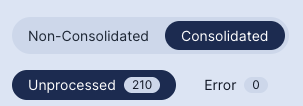
This helps the team identify B2C receipts that are ready for grouping.
For retailers with many outlets, this filter view helps reduce confusion. Teams see which records still need action and which records have already moved forward.
Step 4: Receipts are grouped for LHDN submission
JomeInvoice groups the relevant B2C receipts based on consolidation rules.
The grouping must respect LHDN limits, including file size, invoice count, branch, and currency.
This is one of the main reasons consolidated e-Invoicing software matters for retail. Manual grouping creates risk when transaction volume grows.
Step 5: User selects Single Receipt or Range of Receipt format
JomeInvoice supports two consolidation formats.
Single Receipt keeps line-item detail. It supports up to 300 line items per consolidated invoice. This format works well when the retailer needs more detailed reporting.
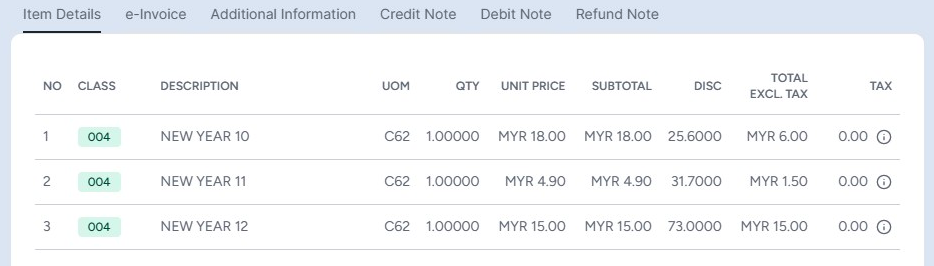
Range of Receipt groups invoices as one line item. This format works well when the retailer wants a simpler summary format for review and submission.
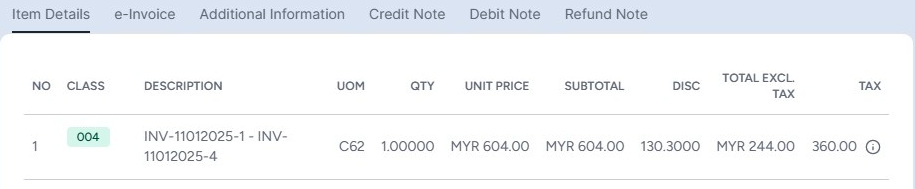
Retailers choose the format based on reporting needs, transaction detail, and internal finance requirements.
Step 6: User reviews and submits to LHDN
Before submitting to LHDN, users review the consolidated invoice.
This step helps reduce errors and gives finance teams better control over the final records.
Once reviewed, the consolidated e-Invoice is submitted to LHDN through JomeInvoice.
Step 7: Status updates appear in the dashboard
JomeInvoice shows status flags so users know what is happening.
The available statuses include:
- Processing
- Ready
- Completed
- Error
- Cancelled
- Empty
These statuses help finance teams track progress without switching between disconnected systems.
Why Daily Sync and Monthly LHDN Submission Work Better for Retailers
Retailers should separate data readiness from LHDN submission.
Daily sync keeps the dashboard current. This helps teams monitor transaction volume, identify missing records, and prepare for month-end.
Monthly submission keeps the LHDN process efficient. Retailers submit consolidated e-Invoices once a month, aligned with the deadline of within 7 days after month-end.
This workflow gives retail teams better control.
They do not need to submit to LHDN every day. At the same time, their internal data does not become stale.
For high-volume B2C retail, this is more practical than last-minute manual preparation.
A useful way to frame the workflow is:
Sync daily. Review regularly. Submit monthly.
This rhythm fits retail operations because daily transaction volume stays visible, while LHDN submission remains manageable.
Real Retail Use Cases for Consolidated e-Invoices in Malaysia
Retailers across different operating models need consolidated e-Invoice workflows. The need is not limited to one type of business.
Avenue K Shopping Mall
Avenue K manages e-Invoicing across multiple retail outlets. With JomeInvoice, the team centralises the e-Invoice environment into one dashboard.
This helps manage different brands and floors with less confusion. It also shows why centralised visibility matters for retail operators with many outlets or tenants.
BonusLink
BonusLink handles high transaction volume. JomeInvoice helps manage large invoice loads and supports reliability during mandatory e-Invoice compliance.
This is relevant for loyalty programmes, retail ecosystems, and businesses that process many customer transactions.
MiX Metro
MiX Metro operates in a retail chain environment. JomeInvoice supports daily operations through a centralised dashboard, real-time e-Invoice status visibility, secure data handling, and a simple user experience.
This matters for SME retail teams that need a system their staff can learn without heavy training.
iSEC Healthcare
iSEC uses JomeInvoice across multiple branches. After adopting JomeInvoice, the team reported better operational efficiency, fewer human errors, and smoother data integration.
This shows how centralised B2C consolidation also helps multi-branch service businesses with retail-style transaction flow.
Why Consolidated e-Invoice Software Matters for High-Volume B2C Retail
A retail POS system records sales. It does not always manage LHDN-ready e-Invoice submission.
Retailers need a middleware layer that prepares transaction data, groups B2C receipts correctly, handles file limits, supports review, and submits to LHDN.
This is where consolidated e-Invoice software becomes important.
For B2C retail, the system should support:
- POS data sync
- CSV upload for unsupported systems
- Draft transaction review
- Consolidated and non-consolidated processing
- Same-branch and same-currency grouping
- Single Receipt and Range of Receipt formats
- CSV export for internal audit
- LHDN submission
- Status tracking
JomeInvoice is built around this middleware role. It sits between the retailer’s POS system and MyInvois, helping the business prepare and submit e-Invoices without replacing the existing POS.
For SME retailers, minimarts, convenience-store operators, F&B chain managers, and retail head-office finance teams, this creates a cleaner path to e-Invoice readiness.
Common Retail POS Consolidated e-Invoice Mistakes
Retailers should avoid these common mistakes when managing consolidated e-Invoices.
Waiting until the deadline
If POS data is not reviewed daily, missing or incorrect records may only appear near the 7-day deadline.
Daily sync and regular review reduce last-minute pressure.
Mixing branches
Consolidated e-Invoices must use the same branch.
Multi-outlet retailers need clean branch-level records. This helps finance teams avoid incorrect grouping.
Mixing currencies
The same currency rule matters for retailers handling transactions in more than one currency.
Retailers should keep currency records clean before consolidation.
Assuming every POS system handles e-Invoice submission
Many POS systems focus on sales capture. They may not support LHDN submission, consolidated grouping, or status tracking.
JomeInvoice helps fill this gap by acting as e-Invoice middleware between the POS system and MyInvois.
Not keeping export records
CSV export helps with internal audit and accounting reconciliation before LHDN submission.
Retailers should treat export records as part of their finance control process.
Treating B2C and B2B invoices the same way
B2C consolidated transactions and B2B non-consolidated e-Invoices have different workflows.
Retailers need clear rules for when to process a transaction as consolidated and when to issue an individual e-Invoice.
How JomeInvoice Helps Retail Teams Stay Ready
JomeInvoice helps retailers manage consolidated e-Invoices through three core strengths.
First, it supports bulk grouping based on LHDN’s limits. This reduces manual checking and helps teams avoid submission issues caused by file size or invoice count.
Second, it offers two consolidation formats. Retailers choose Single Receipt for more line-item detail or Range of Receipt for summary reporting.
Third, it supports CSV export before LHDN submission. This helps finance teams check records, reconcile sales, and keep internal documentation.
For retailers with supported POS systems, JomeInvoice receives transactions automatically. For retailers with unsupported POS systems, CSV upload gives a practical path without POS replacement.
This makes JomeInvoice suitable for:
- High-volume B2C retail owners
- Minimart and convenience-store operators
- F&B chain managers
- Retail head-office finance teams
- Multi-branch operators
- Shopping mall retail environments
- SME retailers preparing for e-Invoice compliance
Ready to simplify consolidated e-Invoices for your retail business?
JomeInvoice helps retailers connect POS transactions, group B2C receipts, review consolidated invoices, and submit to LHDN within the 7-day deadline.
Works with Loyverse, SalesPlay, Smart Cashier POS, Shopify, WooCommerce, Cloudbeds, Techsoft, JurifytePro, and Baiwang Cloud.
FAQ About LHDN Consolidated e-Invoice POS Workflows
How does a retail POS system handle consolidated e-Invoices?
A retail POS system records the sales transaction. JomeInvoice receives the POS data through native integration or CSV upload, saves B2C receipts as drafts, groups them based on LHDN rules, and submits the consolidated e-Invoice to LHDN.
What is the LHDN deadline for consolidated e-Invoices?
The deadline for consolidated e-Invoices is within 7 days after the month-end.
What does LHDN consolidated e-Invoice POS mean?
LHDN consolidated e-Invoice POS refers to the workflow where POS transaction data is grouped into consolidated e-Invoices and submitted to LHDN through an e-Invoice system such as JomeInvoice.
Is JomeInvoice suitable for e-invoicing for B2C retail Malaysia?
Yes. JomeInvoice supports e-invoicing for B2C retail Malaysia through POS integration, CSV upload, consolidated draft grouping, LHDN submission, and status tracking.
What POS systems does JomeInvoice support?
JomeInvoice supports native integrations with Loyverse, SalesPlay, Smart Cashier POS, Shopify, WooCommerce, Cloudbeds, Techsoft, JurifytePro, and Baiwang Cloud.
What if my POS system is not supported?
Malaysia retailers using unsupported POS systems such as StoreHub, AutoCount POS, SQL POS, Xilnex, IRS POS, and others can use the JomeInvoice CSV upload module. POS replacement is not required.
Do all JomeInvoice integrations support consolidation?
Yes. Once data enters JomeInvoice, the consolidation workflow is the same. Native integrations auto-sync transactions. Unsupported POS systems use CSV upload.
What are the LHDN limits for consolidated e-Invoices?
The limits are 5 MB per consolidation, 100 e-Invoices per consolidation, and 300 KB per e-Invoice. Consolidated e-Invoices must also use the same branch and same currency.
Does JomeInvoice support CSV export for consolidated e-Invoices?
Yes. JomeInvoice supports CSV export of consolidation records for internal audit and accounting reconciliation before LHDN submission.
Disclaimer: This article is for general informational purposes only and does not constitute legal or tax advice. LHDN guidelines are subject to updates. Always refer to the latest official LHDN e-Invoice Guidelines at myinvois.hasil.gov.my and consult a qualified tax professional for advice specific to your business.