

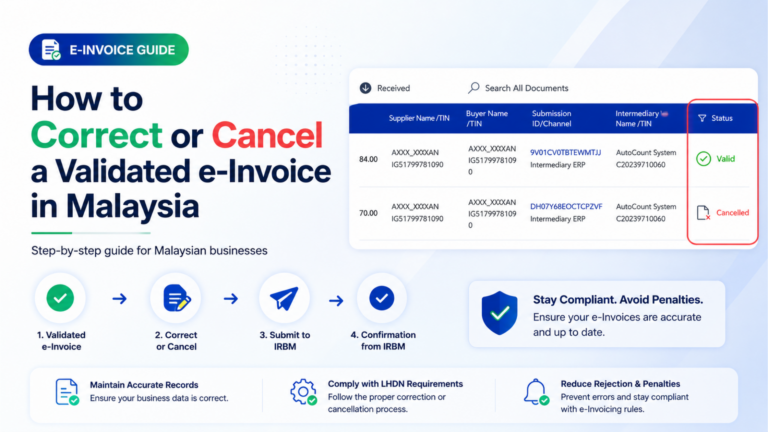
🔑Key Takeaway
- A validated e-Invoice cannot be edited directly.
- A supplier can cancel e-Invoice within 72 hours from the time it is validated.
- A buyer can request rejection through MyInvois within 72 hours if the e-Invoice has an error.
- If the seller agrees with the rejection request and the cancellation is completed within the 72-hour window, the seller may issue a new corrected e-Invoice.
- If the seller finds the mistake first, the seller can cancel the validated e-Invoice within the allowed 72-hour window.
- After 72 hours, the e-Invoice cannot be cancelled directly.
- To amend validated e-Invoice records after 72 hours, use Credit Note, Debit Note, or Refund Note.
- The original e-Invoice record remains in the LHDN system even after adjustment.
- Large enterprises and SMEs should use a proper e-Invoicing workflow or einvoicing software to reduce manual mistakes before submission.
Mistakes happen when businesses issue invoices.
The buyer’s TIN number may be wrong. The amount may be wrong. The item quantity may be wrong. A delivery fee may be missing. A customer may return goods after the e-Invoice has already been validated.
The key question is simple: how to amend an e-Invoice after it has been validated by LHDN?
This guide explains the e-Invoice cancellation 72 hours rule, how MyInvois cancel e-Invoice works, how MyInvois reject e-Invoice works, and what Malaysian large enterprises and SMEs should do when they need to amend validated e-Invoice records.
Can You Cancel or Amend an e-Invoice After Validation?
Yes, but there are limits.
Once an e-Invoice is validated, businesses cannot simply edit the original document like a normal invoice file.
There are two possible paths:
• Within 72 hours after validation, the supplier may cancel e-Invoice and issue a new one.
• After 72 hours, the supplier must amend validated e-Invoice records through Credit Note, Debit Note, or Refund Note.
This means timing matters.
If your team finds the mistake early, cancellation is still possible. If your team finds it late, you need an adjustment document.
What Does the 72-Hour e-Invoice Cancellation Rule Mean?
The e-Invoice cancellation 72 hours rule starts from the time the e-Invoice is successfully validated.
It does not start from the time your staff prepared the invoice. It starts from the validation time.
For example, if the e-Invoice is validated at 3:00 PM on Monday, the 72-hour window starts from that moment.
During this period:
• The seller may cancel the validated e-Invoice.
• The buyer may request rejection if the invoice details are wrong.
• The seller may issue a new e-Invoice after cancellation.
After this period, cancellation is no longer the right method.
The business must amend the transaction using Credit Note, Debit Note, or Refund Note.
Scenario 1: Buyer Finds an e-Invoice Error Within 72 Hours
Sometimes, the buyer receives the e-Invoice and notices a mistake.
Common buyer-side errors include:
- Wrong buyer name
- Wrong TIN
- Wrong address
- Wrong amount
- Wrong item information
- Wrong quantity
- Wrong tax details
In this case, the buyer can use MyInvois reject e-Invoice function within 72 hours.
How MyInvois Reject e-Invoice Works
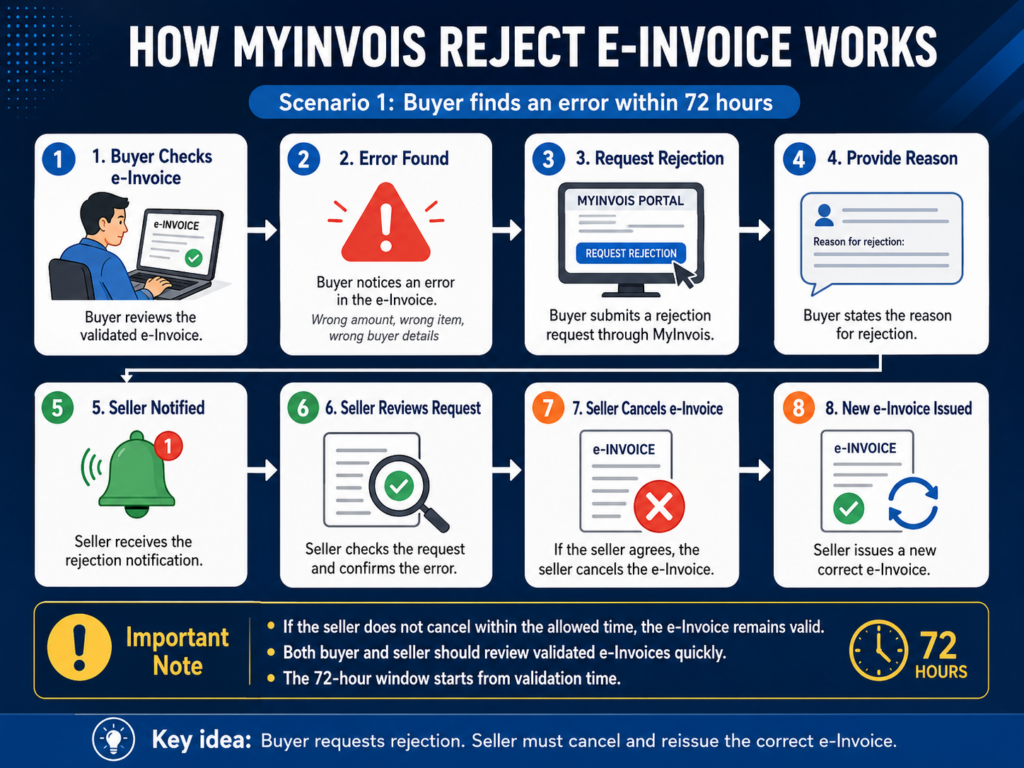
The process usually works like this:
Step 1: Buyer checks the validated e-Invoice.
Step 2: Buyer finds an error.
Step 3: Buyer requests rejection through MyInvois.
Step 4: Buyer provides a reason for rejection.
Step 5: Seller receives the rejection notification.
Step 6: Seller reviews the rejection request.
Step 7: If the seller agrees, the seller cancels the e-Invoice.
Step 8: Seller issues a new correct e-Invoice.
If the seller does not cancel the e-Invoice within the allowed time, the e-Invoice remains valid.
This is why both buyer and seller should check validated e-Invoices quickly.
Scenario 2: Seller Finds an e-Invoice Error Within 72 Hours
Sometimes, the seller notices the mistake before the buyer does.
For example, the seller may realise that:
- The wrong customer was selected.
- A product line was missing.
- A delivery fee was not added.
- The wrong SST amount was used.
- The invoice total was incorrect.
- The wrong transaction date was entered.
In this situation, the seller can use MyInvois cancel e-Invoice function within 72 hours.
How MyInvois Cancel e-Invoice Works
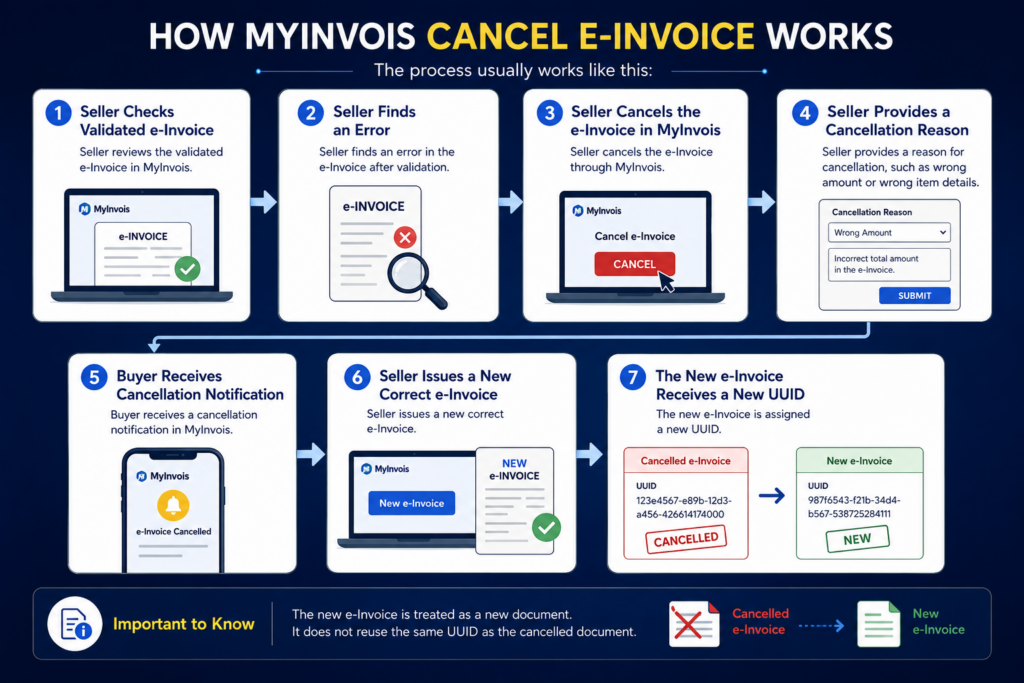
The process usually works like this:
Step 1: Seller checks the validated e-Invoice.
Step 2: Seller finds an error.
Step 3: Seller cancels the e-Invoice in MyInvois.
Step 4: Seller provides a cancellation reason, such as wrong amount or wrong item details.
Step 5: Buyer receives a cancellation notification.
Step 6: Seller issues a new correct e-Invoice.
Step 7: The new e-Invoice receives a new UUID.
The new e-Invoice is treated as a new document. It does not reuse the same UUID as the cancelled document.
Reduce e-Invoice Errors Before Submission
Wrong buyer details, missing charges, and refund adjustments can create extra work after validation. JomeInvoice helps Malaysian large enterprises and SMEs manage e invoice Malaysia submission, track statuses, and reduce manual mistakes with a clearer e-Invoicing workflow.

What Happens If More Than 72 Hours Has Passed?
After 72 hours, it is too late to cancel the validated e-Invoice directly.
This does not mean the mistake cannot be fixed.
It means the supplier must use an adjustment document.
To amend validated e-Invoice records after 72 hours, the seller must issue one of these:
• Credit Note
• Debit Note
• Refund Note
These documents adjust the transaction record without deleting the original validated e-Invoice.
The original invoice record will still remain in the LHDN system.
This is important for audit and record keeping. Adjustment is not the same as cancellation.
Credit Note, Debit Note, and Refund Note: What Is the Difference?
After 72 hours, many SMEs get confused because they cannot directly cancel e-Invoice.
The right method depends on what kind of mistake happened.
Important: Use this simple guide,
• Credit Note reduces the invoice amount.
• Debit Note increases the invoice amount.
• Refund Note records an actual refund after payment has been made.
When to Use a Credit Note
Use a Credit Note when the original e-Invoice amount needs to be reduced.
This usually happens when:
- Goods are returned before payment.
- A discount was missed.
- The original invoice overcharged the buyer.
- Some items were damaged or rejected.
- The buyer should pay less than the original amount.
Credit Note Example
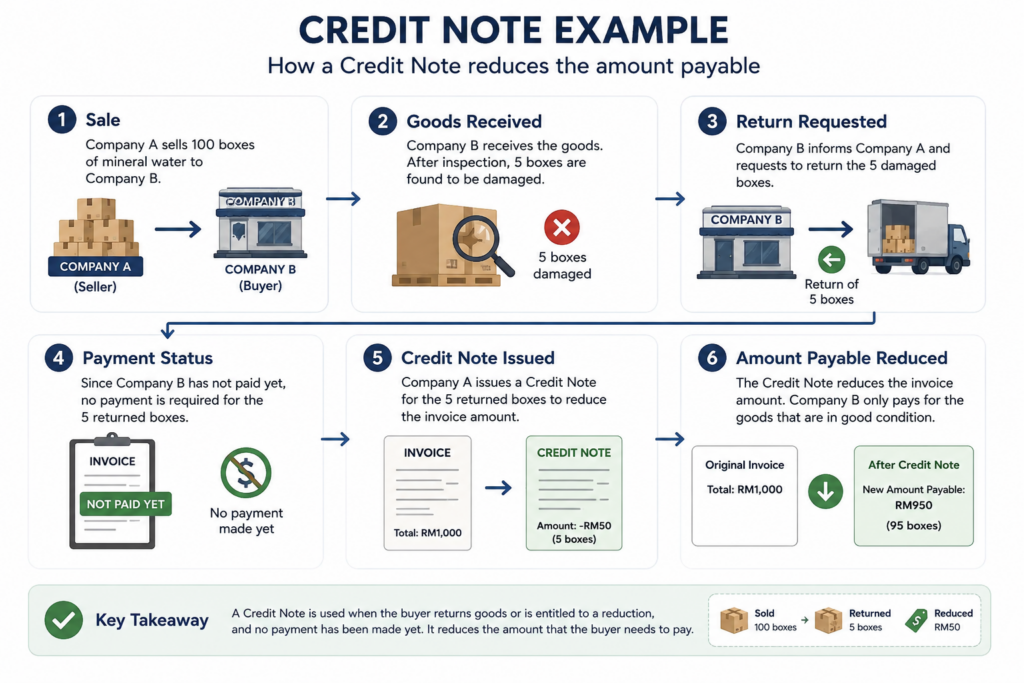
Company A sells 100 boxes of mineral water to Company B.
After receiving the goods, Company B finds that 5 boxes are damaged and asks to return them.
If Company B has not paid yet, Company A may issue a Credit Note to reduce the invoice amount.
The Credit Note tells the buyer that the amount payable has been reduced.
In simple terms, Credit Note reduces what the customer needs to pay.
When to Use a Debit Note
Use a Debit Note when the original e-Invoice amount needs to be increased.
This usually happens when:
- A delivery fee was missed.
- Extra service charges were not included.
- The quantity was undercharged.
- The original invoice amount was lower than it should be.
- Extra costs were added after the original invoice.
Debit Note Example
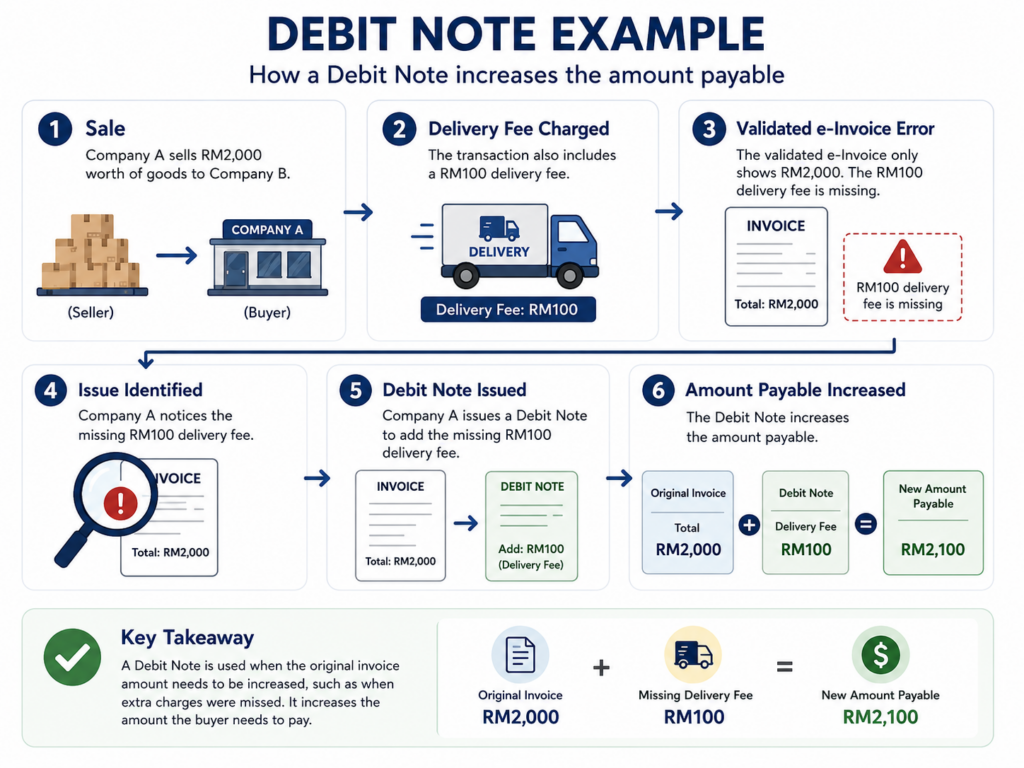
Company A sells RM2,000 worth of goods to Company B and charges RM100 delivery fee.
But the validated e-Invoice only shows RM2,000.
Company A may issue a Debit Note to add the missing RM100 delivery fee.
The Debit Note tells the buyer that the amount payable has increased.
In simple terms, Debit Note increases what the customer needs to pay.
When to Use a Refund Note
Use a Refund Note when the customer has already paid, and the seller needs to refund money.
This usually happens when:
- The customer paid in full.
- Goods were later returned.
- A refund was approved.
- The refund affects the original transaction.
Refund Note Example
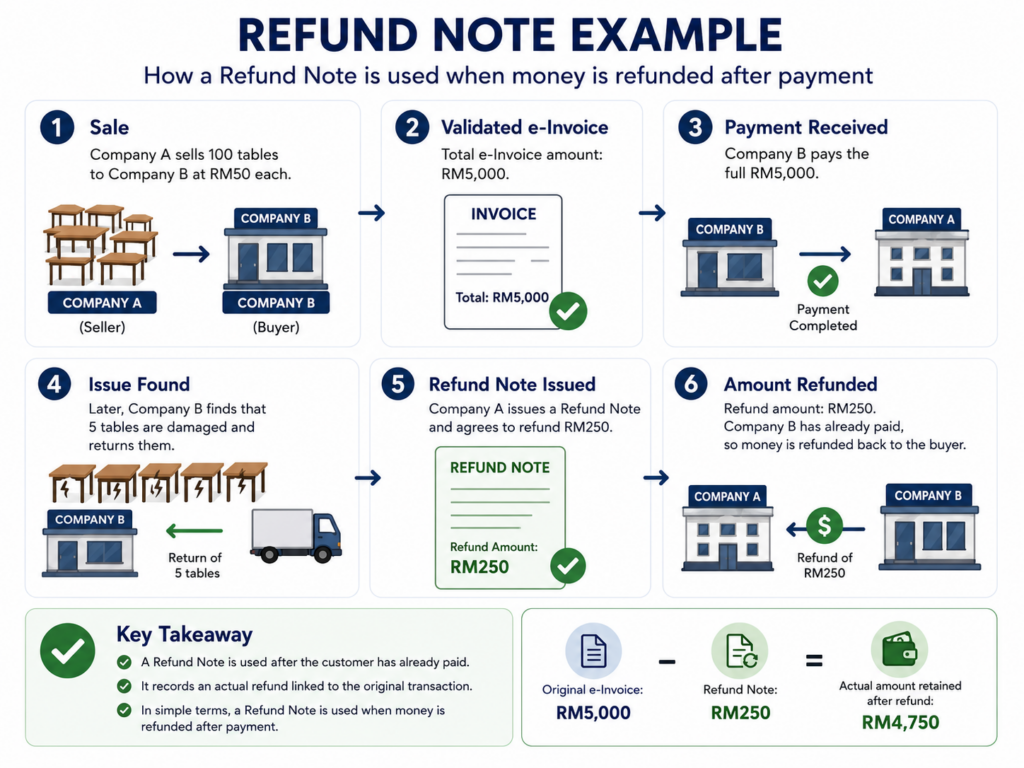
Company A sells 100 tables to Company B at RM50 each.
The total e-Invoice amount is RM5,000.
Company B pays the full RM5,000. Later, Company B finds that 5 tables are damaged and returns them.
Company A agrees to refund RM250.
In this case, Company A may issue a Refund Note because actual money is refunded after payment.
In simple terms, Refund Note is used when refund happens after the customer has already paid.
Credit Note vs Refund Note: What SMEs Often Mix Up
Credit Note and Refund Note may look similar because both reduce the final transaction value.
But they are not the same.
Note: A Credit Note is generally used to reduce the value of the original transaction due to returns, discounts, overcharges, or other adjustments.
A Refund Note is generally used when the seller refunds money to the buyer after payment has been made.
The key difference is payment status.
If there is no actual refund, a Credit Note may be more suitable.
If there is actual money returned after payment, a Refund Note may be more suitable.
How JomeInvoice Helps With e-Invoicing Workflows
JomeInvoice helps Malaysian large enterprises and SMEs manage e-Invoicing with a clearer daily workflow.
Instead of relying only on manual entry, businesses can manage e-Invoice records, track submission status, and handle bulk upload in one place.
JomeInvoice also supports businesses that need to connect POS, eCommerce, and accounting software.
This helps businessess reduce repeated manual work and avoid common submission mistakes.
For teams that issue many invoices every month, einvoicing software gives better visibility than managing everything manually.
Start Your SME e-Invoice Trial for RM2 Only!
Need a simpler way to manage e-Invoicing and reduce amendment work? JomeInvoice integrates with POS, eCommerce, and accounting software, so your team can reduce manual uploads, track submissions, and keep records organised in one place.
FAQ About How to Amend an e-Invoice or Cancel e-Invoice
How do I correct an e-Invoice after validation?
A validated e-Invoice cannot be edited directly. If the mistake is found within 72 hours, the supplier may cancel e-Invoice and issue a new correct one. If more than 72 hours has passed, the supplier must issue a Credit Note, Debit Note, or Refund Note.
Can I cancel e-Invoice after it is validated?
Yes, but only within the e-Invoice cancellation 72 hours window from the time the document is marked as valid.
Can I cancel a valid e-Invoice after 72 hours?
No. After 72 hours, the supplier should not cancel the validated e-Invoice directly. The transaction should be adjusted using Credit Note, Debit Note, or Refund Note.
What happens if the buyer requests rejection of an e-Invoice?
The seller receives the rejection request. If the seller agrees, the seller can cancel the e-Invoice and issue a new correct e-Invoice.
How do I amend validated e-Invoice after 72 hours?
To amend validated e-Invoice records after 72 hours, issue a Credit Note, Debit Note, or Refund Note, depending on the correction needed.
When should I use a Credit Note?
Use a Credit Note when the original e-Invoice amount needs to be reduced.
When should I use a Debit Note?
Use a Debit Note when the original e-Invoice amount needs to be increased.
When should I use a Refund Note?
Use a Refund Note when the customer has already paid and the seller needs to refund money.
Does the original e-Invoice disappear after adjustment?
No. The original e-Invoice record remains in the LHDN system. The adjustment document records the correction.
Can JomeInvoice help reduce e-Invoice errors?
Yes. JomeInvoice is the best einvoicing software that helps SMEs manage e-Invoicing, track submission status, handle bulk upload, and organise records through a clearer workflow. Feel free to book a demo now!