


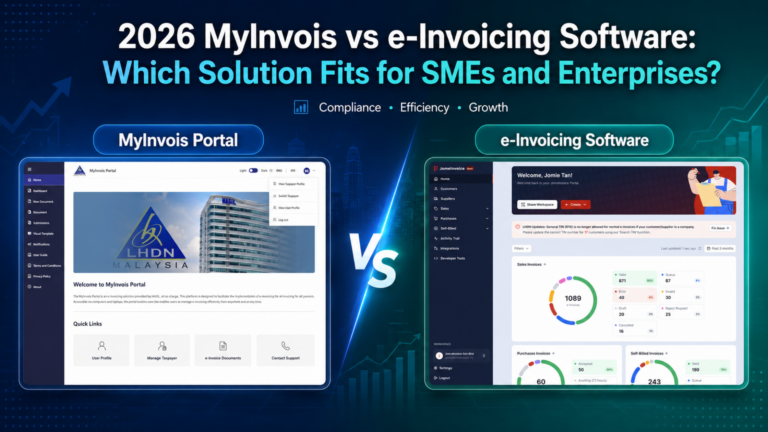
🔑Key Takeaway
- MyInvois Portal is a free official platform by HASiL for taxpayers to manage e-Invoices.
- MyInvois Portal is generally suitable for businesses with relatively low invoice volumes and straightforward manual workflows.
- Accounting-based e-Invoicing software works well when most invoices are already issued inside the accounting system.
- Direct API integration is powerful, but it usually requires technical setup, monitoring, and maintenance.
- e-Invoice middleware is more flexible when invoice data comes from ERP. POS, eCommerce, accounting software, or even CSV files bulk upload.
- JomeInvoice supports businesses ranging from manual workflows to integrated POS, accounting software, ERP, eCommerce and enterprise environments.
- The best e-Invoicing solution is not always the one with the most
accountingfeatures. It is the one that best fits your business workflow, systems infrastructure, integration needs, and future growth for scalability.
Comparing MyInvois vs e-Invoicing Software is not only about free vs paid. It is about manual work vs automation, fixed system vs integration flexibility, and short-term compliance vs long-term scalability for your company’s e invoice workflow.
This guide explains how Malaysian large enterprises and SMEs can choose between MyInvois Portal, ERP/accounting-based e-Invoicing software, direct API integration, and middleware solutions such as JomeInvoice.
What Is MyInvois Portal?
MyInvois Portal is an official e-Invoicing platform provided by HASiL at no charge.
For businesses with simple e-Invoicing requirements, MyInvois Portal can be a practical starting point.
It may suit businesses that:
- Issue a small number of invoices every month
- Do not need POS or eCommerce integration
- Have simple B2B invoicing needs
- Do not need advanced approval workflows
- Are comfortable entering invoice data manually
- Want to start e-Invoicing without paying for software
The main advantage is clear. It is an official and free e-Invoicing solution.
But free does not always mean less work.
If your business handles many invoices, multiple staff, different entities and branches, different systems, or frequent customer requests, manual portal work can become extremely time-consuming.
What Is e-Invoicing Software?
e-Invoicing software helps businesses prepare, submit, track, and manage e-Invoices more efficiently.
Some einvoicing software is built inside accounting systems. Some are part of ERP software. Some work as standalone LHDN e-Invoice software. Some work as e-Invoice middleware that connects existing systems to MyInvois such as JomeInvoice.
This is where businesses need to understand the differences between these approaches.
Not every business needs full accounting software. Not every business needs direct API integration. Not every business should rely solely on MyInvois Portal.
The right setup depends on how your business already works.
For SMEs, SME einvoicing software should be easy to adopt, simple to manage, and practical for daily invoice submission. For larger organisations, enterprise einvoicing software should support higher invoice volume, multi-system integration, branch or subsidiary workflows, ERP connectivity, and stronger process control.
MyInvois vs e-Invoicing Software: 2026 Quick Comparison
Use this table to compare MyInvois vs e-Invoicing software before choosing the right SME einvoicing software or enterprise einvoicing software setup.
| Option | Best For | Main Strength | Main Limitation |
| MyInvois Portal | Busineses with low invoice volumes and simple manual workflows | Free official portal by HASiL | Manual entry and limited workflow automation |
| Accounting-based einvoicing software | Businesses that generate invoices primarily through accounting software | Accounting and e-Invoice in one system | Less flexible if invoices come from POS, eCommerce, ERP, or multiple systems |
| Direct API integration | Businesses with in-house IT teams and custom integration requirements | Custom automation | Needs technical setup, testing, monitoring, and maintenance |
| e-Invoice middleware, such as JomeInvoice | Businesses with multiple systems, ERP, POS, eCommerce, accounting software, branches or growing invoice volumes | Connects existing systems to LHDN, supports automation, CSV upload, and integration flexibility | Needs setup and correct data mapping |
The best choice is not always the most advanced one.
The best choice is the one that fits your current workflow and can continue to support your business as operational requirements grow.
When Is MyInvois Portal Enough?
MyInvois Portal may be enough for businesses with relatively low invoice volumes and straightforward manual workflows. For example, it may work well for:
- Freelancers
- Small service providers
- Consultants
- Micro businesses
- Businesses with only a few invoices per month
- Businesses with a single sales or invoicing system and low submission volume
- Businesses that do not use POS, eCommerce, or ERP systems
- Companies that only need basic manual submission
If your team only issues a few e-Invoices monthly, MyInvois Portal can be a practical first step.
However, businesses should think beyond their immediate e-Invoicing needs.
Ask these questions:
- Will invoice volume increase?
- Will more staff need access?
- Will you need to track submission status?
- Will customers request copies later?
- Will you need bulk upload?
- Will you need to connect POS or eCommerce orders?
- Will you need organised storage and invoice history?
If the answer is yes, MyInvois Portal may become too manual over time.
When Is Accounting-Based e-Invoicing Software Enough?
Accounting-based e-Invoicing software can be enough when your invoicing workflow already happens inside one accounting system.
For example, if your business creates all invoices in accounting software, records all payments there, and does not depend on POS, eCommerce or other business systems as the primary source of invoice data, an accounting-based e-Invoice module may be sufficient.
This setup may suit:
- Businesses with accounting-led invoicing workflows
- Businesses with centralised finance teams
- Companies that issue mostly B2B invoices
- Businesses that already manage invoicing through a single accounting platform
- Businesses that do not need multiple external integrations
Accounting software is useful because it keeps finance records and invoice data together.
Important: However, accounting-based e-Invoicing software is not always the best fit for every business
Many businesses do not generate invoice data solely from their accounting software.
Retail businesses generate sales through POS systems. Online sellers rely on platforms such as Shopify or WooCommerce. Hotels use property or booking management systems. Legal firms often use practice management software. Some businesses also rely on Excel or CSV files as part of their invoicing workflow.
If your invoice data originates from multiple business systems, accounting software alone may not provide all the integration capabilities needed to support an efficient e-Invoicing workflow.
Why Accounting Software May Not Be the Best e-Invoicing Solution for Every Business
Many businesses assume that the best e-Invoicing solution must be an accounting platform.
That is not always true.
Important: Accounting software is designed for accounting and financial management. However, effective e-Invoicing also involves data integration, LHDN submission, validation, status tracking, customer information management and system connectivity.
Here are common situations where accounting-based e-Invoicing may not fit neatly.
Your Sales Come from POS
Retail businesses often issue receipts through POS systems.
The cashier does not create invoices inside accounting software. The transaction starts at the counter.
If your e-Invoice workflow depends on accounting software only, your team may still need to export POS data, re-enter data, or do extra reconciliation.
Your Orders Come from eCommerce
eCommerce sellers may receive orders through Shopify, WooCommerce, or other platforms.
Customer data, order value, shipping fees, discounts, and refunds may live inside the eCommerce platform first.
In this case, e-Invoice integration becomes important. Businesses need a solution that can connect online order data to the LHDN e-Invoice submission workflow.
Your Business Uses Multiple Systems
Many businesses—including SMEs, multi-branch organisations and enterprises—use different systems for POS, ERP, accounting, inventory, CRM and customer management.
If your e-Invoicing solution only works within one accounting system, your team may still need to move data manually between different business systems, increasing administrative work and the risk of data inconsistencies.
Your Branches Use Different Workflows
Businesses operating multiple outlets, branches, business units or subsidiaries may have different systems, workflows or staff access levels across locations. A flexible e-Invoice middleware can help connect different sources without forcing the entire business to migrate everything into one accounting platform.
Your Team Needs Easy Adoption
Some businesses do not have dedicated IT teams or accounting-trained staff.
They need simple dashboards, guided setup, CSV upload, and clear status tracking.
The best e-Invoicing solution is one that teams can adopt and use confidently in their daily operations.
Why e-Invoice Middleware Can Be More Flexible
e-Invoice middleware like JomeInvoice sits between your business systems and LHDN MyInvois.
For smaller businesses, middleware can work as SME einvoicing software that simplifies daily submission, tracking, and record keeping. For larger organisations, the same middleware approach can support enterprise einvoicing software needs by connecting ERP, POS, accounting, eCommerce, CSV, and API workflows to LHDN MyInvois.
Note: Instead of replacing your current POS, accounting software, ERP, or eCommerce store, middleware helps connect these systems to the e-Invoice submission workflow.
This gives businesses a more flexible way to adopt e-Invoicing without replacing their existing systems.
An e-Invoice middleware can help with:
• Capturing invoice data from existing systems
• Converting data into LHDN-required format
• Submitting e-Invoices to MyInvois
• Tracking validation status
• Managing records in one place
• Supporting CSV upload for unsupported systems
• Reducing manual data entry
• Supporting future integrations as the business grows
This is why MyInvois vs e-Invoicing Software should not be framed as a free portal vs paid accounting software only.
There is a third option: middleware.
For businesses with multiple systems- including SMEs, growing organisations and enterprises — e-Invoice middleware may be the most practical way to connect existing systems to the MyInvois platform.
Make e-Invoicing Less Manual
If MyInvois Portal feels too manual, JomeInvoice helps businesses manage e-Invoice submission, validation tracking, CSV uploads, and system integrations in one place. It is designed to work with your existing POS, accounting software, ERP, eCommerce platforms and other business systems —so you can simplify e-Invoicing without replacing the tools you already use.

How JomeInvoice Supports Businesses With or Without Existing Systems
Not every business uses POS software, ERP, or accounting software to manage invoicing.
Some businesses still manage invoices manually. Some use Excel. Some only need a simple way to create and submit LHDN-compliant e-Invoices.
JomeInvoice supports these businesses with a one-stop e-Invoicing platform that works whether or not they already have POS,accounting software or ERP systems.
This matters because many businesses want to comply with e-Invoicing without replacing existing systems or investing in accounting software they do not need. With JomeInvoice, businesses can:
- Create e-Invoices from one platform
- Manage sales invoices and self-billed invoices
- Store customer information
- Track invoice history
- Access the system from phone, tablet, or desktop
- Manage e-Invoice records without technical setup
- Use a guided workflow without accounting experience
This makes JomeInvoice suitable for businesses that want a simpler way to manage e-Invoicing while keeping their existing workflows.
How JomeInvoice Supports e-Invoice Integration Malaysia
For many growing businesses, the challenge is not just creating e-Invoices.
The challenge is connecting multiple sales channels and business systems into a single LHDN e-Invoicing workflow.
JomeInvoice functions as an e-Invoice middleware. It can connect existing invoice-issuing systems and help automate submission to LHDN MyInvois when the required access and setup are available.
This means businesses can continue using their existing systems without replacing everything at once.
JomeInvoice can support businesses using:
• POS systems
• eCommerce platforms
• Accounting software
• ERP systems
• CRM systems
• CSV files
• API workflows
This is useful for businesses that want automation but do not want a full system migration.
Instead of asking, “Which software should replace my current workflow?” businesses can ask, “Which software can connect to my current workflow?”
That is often a better question for businesses with existing systems and workflows.
What Businesses Actually Need from LHDN e-Invoice Software
The best e-Invoicing solution should do more than simply submit an e-Invoice.
Businesses need software that fits their day-to-day operations.
Look for these features before choosing LHDN e-Invoice software.
1. Easy Setup for Non-Technical Users
Many businesses do not have dedicated IT teams or technical specialists.
The software should be simple enough for business owners, admin staff, and finance teams to use.
2. Manual and Bulk Upload Options
Not every business starts with full automation.
CSV upload is useful for businesses that still use Excel or unsupported systems.
3. Integration Flexibility
Good e-Invoice integration Malaysia should support different business systems.
This includes POS, eCommerce, accounting software, ERP, or API-based systems.
4. Clear Submission Status Tracking
Businesses need to know whether an e-Invoice is submitted, validated, rejected, cancelled, or pending.
Without status tracking, teams waste time checking manually.
5. Customer and Supplier Record Management
e-Invoicing needs correct buyer and supplier details.
A good system helps reduce repeated data entry and keeps records organised.
6. Adjustment Support
Businesses need to handle credit notes, debit notes, refund notes, cancellations, and self-billed invoices correctly.
7. Record Storage and Audit Readiness
Businesses should maintain e-Invoice records, customer records, and supporting documents properly.
A searchable archive helps reduce stress during review, audit, or customer request.
For businesses looking for a practical e-Invoicing solution, JomeInvoice helps simplify compliance while supporting existing workflows and future growth.
Example: Which Setup Should Different Businesses Choose?
Small Service Business
A small service business with 5 invoices per month may start with MyInvois Portal.
If the owner wants easier tracking, storage, and less manual entry, JomeInvoice Starter may be a better next step.
Retail Shop with POS
A retail shop should not rush to replace its POS.
If the POS is supported, JomeInvoice can connect through integration. If the POS is unsupported, CSV upload can still help the shop stay compliant without replacing the POS.
Online Seller
An online seller using Shopify or WooCommerce should consider e-Invoice integration Malaysia.
Online orders, shipping fees, refunds, and customer information often start inside the eCommerce platform. Middleware helps connect that data to e-Invoicing.
Accounting Software User
If a business already creates all invoices inside accounting software, the accounting e-Invoice module may be sufficient
But if sales come from POS, eCommerce, or other systems, middleware can reduce manual movement of data.
Multi-Branch Business
Businesses operating multiple outlets, branches or subsidiaries often need better visibility across locations.
They may require branch-level access, consolidated records, centralised monitoring and clearer submission tracking E-Invoice middleware may be a more practical approach than relying solely on manual portal submissions.
Enterprise ERP Environment
A business running ERP systems such as SAP, Oracle, Microsoft Dynamics or a custom ERP may want to keep its existing infrastructure. Middleware can help connect these systems to MyInvois while reducing the need for major system changes.
How to Decide Between MyInvois Portal, Accounting Software, and Middleware
Use these questions before choosing.
How Many e-Invoices Do You Issue Monthly?
If volume is low, MyInvois Portal may work.
If invoice volume is growing, an e-Invoicing solution with automation and integration features can help reduce repeated manual work.
Where Does Your Invoice Data Start?
If it starts in accounting software, accounting-based e-Invoicing may work.
If it starts in POS, eCommerce, ERP, or multiple systems, e-Invoice middleware may be better.
Do You Need Automation?
If yes, MyInvois Portal may not be enough.
Choose a system that supports integration, CSV upload, status tracking, and automated submission.
Do You Have an IT Team?
If yes, direct API integration may be an option. If not, middleware can provide a simpler way to connect existing systems without extensive development.
Do You Want to Replace Your Current System?
If not, consider an e-Invoice middleware that can integrate with your existing systems.
JomeInvoice helps businesses integrate with existing systems where possible, reducing the need for full system replacement while supporting a smoother transition to e-Invoicing.
Choose an e-Invoicing Setup That Fits Your Business
JomeInvoice supports businesses with or without existing systems—from manual invoicing and CSV workflows to POS, accounting software, eCommerce platforms and ERP integration. Stay compliant with Malaysia’s e-Invoicing requirements while reducing manual work and preserving the systems your business already relies on.
FAQ About MyInvois vs e-Invoicing Software
What is the difference between MyInvois Portal and e-Invoicing software?
MyInvois Portal is an official free platform by HASiL for issuing and managing e-Invoices. e-Invoicing software usually gives businesses more workflow features, such as automation, bulk upload, status tracking, customer records, storage, and system integration.
Is MyInvois Portal enough for SMEs?
MyInvois Portal may be enough for SMEs with low invoice volume and simple manual workflows. Businesses with higher invoice volume, POS sales, eCommerce orders, multiple branches, or more complex workflows may benefit from an e-Invoicing solution with automation and integration capabilities.
What is the best SME einvoicing software?
The best SME einvoicing software depends on how your business issues invoices. If your invoices come from multiple systems, an e-Invoice middleware like JomeInvoice may be more practical than using only accounting software or manual portal entry.
Is accounting software better than e-Invoice middleware?
Accounting software is useful when all invoices are created inside the accounting system. e-Invoice middleware may be better when invoice data comes from POS, eCommerce, ERP, accounting software, CSV files, or multiple branches.
Does JomeInvoice replace accounting software?
No. JomeInvoice does not need to replace accounting software. It can work as e-Invoice middleware that connects existing systems to the LHDN e-Invoice workflow.
Can I use JomeInvoice without POS or accounting software?
Yes. JomeInvoice supports businesses that do not have POS or accounting software. Businesses can create, send, and manage LHDN-compliant e-Invoices from one platform.
Can JomeInvoice connect with POS and eCommerce platforms?
Yes. JomeInvoice supports e-Invoice integration Malaysia for supported platforms and can also use CSV upload for unsupported systems, depending on the business setup.
Why is e-Invoice middleware useful? ?
e-Invoice middleware is useful because many businesses use different systems for sales, accounting, eCommerce, and daily operations. Middleware helps connect these systems to LHDN without requiring a full software replacement.
Is direct API better than middleware?
Direct API integration is often suitable for organisations with in-house technical teams and custom integration requirements. . For most SMEs, middleware is easier because it reduces the need to build, test, monitor, and maintain direct integration with MyInvois.
Why should businesses choose automated e-Invoicing?
Automated e-Invoicing reduces manual entry, improves tracking, supports cleaner records,
and helps teams manage compliance with less repeated work. This is important as invoice volume grows.
Is e-Invoice middleware only for SMEs?
No. e-Invoice middleware is used by businesses of different sizes, including organisations operating multiple systems, branches, ERP platforms or enterprise applications. It helps connect existing systems to MyInvois without requiring businesses to replace their current infrastructure.