

- The STAMPS system was discontinued after 31 December 2025; from 1 January 2026, all stamp duty matters must be processed through the MyTax portal under e-Stamp Duty.
- Companies stamping employment contracts, company agents handling documents on behalf of a business, and individuals stamping personal documents must all use e-Stamp Duty in MyTax.
- Employment Contract Stamping on behalf of a company requires the Company Agent Role; the Personal Role is used only for personal documents.
- Registering a Company Agent Admin ID requires supporting documents such as company registration documents, identification documents of the appointed admin, and an authorization letter from the company.
- The e-Stamp Duty module is reached inside MyTax via ezHasil Services, then Duti Setem, then e-Stamp Duty.
The STAMPS system was discontinued after 31 December 2025. From 1 January 2026, all stamp duty matters must be processed through the MyTax portal under e-Stamp Duty.
If you handle Employment Contract Stamping for your company, you need to understand how the new system works. Early preparation prevents delays and rejected submissions.
Transition from STAMPS to MyTax e-Stamp Duty
The Inland Revenue Board has moved stamp duty services into the MyTax portal. The new e-Stamp Duty system replaces STAMPS completely.
Key timeline:
- STAMPS system ended on 31 December 2025
- MyTax e-Stamp Duty became mandatory on 1 January 2026
All employers and company representatives must now use the MyTax e-Stamp Duty function to process employment contracts and other dutiable documents.
Who Needs to Use e-Stamp Duty in MyTax
All stamp duty matters now go through e-Stamp Duty in the MyTax portal, because the STAMPS system was discontinued after 31 December 2025. That applies to companies stamping employment contracts, company agents handling documents on behalf of a business, and individuals stamping personal documents. You must use e-Stamp Duty in MyTax if you are:
- A company stamping employment contracts
- A company agent handling documents on behalf of a business
- An individual stamping personal documents
For Employment Contract Stamping, companies must apply under the correct company role inside the MyTax portal.
Handling LHDN compliance beyond stamp duty?
JomeInvoice connects your existing accounting, POS or ERP system to MyInvois and keeps every e-invoice validated with LHDN.

Before You Start in the MyTax Portal
Before accessing e-Stamp Duty, confirm your account and role settings.
Log in to Your MyTax Account
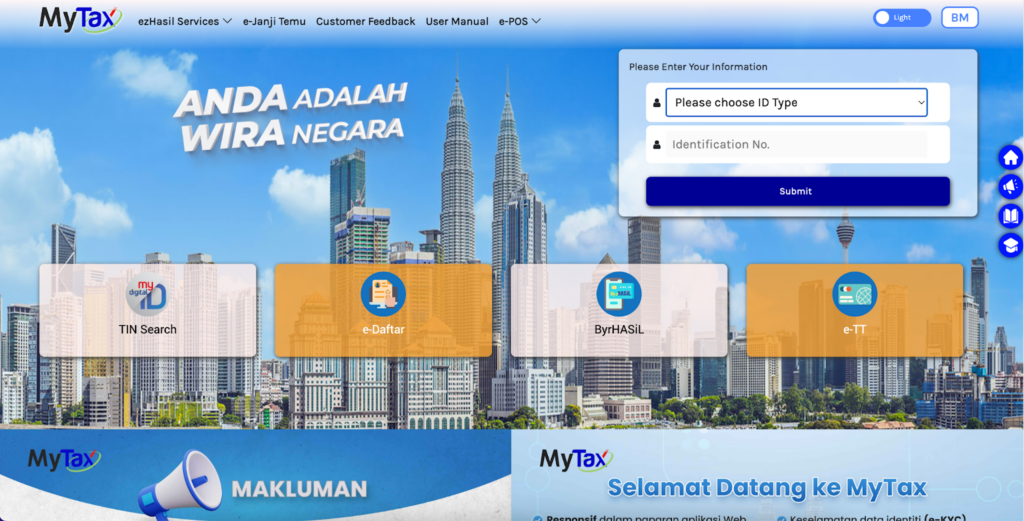
Access the MyTax portal and log in using your identification number and password. Ensure your account is active and verified.
Understand MyTax Roles
There are two common roles relevant to stamp duty:
- Personal Role
- Company Agent Role
Personal Role is used to stamp personal documents.
Company Agent Role is required for Employment Contract Stamping on behalf of a company.
Common e-Stamp Duty Mistake to Avoid
Selecting the wrong MyTax role is a common issue. If you choose Personal Role when stamping an employment contract:
- You may not see the correct e-Stamp Duty options
- Submission access may be restricted
- You may need to reapply for the correct role
- Your stamping process may be delayed
Always confirm you are using the Company Agent Role before starting Employment Contract Stamping in MyTax.
How to Access e-Stamp Duty in MyTax Portal
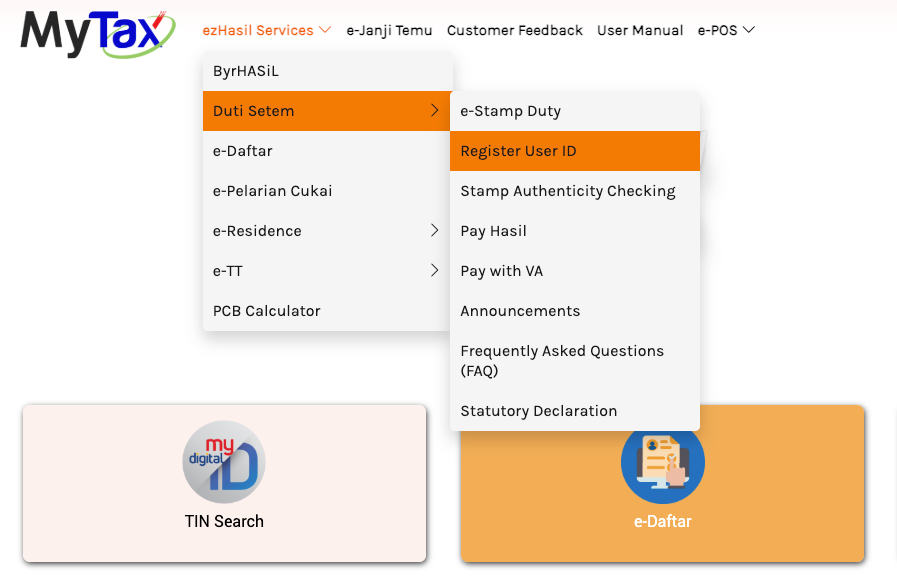
To reach e-Stamp Duty, log in to the MyTax portal, open ezHasil Services, select Duti Setem and click e-Stamp Duty. This opens the e-Stamp Duty module, where stamping submissions are handled. If you are stamping an employment contract for a company, confirm that you are using the Company Agent Role before you start. The steps are:
- Log in to MyTax.
- Go to ezHasil Services.
- Select Duti Setem.
- Click e-Stamp Duty.
This will bring you to the e-Stamp Duty module where stamping submissions are handled.
Selecting the Correct Role for Employment Contract Stamping
Choose the Company Agent Role when you stamp an employment contract on behalf of a company, and use the Personal Role only for personal documents. You do not need to switch to an employer account, because the Company Agent Role within MyTax is sufficient for Employment Contract Stamping. After entering the e-Stamp Duty section:
- Choose Company Agent Role if you are stamping for a company
- Use Personal Role only for personal documents
There is no need to switch to an employer account. The Company Agent Role within MyTax is sufficient for Employment Contract Stamping.
Register Company Agent Admin ID in MyTax
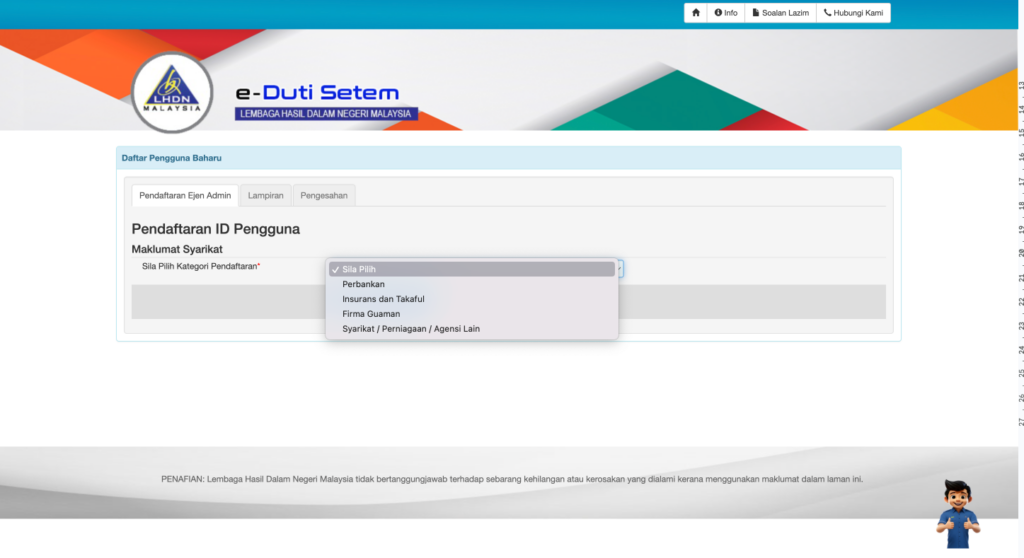
If you do not have a Company Agent Role yet, register a Company Agent Admin ID inside e-Stamp Duty before you try to stamp anything. Select Register User ID, choose the relevant company category, upload the supporting documents and submit for approval. Once the registration is approved, you can make e-Stamp Duty submissions under the Company Agent Role.
Steps:
- Go to e-Stamp Duty.
-
Select Register User ID.
-
Choose the relevant company category.
-
Upload required supporting documents.
- Submit for approval.
Supporting documents may include:
- Company registration documents
- Identification documents of the appointed admin
- Authorization letter from the company
Once approved, you can proceed with e-Stamp Duty submissions under the Company Agent Role.
Malaysia Employment Contract Stamping Process in MyTax Portal
To stamp an employment contract in MyTax, enter e-Stamp Duty, fill in the document details, upload the contract, confirm the stamp duty amount, pay through the available payment method and download the stamped certificate. Do this under the Company Agent Role, not the Personal Role, or you may not see the correct e-Stamp Duty options. After selecting the correct role:
- Enter e-Stamp Duty
- Fill in document details
- Upload the employment contract
- Confirm stamp duty amount
- Make payment through the available payment method
- Download the stamped certificate
The workflow is similar to the previous STAMPS system. The main difference is that all actions now take place inside the MyTax portal.
Important Notes for Employers in Malaysia
Keep these points in mind:
- Ensure your Company Agent Role is approved before urgent submissions
- Submit through MyTax only, because STAMPS closed on 31 December 2025
- Prepare supporting documents in advance
- Verify details carefully before submitting e-Stamp Duty applications
Late preparation can result in processing delays, especially close to the system transition deadline.
Final Reminder on MyTax e-Stamp Duty
From 1 January 2026, all stamp duty matters must be handled through MyTax e-Stamp Duty.
If you manage Employment Contract Stamping for your company:
- Confirm your MyTax account is active
- Apply for Company Agent Role early
- Familiarize yourself with the MyTax portal navigation
Early action ensures smooth compliance and avoids last-minute complications now that the old STAMPS system is discontinued.
Beyond Stamp Duty: e-Invoicing for Your Finance Team
Stamping employment contracts is an HR and company administration task, and MyTax handles it with no extra software. E-invoicing is the separate LHDN workstream that lands on your finance team. If your company issues e-invoices at volume, JomeInvoice is middleware that custom-integrates your existing ERP or accounting system with MyInvois, and it is built mainly for larger enterprises. See how JomeInvoice works for enterprise finance teams.
Early action ensures smooth compliance
From 1 January 2026, all stamp duty matters must be handled through MyTax e-Stamp Duty. Early action ensures smooth compliance and avoids last-minute complications now that the old STAMPS system is discontinued.
Keep your business compliant with LHDN’s digital systems.
JomeInvoice custom-integrates with the systems you already use and maintains the audit trail LHDN inspects. Start self-serve at sme.jomeinvoice.my or book a demo.
Disclaimer: This article is for general informational purposes only and does not constitute legal or tax advice. LHDN guidelines are subject to updates. Always refer to the latest official LHDN e-Invoice Guidelines at myinvois.hasil.gov.my and consult a qualified tax professional for advice specific to your business.
Frequently Asked Questions
When did the MyTax e-Stamp Duty system replace STAMPS?
The STAMPS system was discontinued after 31 December 2025. From 1 January 2026, all stamp duty matters must be processed through the MyTax portal under e-Stamp Duty.
Who needs to use e-Stamp Duty in MyTax?
You must use e-Stamp Duty in MyTax if you are a company stamping employment contracts, a company agent handling documents on behalf of a business, or an individual stamping personal documents.
Which MyTax role is required for Employment Contract Stamping?
Company Agent Role is required for Employment Contract Stamping on behalf of a company. There is no need to switch to an employer account. The Company Agent Role within MyTax is sufficient for Employment Contract Stamping.
What happens if I select the wrong MyTax role?
If you choose Personal Role when stamping an employment contract, you may not see the correct e-Stamp Duty options, submission access may be restricted, you may need to reapply for the correct role, and your stamping process may be delayed.
How do I access e-Stamp Duty in the MyTax portal?
Log in to MyTax, go to ezHasil Services, select Duti Setem, and click e-Stamp Duty. This will bring you to the e-Stamp Duty module where stamping submissions are handled.
What supporting documents are needed to register a Company Agent Admin ID?
Supporting documents may include company registration documents, identification documents of the appointed admin, and an authorization letter from the company. Once approved, you can proceed with e-Stamp Duty submissions under the Company Agent Role.
Last updated: 10 November 2026 | Written by Yinn Sheng Ng, Head of Marketing
References
- MyTax portal (LHDN, incl. the e-Stamp Duty module under ezHasil Services): mytax.hasil.gov.my